

A larger security suite isn’t automatically a better fit. For independent MSPs, the right choice depends on the services clients need and the work your team can manage consistently. That’s the key to evaluating kaseya 365 security alternatives for independent msps: compare service fit, not just the size of the bundle.
It’s reasonable to want fewer tools, simpler billing, and broad coverage in one place. Kaseya 365 bundles endpoint management, backup, antivirus, ransomware detection, and EDR/MDR, while alternatives take different approaches. Some combine security functions in a multi-tenant platform; others focus on a specific security role or pair with separate RMM and PSA tools. Switching doesn’t have to mean accepting coverage gaps or adding layers of manual work, but it does require a clear view of what each tool handles.
This comparison breaks down practical options by platform role, security coverage, multitenancy, and MSP commercial needs. You’ll see where bundled and best-of-breed stacks fit, what to weigh beyond per-unit pricing, and how to build a manageable offering that can grow with client demand. The goal is to choose a stack that supports recurring services and gives your team a clear path from security tools to strategic client guidance.
Key Takeaways
- Compare kaseya 365 security alternatives for independent msps by platform role and service fit, not by feature count alone.
- Separate what each option includes from capabilities that require another tool or a service-led approach.
- See how Acronis, Syncro, Huntress, and ReadySECURE support different operating models rather than serving as identical replacements.
- Use a four-step decision process to map client commitments, identify coverage gaps, assess management effort, and plan a controlled transition.
- Explore how ReadySECURE’s multi-tenant console and white-label reporting can support a focused, client-facing security offer.
Why independent MSPs look for Kaseya 365 Security alternatives
Comparing security platforms is sound operational planning, not a verdict that Kaseya 365 is unsuitable. Kaseya 365 bundles endpoint management, endpoint backup, antivirus, ransomware detection, and EDR/MDR. That breadth can suit an MSP that wants several endpoint functions packaged together. The right platform still depends on the services you sell, the clients you support, and the workflows your team can sustain.
Searches for kaseya 365 security alternatives for independent msps often start with a change in the business, not a single missing feature. An MSP may be expanding into compliance or Microsoft 365 security, simplifying a crowded tool stack, responding to different client requirements, or changing how it delivers security. An alternative might replace one component, complement existing tools, or support a broader redesign. It doesn’t have to replace every part of the stack.
What independent MSPs need from a security platform
Start with the operating model. A platform should make it practical to administer multiple client environments, see where attention is needed, and produce consistent client-facing reporting. Map its coverage to your actual service commitments and technical capacity. A wide feature set is useful only if your team can configure, monitor, and explain the capabilities it uses.
Separate software from service delivery, too. A platform can provide tools and visibility, but it doesn’t automatically provide strategic advice, testing, or incident response expertise. The distinction matters for MSPs building toward a Managed Security Service Provider (MSSP) model, where security delivery becomes a defined part of the client relationship. Decide which work your team handles through technology and where specialist support strengthens the service.
When an alternative deserves a closer look
Review the stack when technicians repeat tasks across disconnected consoles, reports tell different stories, or important security activity lacks a clear owner. These are signs to investigate workflows and coverage, not automatic proof that one vendor is the problem. Record which tools support each client commitment before deciding what to change.
Then choose between bundled breadth and focused depth. A broad suite may reduce the number of separate platforms to administer, while a focused tool may align more closely with a specific service need. Either choice can add complexity if it creates duplicate alerts, extra handoffs, or new reporting work. Compare the full operating effort, not just the feature list.
- Service-fit trigger: Client needs have expanded beyond the security functions your current setup supports.
- Simplification trigger: Overlapping tools create redundant workflows or fragmented visibility.
- Operating-model trigger: Your team’s roles, technical capacity, or approach to specialist support has changed.
Before switching, map dependencies such as endpoint coverage, backup processes, alert routing, client reports, and contractual commitments. That inventory helps you decide whether you need a full-suite replacement or a targeted addition. It also gives the next comparison a sharper test: will the proposed stack close a real service gap without creating unnecessary management work?
Compare Kaseya 365 Security alternatives by coverage and operating fit
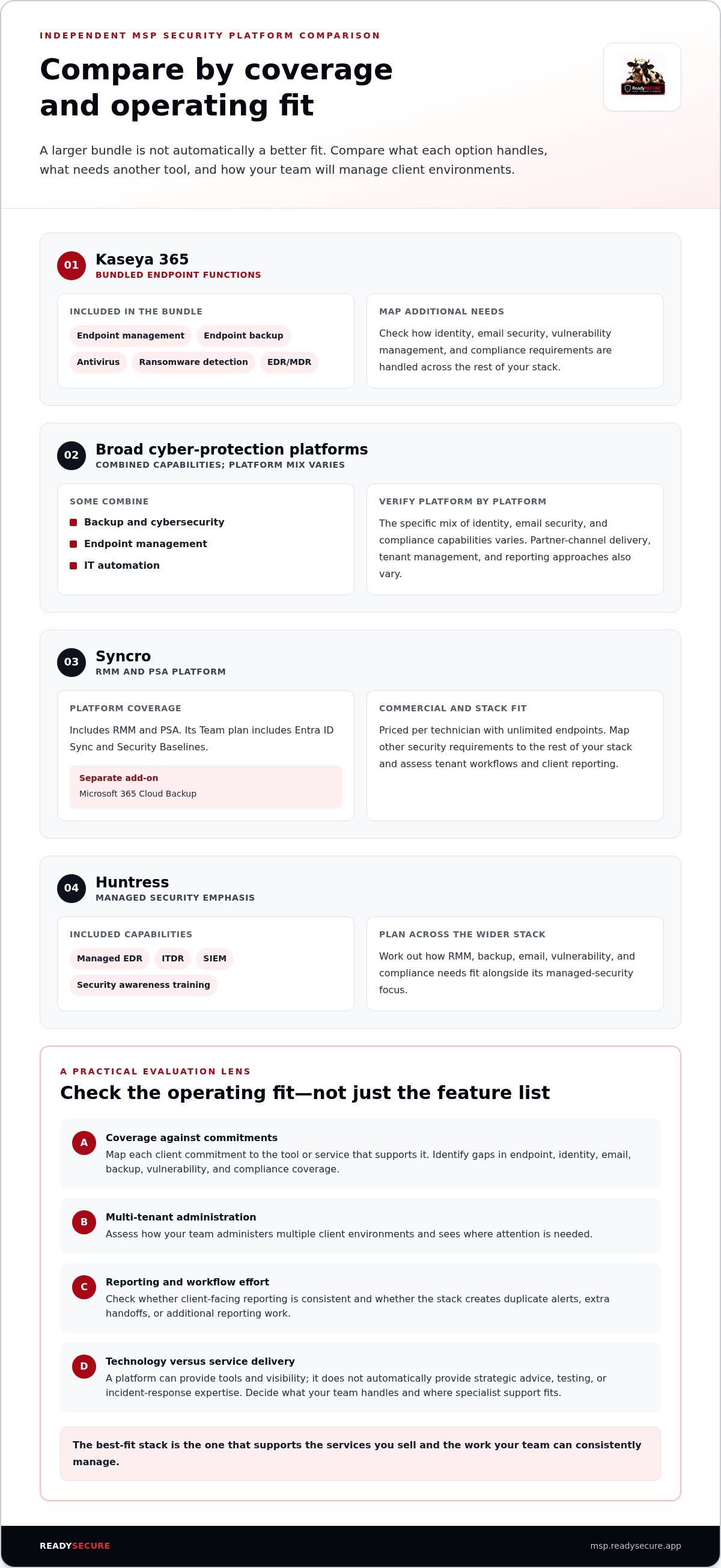
Compare what each option covers, how it’s delivered, and how your team will manage client environments. Use the table to distinguish each platform’s stated emphasis, then evaluate how its capabilities fit your client commitments and day-to-day workflows.
| Option | Capability and delivery model | Tenant management | Client reporting |
|---|---|---|---|
| Kaseya 365 | Included: endpoint management, backup, antivirus, ransomware detection, and EDR/MDR in the bundle. Map any additional identity, email security, vulnerability management, or compliance requirements to the rest of your stack. | MSP-oriented subscription; include tenant workflows in your operational evaluation. | Assess client reporting as part of your platform workflow. |
| Broad cyber-protection platforms | Included: Some combine backup, cybersecurity, endpoint management, and IT automation. The specific mix of identity, email security, and compliance capabilities varies by platform. | Partner-channel delivery may be available; tenant-management approaches vary by platform. | Reporting capabilities vary by platform. |
| Syncro | Included: RMM and PSA; its Team plan includes Entra ID Sync and Security Baselines. Microsoft 365 Cloud Backup is a separate add-on. Map other security requirements to the rest of your stack. | Platform is priced per technician with unlimited endpoints; include tenant workflows in your operational evaluation. | Assess client reporting as part of your platform workflow. |
| Huntress | Included: managed EDR, ITDR, SIEM, and security awareness training. Its emphasis is managed security, so plan how RMM, backup, email, vulnerability, and compliance needs fit into the wider stack. | Plan tenant oversight as part of your MSP workflow. | Include reporting in your client-service workflow. |
| ReadySECURE | Included: vulnerability management, Microsoft 365 security hardening, mail security, and compliance. Service-led: vCISO support, penetration testing, and incident response. | Multi-tenant console. | White-label reporting tools. |
Distinguish platform breadth from security coverage
RMM, PSA, backup, and automation can reduce tool sprawl, but they aren’t interchangeable with endpoint, identity, email, vulnerability, or compliance coverage. Mark a capability “separate” when it requires another tool or add-on, and “service-led” when expert delivery supports it. The NSA Guidance on Protecting Managed Service Providers reinforces why MSP security deserves deliberate evaluation. For Microsoft-specific control criteria, consult the “Best M365 Security Hardening Tools for MSPs: 2026 Guide.”
Check MSP operations and client-facing delivery
Test the practical workload, not just the feature list. Use a representative client environment to trace onboarding, routine administration, exception handling, and report preparation. Check whether tenant views help technicians spot client-specific issues and whether reporting supports your service presentation. ReadySECURE’s multi-tenant console and white-label reports can suit MSPs that want to consolidate several security functions and present findings under their own brand. Explore the ReadySECURE MSP platform as one option in that operating model.
For kaseya 365 security alternatives for independent msps, the strongest comparison is tied to real client commitments: what’s covered, who operates it, and how you’ll show the work.
Kaseya 365 Security alternatives: Acronis, Syncro, Huntress, and ReadySECURE
These options serve different roles, so compare each against the work your MSP intends to deliver. Broad cyber-protection and IT-automation platforms combine several operational functions. Syncro connects IT management with selected Microsoft 365 capabilities. Huntress focuses on managed security. ReadySECURE centers on multi-tenant security services and white-label reporting. The right fit depends on your service priorities, existing tools, and how your team will run the day-to-day work.
How the alternatives differ in platform emphasis
Broad cyber-protection platforms can bring backup, cybersecurity, endpoint management, and automation together. This emphasis may suit MSPs looking to consolidate protection and IT operations. Assess whether the platform’s coverage matches your client commitments, and compare its licensing model and administration requirements with your current processes. A broad platform can simplify some workflows, but you still need to identify which security services it supports and which require separate tools or expertise.
Syncro centers on RMM and PSA, with unlimited endpoints priced per technician. Its Team plan adds Entra ID Sync and Security Baselines, while Microsoft 365 Cloud Backup is a separate add-on. That mix may suit an MSP seeking to unite IT operations and selected Microsoft 365 functions. It isn’t automatically a substitute for every security capability, so map additional needs such as vulnerability management, mail security, and compliance against the rest of your stack.
Huntress is a managed-security option with offerings that include EDR, ITDR, SIEM, and security awareness training. It may fit an MSP seeking support in those specific areas. It isn’t positioned as an all-in-one RMM and PSA platform, so consider how its capabilities work alongside existing endpoint management, backup, email, vulnerability, and compliance tools.
Where ReadySECURE fits for independent MSPs
ReadySECURE is designed around MSP security delivery. Its multi-tenant console brings vulnerability management, Microsoft 365 security hardening, mail security, compliance, and reporting together. White-label reporting tools let MSPs present security findings as part of their own client-facing service, creating a branded way to communicate security work and its relevance to each client.
Technology is only part of the delivery model. ReadySECURE also provides expert-led vCISO support, penetration testing, and incident response as services. These options can extend an MSP’s delivery model when a client needs strategic guidance, testing, or support responding to an incident. They add a service dimension beyond platform capabilities, allowing the MSP to shape its offer around defined client requirements.
For kaseya 365 security alternatives for independent msps, match the platform role to the offer you want to deliver. Choose a broad protection-and-automation platform for that emphasis, Syncro for combined IT management and selected Microsoft 365 capabilities, Huntress for focused managed security, or ReadySECURE when multi-tenant security coverage and white-label reporting are central to your service model.
Use this decision framework before replacing or adding a platform
A platform decision should start with the service you intend to deliver, not the vendor’s longest feature list. Use this four-step process to decide whether to replace a tool, add a focused capability, or leave the stack as it is. It keeps client commitments in view and makes operational effort part of the comparison, without relying on assumed savings or headline pricing.
Map requirements before comparing vendors
Build a working inventory by client or service tier. Group needs under security coverage, tenant operations, reporting, and expert support. Mark each item as a must-have, a capability already handled elsewhere, or a future service opportunity. A client with Microsoft 365 hardening and compliance needs may call for a different mix than one whose priority is endpoint coverage. Keep the requirements specific to your actual client base.
- Map services. Record the security services you deliver today and the commitments attached to each client. Note which tools support each service, who operates them, and what evidence or reports clients receive.
- Identify gaps. Find uncovered requirements, duplicated functions, and manual handoffs. Separate essential controls from capabilities that can remain in current tools. A gap may call for a specialist service or a focused platform, not a full-suite replacement.
- Compare operations. For each candidate, trace the work from onboarding through routine review and client reporting. Include tenant oversight, alert handling, staff training, integrations, and extra administration. Assess the total operating fit, not just the subscription structure.
- Plan transition. List technical and service dependencies, assign owners, and sequence changes. Define how coverage will remain managed as tools are introduced or retired, and what client communication or reporting must continue during the change.
Plan a controlled evaluation and transition
Test the shortlist against representative environments, such as a client with Microsoft 365 security requirements and another with vulnerability-management or compliance needs. Follow the same tasks in each platform: review tenant status, identify an issue, document the action, and prepare a client-facing update. This reveals practical friction that a feature comparison can miss.
Set success measures before the evaluation begins. Look for clearer visibility across the relevant tenants, reliable delivery of the services you committed to, and workflows your team can maintain. Track extra steps, duplicate alerts, reporting effort, and dependencies on other tools. If a proposed change creates a new blind spot or an unowned task, adjust the sequence before expanding it.
For kaseya 365 security alternatives for independent msps, this process turns vendor comparison into a decision grounded in client needs and delivery capacity. If white-label security reporting is part of your planned offer, explore the guide to white-label security platforms as you shape the client-facing model.
Ready to assess a multi-tenant security approach against your requirements? Explore the ReadySECURE MSP platform.
Make ReadySECURE part of a focused independent-MSP security offer
A strong platform decision starts with the service you want clients to receive. ReadySECURE is an MSP-oriented option for teams that value multi-tenant security management and white-label reporting. Its role is specific: bring several security functions into one console and help MSPs present that work through their own client-facing service.
Consider it when your comparison identifies needs across vulnerability management, Microsoft 365 security hardening, mail security, or compliance. That doesn’t mean every MSP should replace every existing tool. Use the gaps you documented to decide whether this coverage fits as a focused security platform alongside the rest of your stack.
Match ReadySECURE to the services you want to deliver
Map each capability to a client need and a defined service. For example, vulnerability management can support clients who need visibility into vulnerabilities; Microsoft 365 security hardening can align with clients seeking stronger Microsoft 365 configurations; mail security and compliance can address separate areas of a broader security program. Keep the scope clear. A platform capability should connect to an action your team can deliver and explain.
The multi-tenant console brings these functions together across managed clients. That shared view can support oversight without treating every client environment as identical. Pair it with white-label reporting to present security activity and findings under your MSP’s brand. The report then becomes part of the service conversation, helping clients understand the work being delivered and giving your team a consistent way to communicate it.
Technology won’t cover every advisory or specialist requirement on its own. ReadySECURE also offers expert-led vCISO support, penetration testing, and incident response as services. These can extend an MSP’s delivery model when a client needs strategic guidance, testing, or support responding to an incident. Treat them as distinct service options, and connect each to the client need and delivery responsibility you’ve identified.
Turn the evaluation into a next step
Carry four decisions into the final comparison: which security services matter to your clients, which gaps the current stack leaves, how your team will manage the work across tenants, and how you’ll report it. Then assess ReadySECURE against those requirements. Focus on its coverage and service options, rather than assuming it has the same scope as an endpoint bundle, RMM, PSA, or managed-security platform.
For independent MSPs weighing kaseya 365 security alternatives for independent msps, the aim isn’t simply to add another console. It’s to shape an offer your team can deliver, explain, and expand as client needs change. A focused service scope, shared oversight, and branded reporting give you a practical basis for that decision.
Explore the ReadySECURE MSP security platform and see how its coverage aligns with your service priorities, operational needs, and growth plans.
Turn Your Security Stack Into a Deliberate Service Offer
The next move isn’t adding another tool by default. It’s deciding what clients should receive, how your team will deliver it, and how the service can evolve as demand changes. That’s the practical lens for evaluating kaseya 365 security alternatives for independent msps: build around your service model, not a vendor’s bundle size.
ReadySECURE gives MSPs a multi-tenant security console with white-label reporting, covering vulnerability management, Microsoft 365 security, mail security, and compliance. Expert-led vCISO support, penetration testing, and incident response can extend the service model where clients need added guidance or specialist support. Use these capabilities to shape a clear, client-facing offer that fits your operating capacity and growth plans.
Put your priorities to work. Explore ReadySECURE’s security platform for MSPs and consider how its capabilities align with the services you want to deliver. Make the next decision with purpose, build steadily, and give your security offering room to grow.
Frequently Asked Questions
What are the best alternatives to Kaseya 365 Security for independent MSPs?
The best option depends on the security work your MSP wants to deliver and the tools already in place. Compare broad cyber-protection platforms, IT management suites, focused managed-security tools, and MSP security platforms as different categories. For kaseya 365 security alternatives for independent msps, start with a client scenario: identify the needed service, who will operate it, and what evidence the client expects to see.
Is Acronis a direct alternative to Kaseya 365 Security?
It can be an alternative for MSPs seeking a broad protection platform, but it shouldn’t be treated as a direct, feature-for-feature substitute. Compare the workloads and functions each option covers, including backup, endpoint management, and cybersecurity. Then identify what your current client commitments require beyond those areas. A side-by-side comparison helps show where another tool or service fits into the stack.
Can Syncro replace a dedicated MSP security platform?
Syncro may cover parts of an MSP’s operating stack, but whether it can replace a dedicated security platform depends on the services you deliver. Its RMM and PSA functions and selected Microsoft 365 capabilities may suit an MSP consolidating IT operations. If your offer also requires vulnerability management, mail security, or compliance workflows, map how those needs are handled before removing other tools. Operational consolidation alone doesn’t establish complete security coverage.
How does Huntress differ from an all-in-one MSP platform?
Huntress focuses on managed-security capabilities rather than presenting itself as a complete RMM and PSA operating suite. Its portfolio includes managed EDR, ITDR, SIEM, and security awareness training. That focus may fit an MSP seeking support in those specific areas. Consider how it would work alongside your tools for service desk operations, backup, and other client security needs, and clarify who owns each task in the combined workflow.
What should an independent MSP compare before switching security platforms?
Compare coverage, delivery responsibilities, tenant oversight, reporting, licensing structure, integrations, and the work required to run the platform. Include implementation tasks and dependencies on tools that will remain. Then test routine workflows with a representative client environment, such as reviewing a finding and preparing a client update. This helps expose extra steps or missing handoffs that a feature checklist may overlook.
Can ReadySECURE support white-label security services for MSP clients?
Yes. ReadySECURE provides white-label reporting tools that MSPs can use to present security services under their own brand. Its multi-tenant console brings vulnerability management, Microsoft 365 security hardening, mail security, and compliance together. Expert-led vCISO support, penetration testing, and incident response are also available as services. An MSP can use these capabilities and services to shape a client offer around specific needs and its chosen delivery model.
What happens if an MSP replaces a security platform before mapping existing coverage?
A replacement made without a coverage map can leave a client task, data source, or reporting step without an owner. For example, retiring a tool may disrupt a process that another service depends on, even if the new platform covers similar functions. Document client commitments, integrations, alert handling, and report inputs first. Then sequence changes and assign responsibility for each requirement throughout the transition.


