

A vulnerability scan can create more work than it removes. For MSPs, vulnerability scanning delivers value when each scan has a defined scope, suitable settings, and a clear path from findings to fixes. A raw report alone can’t tell your team which issues matter most across different client environments.
Client networks vary, technical findings can be hard to validate and explain, and repeating scans while tracking remediation can consume limited staff time. The answer isn’t to scan less carefully or send every alert straight to a client. It’s to build a repeatable workflow that turns results into useful action.
This guide explains how to define authorized scope, choose scan settings, run scans carefully, validate findings, and prioritize remediation. It also covers ways to make the process manageable across multiple clients. Finally, we’ll look at how continuous scanning, risk-based prioritization, and a multi-tenant console can support the work, including how ReadySECURE helps MSPs manage vulnerabilities. The goal is to use scan reports to guide decisions, not mistake them for a complete security program.
Key Takeaways
- Separate potential exposure from confirmed exploitability so scan results lead to informed decisions.
- Build each scan on written authorization, a defined scope, careful preparation, and clear documentation.
- Validate findings against asset details and detection evidence; severity scores alone don’t capture client-specific risk.
- Make vulnerability scanning repeatable by standardizing coverage, settings, validation notes, and client reporting.
- Use multi-tenant coordination and risk-based prioritization to manage findings across client environments more efficiently.
What vulnerability scanning finds, and what a scan cannot tell you
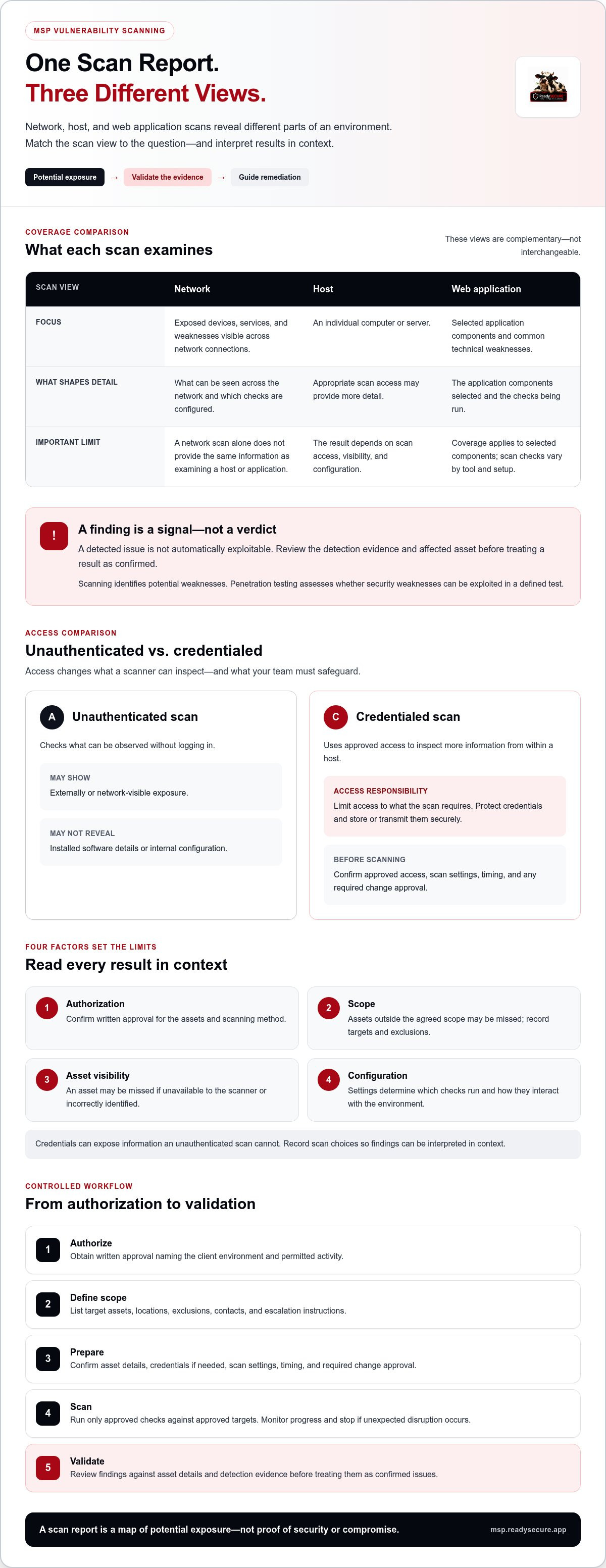
A scan report is a map of potential exposure, not a verdict on whether a client can be breached. Vulnerability scanning uses automated checks to look for known weaknesses in systems, software, and configurations. It gives MSPs a repeatable way to identify issues that may need investigation or remediation. The results are only as useful as the scanner’s visibility and configuration.
What does a vulnerability scan check?
A scanner can compare detected software and versions with information about known vulnerabilities, flag outdated components, and check selected configuration settings. For example, it might identify an installed application version associated with a published weakness or a configuration that falls outside the checks being run. A vulnerability scanner automates this examination, but the checks vary by tool and scan setup.
Network, host, and web application coverage
Network scans look for exposed devices, services, and weaknesses visible across network connections. Host scans examine an individual computer or server and may provide more detail when the scan has appropriate access. Web application scans focus on selected application components and common technical weaknesses. These views are not interchangeable: a network scan alone won’t provide the same information as an examination of a host or application.
What shapes the results?
Four factors set the limits of a scan: authorization, scope, asset visibility, and configuration. An asset may be missed if it is outside the agreed scope, unavailable to the scanner, or incorrectly identified. Credentials can allow certain scans to inspect information that an unauthenticated scan can’t access. Settings determine which checks run and how they interact with the environment. Record these choices so findings can be interpreted in context.
What scanning does not prove
A detected issue is not automatically exploitable. A scanner may report a potential weakness based on a software version or observed response, but that signal alone doesn’t confirm that the weakness can be used in the client’s environment. Review the evidence and affected asset before treating a result as confirmed.
Scanning also can’t guarantee that every weakness will be found. Unrecognized assets, unsupported checks, configuration gaps, and weaknesses outside the scanner’s detection methods can leave blind spots. No single scan report proves an environment is secure.
Scanning identifies potential weaknesses; penetration testing assesses whether security weaknesses can be exploited in a defined test. Use scanning to build visibility into known issues, then treat the results as inputs for validation and remediation, not as proof of security or compromise.
How to plan and run a vulnerability scan safely
A controlled scan starts before you press “run.” For each client, agree on what’s authorized, what’s in scope, and how the team will respond if scanning causes an unexpected issue. That preparation helps protect client operations and gives you results you can reproduce, interpret, and act on.
Pre-scan checklist: Confirm written authorization, approved assets and exclusions, scan access and settings, timing, client contacts, and an escalation path.
Set scope, permissions, and exclusions first
Get clear written authorization from someone with authority to approve testing. Define the assets covered, such as specific network ranges, hosts, or applications, and identify relevant locations or environments. Don’t assume that access to a client network means permission to scan every connected system.
Record exclusions and boundaries, too. Note which systems must stay untouched, who owns each environment, and whom to contact if a scan reveals an urgent issue or unexpected impact. Confirm that approval covers both the selected assets and the scanning method. Keep the record with the engagement documentation so technicians can verify the approved scope before each run.
Choose scan access and timing
An unauthenticated scan checks what can be observed without logging in. It can show externally or network-visible exposure, but may not reveal installed software details or internal configuration. A credentialed scan uses approved access to inspect more information from within a host. That added visibility comes with responsibility: limit access to what the scan requires, protect credentials, and store or transmit them securely.
Coordinate the scan window with the client’s operating schedule and change controls. Consider whether systems support critical workflows, and avoid intensive checks during sensitive periods unless that timing is explicitly approved. When introducing unfamiliar settings, start with a limited set of representative assets. Agree on how to pause the scan and who should be notified if services behave unexpectedly.
Follow a controlled workflow
- Authorize: Obtain written approval that names the client environment and permitted activity.
- Define scope: List target assets, locations, exclusions, contacts, and escalation instructions.
- Prepare: Confirm asset details, credentials if needed, scan settings, timing, and any required change approval.
- Scan: Run only the approved checks against the approved targets. Monitor progress and stop if unexpected disruption occurs.
- Validate: Review findings against asset details and detection evidence before treating them as confirmed issues.
- Document: Record the date, scope, settings, exceptions, validation notes, and follow-up actions.
This sequence makes vulnerability scanning a controlled operation rather than an improvised task. Repeat it whenever scope or access changes, and retain the records so the next technician understands what was tested and why.
For MSPs coordinating this workflow across client environments, ReadySECURE vulnerability management brings continuous scanning and risk-based prioritization into a multi-tenant security console.
How to interpret scan results and validate likely false positives
A finding is a lead to investigate, not a ready-made client conclusion. Before assigning work or including an issue in a report, connect the scanner’s claim to the correct asset and supporting evidence. Careful review helps prevent two costly mistakes: escalating an inaccurate alert and overlooking a genuine weakness because the result looked unclear.
Review evidence before accepting a finding
Start with the asset identifier, hostname or address, software name, and observed version. Check that they match the client’s current inventory. An old hostname, reused address, or stale inventory record can make a valid detection appear to belong to the wrong system.
Next, inspect the detection details. Look for the version or configuration observed, the check that triggered the alert, and any scanner notes about limitations. Compare those details with reliable asset records or other authorized evidence. For example, a scanner may identify a vulnerable software version from a service banner, while the host’s package records show a vendor-issued fix has been applied without changing that banner. Don’t dismiss the alert based on the banner alone; verify the installed version and patch status.
If evidence is incomplete, label the finding unverified and record what needs checking. A targeted follow-up scan or review of relevant system records may resolve the uncertainty. Keep the original result, validation steps, evidence, and outcome together. If you can’t confirm or rule out the issue, say so rather than forcing a yes-or-no conclusion.
Use severity as a signal, not a verdict
A severity score helps sort and compare findings, but it doesn’t fully describe risk to a particular client. It may not reflect whether the affected asset is present, whether the reported condition was confirmed, or how the system is used. Treat the score as a prompt for review, then base your description on verified facts and the client’s operating context. First establish what the finding actually says; then determine its priority.
Explain findings clearly to clients
Translate technical output into three points: which asset is affected, what the scan observed, and what should happen next. Separate confirmed observations from assumptions. “The scan detected version X on server Y” is a factual observation; “an attacker can access client data” is a stronger claim that needs supporting evidence.
For each finding, give the client a concise explanation and a clear operational next step, such as verifying the installed version, reviewing the applicable patch record, or assigning the issue for technical assessment. Avoid promising that a particular change will resolve the exposure before it has been assessed and confirmed.
Consistent validation makes vulnerability scanning reports more credible and useful. Record whether each item is confirmed, unverified, or determined to be a false positive, and preserve the evidence behind that status. This gives technicians and clients a clear account of what the scan found and what remains to be checked.
How MSPs can make vulnerability scanning repeatable across clients
Repeatability comes from a shared operating model, not identical scans for every client. Establish a standard workflow, then tailor its scope and cadence to each environment’s assets, requirements, and operational constraints. This gives technicians a dependable process without assuming every tenant has the same risk profile or technology.
Repeatable scope makes scan coverage comparable across tenants while keeping each client’s boundaries and exceptions visible. It also helps your team spot when an environmental change requires an update to the scan plan.
Create a consistent scan routine without treating every client alike
Build a baseline template for the information every client record should contain: approved assets, exclusions, scan settings, contacts, review owner, and reporting format. Keep client-specific details separate from the baseline. For example, two clients can follow the same documentation process while having different asset coverage, access arrangements, or approved scan windows.
Review the inventory when a client adds systems, changes network structure, moves workloads, or retires assets. A scan plan tied to an outdated inventory can create blind spots or direct checks toward assets that are no longer in scope. Make asset review part of onboarding and change review, not just an occasional cleanup task.
Set scan frequency according to agreed client requirements, changes to the environment, asset exposure, and operational limits. Avoid a universal schedule that ignores business context. Document why the cadence fits, then review it when the environment or client requirements change. Assign an owner to confirm coverage, review results, and communicate agreed next steps. Without clear ownership, recurring scans can produce recurring reports that nobody acts on.
Turn technical output into a manageable client report
A useful report gives the client a clear account of what was checked and what the results mean. Summarize the scan period and scope, note important exclusions or coverage limits, and present significant validated findings in plain language. Explain which asset is affected, what was observed, and what follow-up is agreed. Keep unverified results distinct from confirmed observations.
Track each finding’s status and owner so it doesn’t disappear between reporting cycles. Statuses might distinguish items awaiting validation, confirmed issues assigned for follow-up, and findings closed after review. The scan identifies potential weaknesses; it doesn’t apply patches or confirm that remediation is complete. Update a status only when there’s evidence for the change.
Standard report fields make review faster across tenants: asset, finding, validation status, evidence, assigned owner, next action, and update. White-label reporting can carry that consistent structure into the MSP’s client-facing experience while keeping the content clear and relevant to each client.
ReadySECURE supports MSP vulnerability management with continuous scanning, risk-based prioritization, a multi-tenant security console, and white-label reporting tools. Explore ReadySECURE vulnerability management to coordinate this workflow across client environments.
How a multi-tenant platform supports vulnerability scanning at MSP scale
As client environments and scan schedules grow, coordination becomes a key part of the work. A multi-tenant console gives an MSP a shared place to oversee vulnerability management across separate client environments. It can help teams see scan activity by client, review findings in the right tenant, and keep follow-up work organized without blending client records.
Centralized visibility helps teams manage the operation, but it doesn’t replace the controls that make an individual scan safe and useful. Authorization, scope, scan configuration, and validation still need to be handled for each client. Keep those decisions tied to the client’s environment, even when the team coordinates work from a shared console.
Where platform support fits into the scanning workflow
Use the console to support the recurring process: coordinate scan activity across tenants, review findings in the right client context, and maintain a consistent view of vulnerability management work. Technicians need to know which assets and findings belong to which client before communicating results or assigning follow-up.
Continuous scanning can help keep visibility current as environments change, while risk-based prioritization can help direct attention to findings that warrant review. Neither removes the need to verify that a scan covers the intended assets or that a reported issue is accurate. Treat platform output as an operational aid, not as authorization or proof that a finding is valid.
Move from manual activity to an MSP-ready operating model
A consolidated workflow can reduce fragmented tracking. Instead of relying on separate notes and report processes, MSP teams can coordinate vulnerability management in one multi-tenant security console while maintaining client-specific scope, validation, ownership, and follow-up. This supports consistency in delivery while preserving the differences that matter between tenants.
Client-facing reporting is part of that delivery. White-label reporting tools can help present findings under the MSP’s brand and use a familiar format across accounts. Keep technical review behind the report: confirm the asset and evidence, distinguish verified results from uncertain ones, and state the agreed next step. A polished report improves communication, but it doesn’t make an unvalidated finding accurate or remediate a vulnerability.
ReadySECURE vulnerability management combines continuous scanning and risk-based prioritization with a multi-tenant security console for MSPs. These capabilities support a repeatable operating model, while your team retains responsibility for client authorization, scan choices, and interpreting findings in context.
If you’re looking to coordinate vulnerability management across client environments, explore the ReadySECURE platform as a next step.
Make scanning part of your service model
Treat vulnerability scanning as an ongoing part of how your MSP delivers security, not a task that depends on one technician’s memory. Build the workflow into service operations, assign clear ownership, and review whether scan coverage and follow-up remain aligned as client environments change. This creates a stronger foundation for consistent delivery as your client base grows.
Use each scan cycle to identify where coordination breaks down, where client communication needs clarification, and where manual work can be streamlined. The goal isn’t simply to produce more reports. It’s to make security work easier to manage and more valuable to clients.
ReadySECURE helps MSPs operationalize vulnerability management across client environments with continuous scanning, risk-based prioritization, a multi-tenant security console, and white-label reporting tools. Explore the ReadySECURE platform to see how it can support your service workflow.
Frequently Asked Questions
What is vulnerability scanning, in simple terms?
Vulnerability scanning is an automated way to check digital systems for signs of known security weaknesses. Think of it as an inspection that flags issues for a technician to review, not a pass-or-fail security certificate. For example, a scan might point to an old application version on a client’s server. Your team can investigate whether it’s actually present and decide what action is appropriate.
How does vulnerability scanning work?
A scanner sends checks to selected systems or examines information it can access, then compares what it observes with known weakness indicators and configuration rules. The tool organizes potential issues into findings for review. What it can detect depends on scan access and coverage. For instance, a check of a website’s exposed services won’t necessarily reveal the software installed inside its supporting server.
How often should an MSP run vulnerability scans for clients?
Set scan frequency according to each client’s environment, agreed requirements, asset changes, and capacity to review results. A stable, low-change environment may call for a different routine than an internet-facing system that changes often. Reassess the schedule after major technology changes or when client obligations change. Choose a cadence your team can sustain, including time to validate findings and coordinate follow-up.
Can vulnerability scanning disrupt a client’s systems?
It can, although careful planning reduces the chance. Some systems may react poorly to frequent connection attempts or intensive checks, especially if they’re sensitive, resource-constrained, or running older software. Start with conservative settings for unfamiliar environments and monitor system behavior during an approved scan. If a client reports unusual errors or slowdowns, pause the activity and investigate before continuing. Record what happened to inform future scans.
What is the difference between a vulnerability scan and a penetration test?
A vulnerability scan uses automation to identify potential weaknesses across selected systems. A penetration test is a defined security assessment that examines whether weaknesses can be exploited in the target environment. They answer different questions. A scan can help find known issues across a broad asset set, while a penetration test can assess security beyond a scanner’s automated checks. MSPs may use both as complementary parts of security management.
How can I tell whether a vulnerability scan finding is a false positive?
Check whether the reported asset and software match current client records, then compare the scanner’s evidence with reliable system information. One tricky case is a vendor backport: a software package may include a security fix while retaining an older-looking version string. Don’t close the finding based on the version label alone. Record the evidence reviewed and leave the result marked unverified if you can’t confidently confirm or rule it out.
Does vulnerability scanning fix the vulnerabilities it finds?
No. Scanning identifies potential issues, but a person or remediation process must address them. That might involve applying a vendor update, changing a configuration, or investigating whether a reported condition is present. Assign each confirmed issue to an owner and track it through the client’s change process. After the work, verify the relevant system state or rescan as appropriate; don’t treat a completed ticket alone as proof the weakness is resolved.


