

A large vulnerability backlog does not automatically make your MSP more secure or more profitable. The right vulnerability management software for MSPs turns findings into prioritized, trackable work across client environments, without burying technicians in manual review.
When client risks are spread across disconnected tools, it is difficult to compare exposure consistently. Scan results that do not explain what to review first add another layer of manual work. The answer is not simply more scans. Look for a platform that fits your team’s capacity and service model, and gives you a repeatable way to manage risk across tenants.
This guide covers the MSP-specific criteria that matter: multi-tenant management, risk-based prioritization, remediation tracking, reporting, integrations, and pricing models. You’ll learn how to evaluate platforms against your client environments, reduce the effort involved in communicating findings, and build a service that can scale. We’ll also look at how ReadySECURE brings continuous vulnerability scanning, risk-based prioritization, and white-label reporting together in a multi-tenant security platform, alongside capabilities for a broader client security offering.
Key Takeaways
- Compare vulnerability management software for MSPs by how well it fits your client environments, technician capacity, and service model, not by scan volume alone.
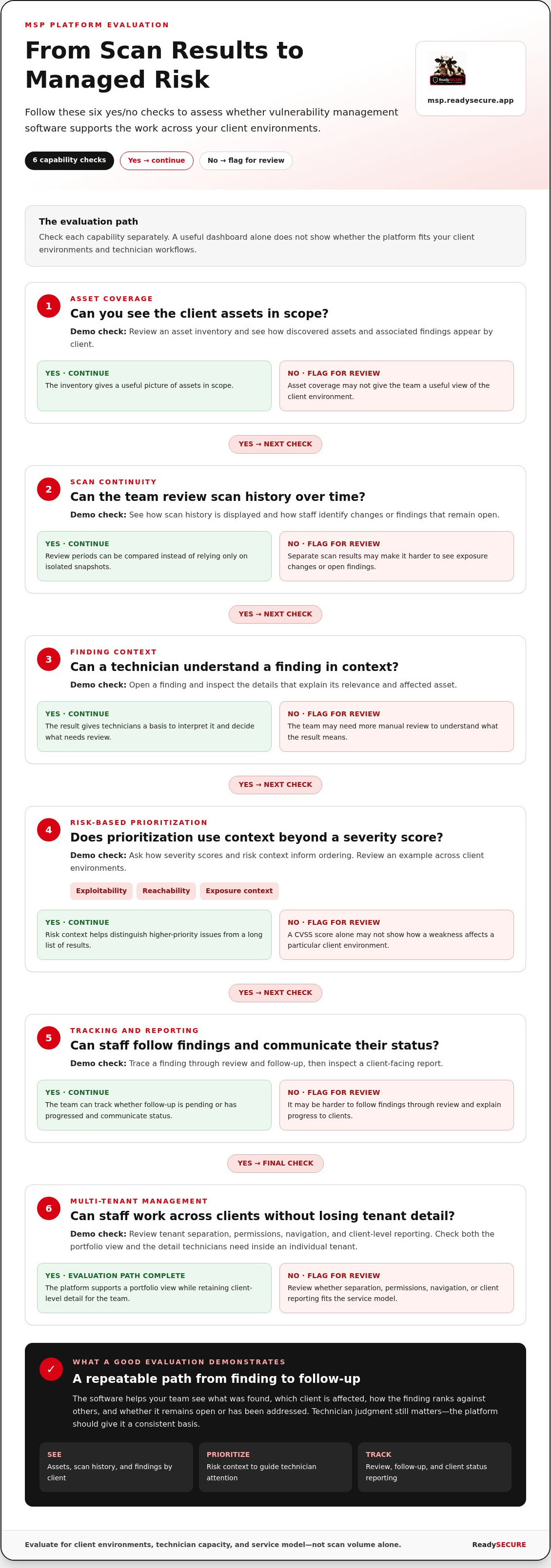
- Assess asset coverage, scan continuity, finding context, prioritization, and tracking separately. Use demonstrations to see how each capability works.
- Check tenant separation, permissions, navigation, and client-level reporting to balance a useful portfolio view with the detail technicians need.
- Run a controlled evaluation using representative client environments and real technician tasks before planning rollout and reviewing outcomes.
- See how ReadySECURE combines multi-tenant vulnerability management, continuous scanning, and risk-based prioritization with white-label reporting.
Why MSPs need vulnerability management software that scales across clients
Every client environment has its own assets, configurations, and exposure. As an MSP adds clients, keeping risks visible and handling findings consistently becomes harder. A scan may reveal a weakness in one environment, but it does not tell you whether that issue is more urgent than another client’s finding, who should act, or how progress should be reviewed.
Vulnerability management software helps MSPs find, prioritize, and track security weaknesses across client environments. It supports an ongoing management process, rather than producing a report from a scan and stopping there. The broader discipline of Vulnerability management includes identifying and assessing weaknesses, then guiding action to reduce risk. For an MSP, software should help make that work consistent across tenants.
That distinction matters in service delivery. A scanner produces technical output; a management platform helps turn that output into an operational view. Your team can see what was found, which client is affected, how the finding ranks against others, and whether it remains open or has been addressed. The software does not replace technician judgment. It gives technicians a consistent basis for applying it.
Where one-off vulnerability scans fall short for MSPs
A one-off scan is a snapshot. Without a consistent way to organize results, comparing clients may mean reconciling different reports, formats, or review periods. Results from separate scans can also make it difficult to see how an individual client’s exposure has changed. Scanning is valuable, but isolated results do not create a repeatable service process.
Ongoing visibility gives technicians a basis for regular service reviews. They can identify findings that remain open, discuss changes in exposure, and explain where attention is focused. The scan identifies potential weaknesses; the MSP still needs to validate context, set priorities, coordinate remediation, and communicate status. Software should support those decisions, not imply that a report fixes the underlying issue.
What MSP-specific software should help you manage
MSP teams need to see findings across multiple client environments while retaining the detail required to act within an individual tenant. A useful system makes it easy to identify the affected client, review the issue in context, and track whether follow-up is pending or has progressed. That portfolio view should help staff work consistently without assuming every client has the same environment or priorities.
Clear prioritization also helps teams use technician time effectively. When findings are organized by risk and client, staff can focus on issues that warrant attention instead of treating every result as equally urgent. This makes client conversations more specific: explain what was found, why it matters, and what decision or action comes next. A repeatable process can improve service consistency and give the MSP a structure to extend as its client base grows.
That is the buying case for vulnerability management software for MSPs. The goal is not to collect more findings. It is to create dependable visibility, support informed decisions, and make risk management repeatable from client to client.
Which vulnerability management software capabilities should MSPs evaluate?
Compare platforms by how well they support the work between finding a weakness and deciding what happens next. Evaluate asset coverage, scan continuity, finding context, prioritization, tracking, and reporting as distinct capabilities. A polished dashboard is not enough; look for evidence that the platform fits your clients and technician workflows.
Risk-based prioritization ranks vulnerabilities using factors such as exploitability, reachability, and exposure context, rather than relying on severity scores alone. CVSS scores can inform triage, but a score by itself does not show how a weakness affects a particular client environment or where technician attention may have the greatest value.
| Capability | MSP benefit | Evidence to request during a demonstration |
|---|---|---|
| Asset coverage | Shows whether the platform can provide a useful picture of the client assets in scope. | Review an asset inventory and see how discovered assets and associated findings are presented by client. |
| Scan continuity | Supports consistent visibility across review periods instead of isolated snapshots. | See how scan history is displayed and how a team identifies changes or findings that remain open. |
| Finding context | Gives technicians information to interpret a result and decide what needs review. | Open a finding and inspect the details available to explain its relevance and affected asset. |
| Prioritization | Helps staff distinguish higher-priority issues from a long list of results. | Ask how severity scores and risk context inform ordering, and review an example across client environments. |
| Tracking and reporting | Helps teams follow findings and communicate status as part of a client-facing service. | Trace a finding through review and follow-up, then inspect a sample report for clarity and client-level detail. |
Assess visibility, scanning, and risk prioritization
During an evaluation, ask to see findings across client environments, not only in a single test account. Check whether staff can identify the affected client and asset, understand the finding’s context, and see why it receives its priority. Assess scan continuity separately from prioritization: regular visibility helps show what is present, while context helps inform what deserves attention. One does not automatically provide the other.
Use vulnerability management software for MSPs to bring these questions into a consistent evaluation. Ask the same questions across platforms, then compare what technicians can actually see and interpret. The aim is to make triage clearer, not to assume every finding will be resolved automatically.
Check remediation tracking and client-ready reporting
Tracking and automation are different capabilities. Determine whether the platform lets your team follow findings through review and remediation follow-up, then establish separately what actions it can automate. Do not assume a status field means a vulnerability has been fixed. Confirm how technicians record progress and distinguish outstanding work from completed follow-up.
Assess reporting on its own merits. Can a technician explain a technical finding in plain language, show its status, and give the client a clear view of relevant risk? White-label reporting can support a consistent MSP-branded service. To see how a multi-tenant security platform can bring vulnerability management into an MSP workflow, explore ReadySECURE for MSPs.
How to compare multi-tenant vulnerability management software for MSPs
A multi-tenant label alone does not show whether a platform will fit your operating model. Compare how it separates client environments, how easily technicians can move between them, and what each user can see or do. Usability and access control are related, but they are not interchangeable: an easy-to-navigate interface does not demonstrate that permissions fit your team’s responsibilities or protect client boundaries.
Use the same practical checks in each product demonstration:
- Tenant separation: Can a technician identify the active client and keep its findings distinct from other environments?
- Navigation: Can staff move from the overall client portfolio to one tenant’s assets and findings without losing context?
- Permissions: Can you see how user roles map to your team’s duties, and what each role can access or change?
- Client-level reporting: Can staff produce a view focused on one client without mixing in other tenants’ information?
- Portfolio visibility: Can a manager review activity or findings across clients while still opening the detail needed for a specific environment?
These checks help reveal whether vulnerability management software for MSPs supports daily service delivery or simply presents multiple client names in one interface. For broader criteria around choosing a white-label platform, this white-label security platform guide provides useful selection context.
Review tenant organization and technician workflows
Make the demonstration follow a realistic task. Ask the presenter to locate a client, open its findings, review an issue, return to the portfolio view, and switch to another tenant. Watch for unclear client context, unnecessary navigation, or steps that could make routine reviews cumbersome. Then compare roles with your team structure: consider who needs to view findings, manage work, or prepare reports. Evaluate what the interface displays separately from the access model that governs those actions.
Test scenarios that reflect your client mix and technician responsibilities. A portfolio view should help staff identify where follow-up is needed, while tenant-level detail should help them understand each finding in context. Neither view replaces the other, so ask to see both in the same workflow.
Evaluate white-label reports and client communication
Reports carry your service experience beyond the console. Review a client-level example and assess whether technical staff can use it to explain findings, status, and follow-up in language business stakeholders can understand. Look for clear organization, client-specific context, and a presentation that supports your MSP’s client-facing service.
Treat reporting as distinct from remediation. A clear report can support recurring reviews and client conversations, but it does not prove that a finding has been fixed or that follow-up happens automatically. Assess what the report communicates, then establish separately how technicians record and review remediation progress. This keeps expectations realistic and gives your team a sound basis for client updates.
How to select and roll out vulnerability management software without overloading your team
A platform earns its place only if your team can use it consistently across clients. Evaluate the workflow before committing to a rollout. Test real technician tasks, estimate the ongoing review and reporting effort, and assign ownership for each step. This keeps the decision focused on operational fit, rather than a feature list that looks impressive but adds friction.
- Define scope. List the client environments and asset categories your service needs to cover. Note important differences between clients and the visibility your team needs for each.
- Test workflows. Use representative environments to review findings, decide what needs attention, and record follow-up. Note where tasks require extra steps.
- Assess reporting. Review a client-facing report and check whether it helps your team explain findings and status to technical and business stakeholders.
- Plan adoption. Assign ownership for reviewing findings, coordinating next steps, and preparing client updates. Account for training and process changes in your rollout plan.
- Review outcomes. After adoption, compare actual workload and workflows with your expectations. Look for recurring bottlenecks, unclear responsibilities, and gaps in client coverage.
Run a practical software evaluation
Choose test environments that reflect your client mix, rather than relying on a single straightforward example. Include the asset categories your MSP expects to oversee, and have technicians perform tasks they will handle in normal service delivery. Ask them to review findings, identify follow-up, and prepare a sample report. Record workflow friction, training needs, and unmet requirements while the details are fresh.
Keep the evaluation controlled. Use the same scenarios and task list for each platform, then compare the effort and clarity required to complete them. This gives you a stronger basis for selecting vulnerability management software for MSPs than a feature checklist alone.
Plan rollout, ownership, and service fit
Before rollout, define who reviews findings, who coordinates remediation follow-up, and who communicates progress to clients. Establish an onboarding and review approach your team can sustain as the client base grows. Include time for training and process adjustments; adoption is part of the workload, not an afterthought.
Assess recurring subscription models against your expected client and asset scope, billing approach, and the effort required to deliver the service. Separate platform charges from internal delivery workload, and model how changes in coverage could affect ongoing commitments. Avoid basing the decision on assumed savings. For broader service design and packaging considerations, the vulnerability management program guide explores the wider program context.
To assess a multi-tenant security platform against your MSP’s workflows, explore the ReadySECURE MSP platform.
How ReadySECURE supports MSP vulnerability management across client environments
For an MSP, vulnerability management needs to work across client environments without turning each review into a separate tool and reporting exercise. ReadySECURE provides a white-label, multi-tenant security platform for MSPs. Its vulnerability management capabilities include continuous scanning and risk-based prioritization, helping teams maintain visibility and assess which findings warrant attention across tenants.
ReadySECURE is designed for MSPs evaluating vulnerability management software for MSPs as part of a broader security service. The platform also brings together Microsoft 365 hardening, mail security, and compliance capabilities. Managing these areas in one multi-tenant console gives MSPs a shared operating environment for security work, while each capability addresses a distinct part of a client’s security posture.
Use vulnerability management within a broader security console
Continuous scanning supports ongoing visibility into client vulnerabilities, while risk-based prioritization helps organize findings by their potential significance. Technicians can use that context to guide review and discuss next steps with clients. The platform supports the management workflow; the MSP remains responsible for interpreting findings and coordinating appropriate follow-up.
For MSPs that also manage Microsoft 365 security, mail security, or compliance work, having those capabilities alongside vulnerability management provides a broader platform context. The M365 security hardening tools guide explores related considerations for MSPs assessing Microsoft 365 security tools.
Extend delivery with white-label reports and expert-led support
White-label reporting tools give MSPs a way to present security information through a client-facing experience aligned with their own service. Reports can structure conversations around findings and risk priorities, but they do not establish that remediation is complete or guarantee a security outcome. Clear reporting works best alongside technician review and agreed follow-up.
MSPs can also draw on expert-led services to support their security offering, including vCISO support, penetration testing, and incident response. These services provide additional expertise alongside the platform’s security capabilities. Together, the platform and services can help MSPs shape a cohesive approach to client security, grounded in each environment and the MSP’s delivery model.
If you’re evaluating a multi-tenant platform for vulnerability management and related security capabilities, explore ReadySECURE for MSPs.
Build your next phase of security delivery
Turn vulnerability management into a defined part of your MSP’s client experience. Set a clear standard for how findings inform priorities, how technicians communicate next steps, and how clients see progress. A repeatable service model gives your team a stronger foundation than adding tools without a plan for how they fit together.
As you shape that model, consider whether your platform can support both vulnerability oversight and your approach to delivering security for clients. ReadySECURE combines continuous vulnerability scanning and risk-based prioritization in a multi-tenant platform, with white-label reporting and additional Microsoft 365, mail security, and compliance capabilities.
Choose vulnerability management software for MSPs that fits your team’s capacity and supports the service you intend to build. Explore ReadySECURE for MSPs to take the next step in shaping your security offering.
Frequently Asked Questions
Does vulnerability management software automatically patch every vulnerability?
No. Software can identify and organize weaknesses, but patching depends on the affected product, change controls, and client approval. Some platforms may support remediation workflows, but that does not mean every issue is patched automatically. For example, an update affecting a critical business application may need testing and a maintenance window. Treat finding, patch decision, deployment, and verification as separate steps, and establish which actions the selected platform actually performs.
How often should an MSP scan client environments for vulnerabilities?
Set scan frequency according to each client’s exposure, asset changes, and service commitments rather than adopting one interval for every environment. A stable environment may call for a different schedule from one with frequent infrastructure changes or newly exposed systems. Combine recurring scans with scans after significant changes, where appropriate. Consider whether scanning affects system performance, and coordinate the schedule with client operations so coverage remains useful and predictable.
Can vulnerability management software assess cloud and SaaS environments?
Some platforms assess cloud workloads or SaaS configurations, but coverage varies by product and environment. A scanner designed for network assets may not reveal identity settings, cloud configuration issues, or weaknesses inside a SaaS tenant. When comparing vulnerability management software for MSPs, map the client’s cloud services and SaaS applications to the platform’s stated assessment scope. Distinguish configuration checks from software vulnerability detection, and identify any environments that need a separate assessment method.
How should an MSP handle a vulnerability when no patch is available?
First, confirm the finding and identify the affected system, business function, and exposure. If no patch exists, use appropriate temporary risk-reduction measures, such as limiting access to the vulnerable service or disabling an affected feature if the client’s operations allow it. Track the issue as unresolved, document the decision and compensating measures, and review it when vendor guidance or a patch becomes available. Do not report mitigation as remediation.
How can MSPs reduce false positives in vulnerability findings?
Validate a questionable finding against the asset’s actual software version, configuration, and exposure before closing it. Check whether the scan had the access needed to identify those details, then compare the result with reliable vendor information. If a finding is a false positive, record why, which asset was reviewed, and when the decision should be revisited. Avoid repeatedly dismissing the same alert without evidence, since asset changes can make an earlier conclusion outdated.
Does vulnerability management software replace penetration testing?
No. Vulnerability management helps identify and track known weaknesses across assets, while penetration testing examines whether weaknesses can be exploited in a defined assessment. For example, a vulnerability scan may flag an outdated component, while a penetration test can assess how that issue could contribute to a broader attack path. Use the activities together: recurring vulnerability visibility supports ongoing oversight, and testing provides a focused view of exploitability within its agreed scope.


