

Compliance automation can keep evidence moving, but it can’t decide whether a client is truly compliant. A dashboard may flag a missing document or show a control check as complete. Your team still needs to determine whether the issue is a genuine security gap, outdated documentation, or evidence that hasn’t been collected yet.
That distinction matters when you manage multiple client environments. Evidence gathering and recurring control checks take time, while frameworks, technology stacks, and client maturity make one-size-fits-all delivery difficult. Automation can standardize repeatable work and improve visibility. MSP expertise turns those signals into sound decisions, clear ownership, and useful client guidance.
This article explains which compliance activities are suited to automation, where human judgment remains essential, and how to build a repeatable service across clients. You’ll learn how to structure evidence collection, control mapping, and review workflows without mistaking automated status for audit readiness. Multi-tenant visibility, client-ready reporting, and expert-led oversight can help make compliance a more scalable part of your MSP offering.
Key Takeaways
- Use compliance automation for recurring evidence collection, reminders, and control monitoring. Keep risk decisions and remediation under human ownership.
- Define scope and controls first so collected evidence maps to the right requirements and review process.
- Separate genuine control gaps from missing or outdated documentation before deciding what action a client needs.
- Build a repeatable workflow by piloting one clearly scoped client environment, assigning owners, and refining reviews before expanding.
- Bring compliance reporting together with vulnerability, Microsoft 365, and mail-security visibility for a clearer, more consistent client service.
What Compliance Automation Means for MSPs, and What It Does Not
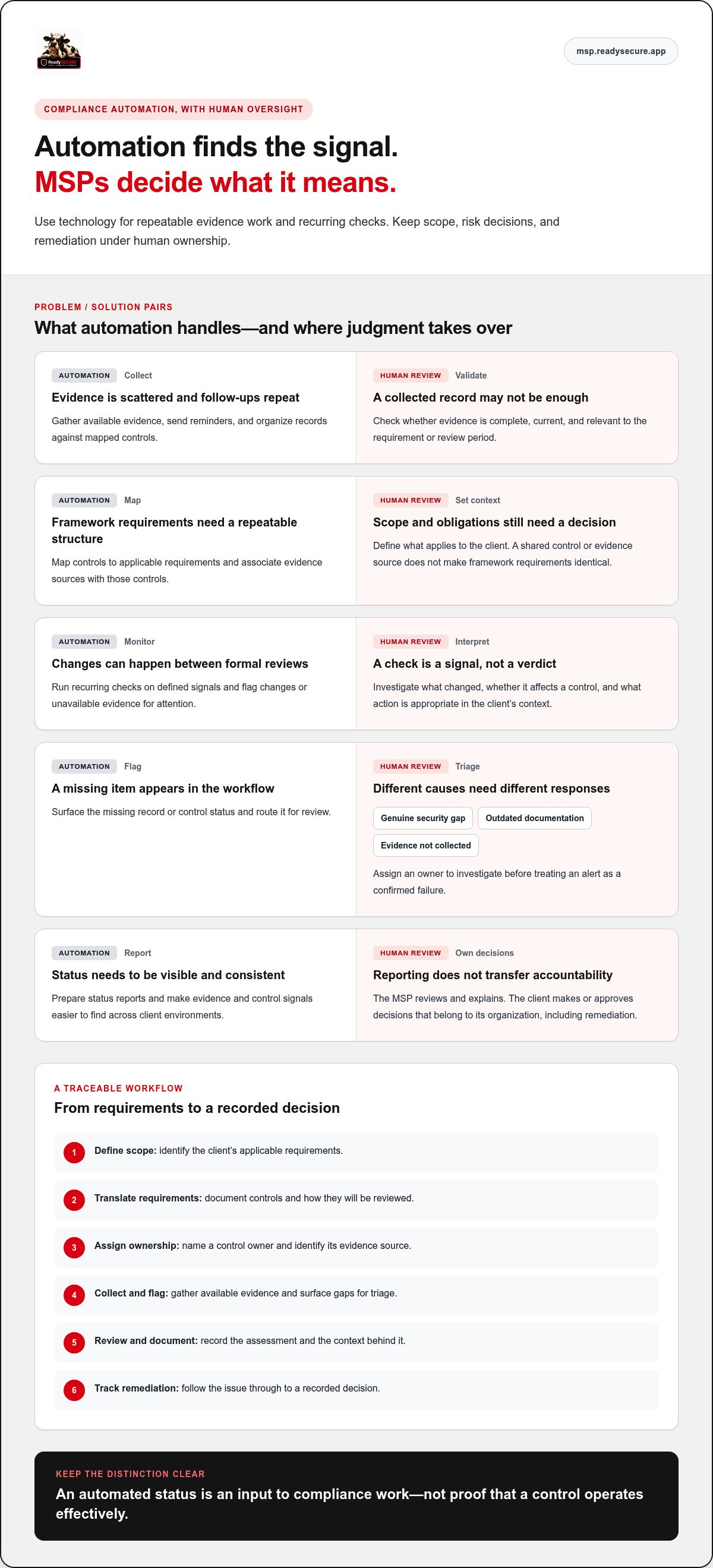
Compliance automation uses technology to handle recurring compliance tasks, evidence collection, and control monitoring. For an MSP, that can mean replacing scattered spreadsheets and repeated client follow-ups with a consistent way to gather information, map controls, and flag items for review. The goal isn’t to remove expertise. It’s to focus that expertise where it matters most.
Compliance is broader than the workflow a tool can automate. It includes deciding which requirements apply, how controls should be designed, who owns them, and what happens when they fall short. A system can organize signals and documentation, but people remain accountable for interpreting those signals and acting on risk. This reflects the wider meaning of regulatory compliance: meeting applicable requirements through an operating program, not simply maintaining a folder of records.
Manual evidence gathering gets harder as an MSP’s portfolio grows. Each client may have a different framework, technology stack, maturity level, and evidence owner. Staff can end up repeating requests, checking settings, and rebuilding reports in separate formats. That creates friction and makes comparisons harder. A repeatable workflow standardizes collection while preserving client-specific scope and review.
Automated evidence can show activity, but it doesn’t prove that a control operates effectively. A system may capture a policy file or record that a setting was enabled at a particular point in time. That alone can’t establish that staff follow the policy or that the control consistently works as intended.
Which Compliance Tasks Can Automation Handle?
Good candidates are recurring, rules-based tasks: collecting available evidence, mapping controls to framework requirements, monitoring defined signals, sending reminders, and preparing status reports. The workflow depends on the framework, client environment, and data sources available to the tools. For example, storing an access policy gives reviewers a document to examine. Assessing whether access practices follow that policy takes additional evidence and human review.
Use automation to make evidence easier to find and changes easier to spot. Then investigate what the results mean. A missing record might point to a control gap, an outdated document, or a collection issue. Those situations need different responses, so assign an owner to investigate rather than treating every alert as a confirmed failure.
Does Compliance Automation Make a Client Compliant?
No. Tools support compliance work; they don’t transfer accountability away from the organization. People still need to approve scope, assess whether control design fits the client’s risks, review exceptions, and direct remediation. An automated status is an input to that process, not a final decision.
For MSPs, the practical benefit is stronger visibility and more consistent processes across client environments. Set clear ownership: the tool gathers and organizes, the MSP reviews and explains, and the client makes or approves decisions that belong to its organization. This creates a more dependable foundation for client reviews without promising audit outcomes or confusing collected evidence with effective controls.
How Compliance Automation Moves from Controls to Audit Evidence
A useful workflow turns framework language into evidence a reviewer can trace. Start by defining the client’s scope and applicable requirements. Translate those requirements into controls, assign an owner to each control, and specify what evidence can demonstrate its operation. Collect available evidence, flag gaps for triage, document the review, and track remediation through to a recorded decision.
Continuous monitoring means running recurring checks that surface relevant changes between formal reviews. It can help an MSP spot a changed setting or unavailable evidence rather than relying only on a snapshot gathered near an audit. A check provides a signal, not a verdict. Reviewers still need context to determine what changed, whether it affects a control, and what action is appropriate.
From Framework Requirements to Mapped Controls
Frameworks describe expected outcomes; an operating workflow makes them actionable. For each in-scope requirement, document the control, its owner, the evidence source, and the review approach. For example, an access-related control might connect a written process to relevant configuration evidence and a named person responsible for review. The appropriate evidence depends on the client’s environment and the control’s intent.
SOC 2 and ISO/IEC 27001 can both involve security controls, but their scope and obligations differ. Mapping can show where a control or evidence item is relevant to more than one framework, reducing duplicate collection when the same source genuinely supports both. It doesn’t make the requirements identical or prove that evidence for one framework automatically satisfies another. Record the rationale and assess each requirement in its own context.
Evidence Collection, Alerts, and Remediation Tracking
Where supported, integrations can collect signals from cloud services and business systems, then associate them with mapped controls. A reviewer can assess whether evidence is complete, current, and relevant to the period or requirement under review. For instance, a configuration snapshot may show a setting at the time of collection, while a policy document explains the expected process. When both are needed, neither should stand in for the other.
An alert is a prompt to investigate, not a completed investigation. Confirm the source and affected control, then determine whether the condition reflects a real gap or a data issue. Assign an owner and due date for any needed remediation. Record the decision, supporting evidence, and follow-up status. This creates a traceable review history and helps the next reviewer understand what happened, not just what a dashboard displayed.
For controls tied to Microsoft 365 configurations, M365 security hardening tools for MSPs can provide relevant security-control context. A multi-tenant workflow can bring evidence collection and control mappings into a consistent review process across client environments. ReadySECURE’s MSP security platform brings compliance and related security workflows together in one multi-tenant console.
What to Automate, and Where MSP Judgment Still Matters
A practical boundary is simple: automate repeatable steps, not accountable decisions. For an MSP, that means standardizing routine work across client environments while leaving risk choices, approvals, and business-impact assessments with people who understand the context. This helps prevent a green status from being mistaken for a complete assurance decision.
Use this comparison to assign ownership before rolling out compliance automation. The evidence column shows what a reviewer can use to confirm that the task was performed and the result considered.
| Task | Automation role | Human owner | Review evidence |
|---|---|---|---|
| Scheduled evidence gathering | Collect available records on a recurring schedule | MSP reviews collection coverage; client maintains source records | Timestamped evidence and source details |
| Control checks and reminders | Run configured checks and notify assigned owners | MSP triages alerts; client confirms operational context | Check result, alert history, and review notes |
| Control-to-evidence mapping | Associate evidence sources with relevant controls | MSP validates relevance for each client and framework | Current mappings with reviewer approval |
| Status reporting | Compile completion and open-item status | MSP explains findings; client confirms decisions and actions | Dated report and recorded follow-up |
| Risk acceptance or scope decisions | Track decisions and flag items for review | Authorized client owner makes or approves the decision | Documented rationale and approval |
| Exceptions and policy approval | Route submissions and retain records | Client approver assesses exceptions and approves policy | Decision, owner, and review history |
Good Candidates for Automation in an MSP Workflow
Automate work that follows a defined pattern: scheduled evidence gathering, recurring control checks, control-to-evidence mapping, reminders, and status reporting. A shared workflow can reduce duplicate administration by preventing teams from rebuilding the same request-and-review process for every client. Coverage still depends on available integrations, permissions, and the client systems in scope. Track those limits so a report doesn’t appear complete while important sources remain outside the workflow.
Decisions That Need Human Review
Keep risk acceptance, control exceptions, remediation priorities, and policy approval with accountable people. A technical alert might identify an exposed setting, but it can’t determine the affected business process, operational constraints, or acceptable risk on its own. The MSP investigates and recommends next steps; the client owns or approves decisions tied to its risk and operations. Assign remediation ownership explicitly, then record the rationale and follow-up.
Automation improves consistency, but unchecked outputs can become stale or misleading. Review failed connections, confirm evidence freshness, and validate that mappings still match the client’s scope. Treat every alert as a prompt for triage, not an automatic finding or remediation order. ReadySECURE’s MSP security platform supports this operating model across client environments.
How to Implement Compliance Automation Across Multiple Clients
Roll out compliance automation as a managed operating process, not a one-time configuration. Standardize the repeatable parts, document each client’s differences, and assign someone to review the output. A measured rollout gives your team a reusable model without treating every client environment as identical.
- Scope each client. Record the applicable framework, in-scope systems, key evidence sources, and client contacts. Make exclusions visible so reports don’t imply coverage beyond the agreed scope.
- Standardize controls. Build a reusable baseline of controls and evidence expectations. Record client-specific requirements and approved exceptions rather than quietly changing the baseline.
- Connect evidence sources. Prioritize systems that provide useful evidence for the selected controls. Confirm access and collection coverage, then document sources that remain manual or outside the workflow.
- Assign owners. Name who reviews findings, approves policy changes, and tracks remediation. Separate the MSP’s monitoring and coordination responsibilities from client decisions and approvals.
- Review results. Set a recurring review cadence for outdated evidence, unresolved findings, exceptions, and control ownership. Use the review to confirm status and assign follow-up, not just export a dashboard.
Set Scope, Baselines, and Client Ownership
Start with a client record that ties the framework to its systems, evidence sources, and responsible contacts. Use a common control baseline to streamline setup across tenants, then capture where a client differs and why. Document who can accept risk, approve exceptions, change policies, and close remediation items. Clear ownership keeps automated status from becoming an unreviewed assumption.
Choose a pilot environment with a defined scope and engaged contacts. Test the full workflow on selected controls before applying the baseline more widely. This exposes gaps in mappings, permissions, and handoffs while the process is still easy to adjust.
Pilot, Review, and Improve the Workflow
During the pilot, check whether connected sources produce evidence that is relevant, complete, and timely for each selected control. Examine false positives and missing data. Confirm that every open item has an owner and that reviewers can understand the result without extra detective work. Fix unclear responsibilities and weak evidence paths before expanding the process to more clients.
Keep the operating cadence practical and consistent. At each review, revisit evidence freshness, unresolved findings, approved exceptions, and control ownership. Refine mappings, reports, and client communications based on what reviewers need to decide and act. A multi-tenant console can help MSPs apply shared workflows while keeping client environments distinct.
ReadySECURE brings compliance and governance together with security visibility in a multi-tenant platform designed for MSPs. Explore ReadySECURE’s MSP security platform to support a repeatable, client-ready workflow.
Turn Compliance Automation into a Scalable MSP Client Service
A repeatable compliance service gives clients more than a folder of collected documents. It creates a steady operating rhythm: gather evidence, review what changed, discuss open issues, track remediation, and share a clear status report. That cadence makes progress visible and gives each client a consistent experience, while keeping decisions and accountability with the right people. Compliance automation supports the delivery; it doesn’t guarantee certification or an audit result.
Build the service around defined responsibilities and client conversations. The MSP coordinates evidence workflows, interprets findings, and reports on follow-up. Client stakeholders provide context, make decisions, and approve actions that belong to their organization. This structure makes routine administration consistent without turning a tool’s status into a promise about compliance.
Build a Repeatable, Client-Facing Compliance Offer
Set a recurring review cycle that clients can understand and your team can deliver reliably. Review evidence and control status, discuss significant changes or unresolved issues, agree on remediation owners, then provide a concise report with decisions and next steps. Keep the format consistent across clients, but tailor the discussion to each client’s scope, framework, and maturity.
Technical evidence is only part of governance. A policy library can help organize documented expectations, while awareness training supports the people and processes behind those controls. Together, these elements give client reviews a wider view than configuration checks alone. Explain the value in practical terms: better visibility, more consistent follow-through, and informed guidance, not a guaranteed certification.
Connect the Compliance Workflow to the Wider Security Stack
Compliance reviews become more useful when related security findings inform the conversation. Vulnerability findings can help frame remediation priorities; Microsoft 365 security signals can add context to relevant configuration controls; mail-security visibility can inform discussions about protective processes. These inputs don’t replace framework-specific review. They help MSPs and clients connect control discussions to security work already underway.
Coordinate the service across client environments. Multi-tenant management, control mappings, and evidence collection can support repeatable workflows, while white-label reporting tools help present findings under the MSP’s brand. Expert-led vCISO support can add strategic guidance as clients set priorities and make governance decisions. The result is a client-facing program with clear reporting and human ownership, not a dashboard left to speak for itself.
For broader context on how platform capabilities support MSP service delivery, explore the profitable MSP’s guide to white-label security platforms. To bring compliance and related security workflows together in a multi-tenant platform, explore ReadySECURE for your MSP.
Build Your Next Stage of MSP Growth
Make your next step deliberate: choose the client workflow that creates the most friction, define what a dependable review should look like, and build a service your team can deliver consistently. This gives you a practical foundation for expanding compliance automation without letting process scale faster than accountability.
ReadySECURE gives MSPs a multi-tenant platform for client environments, bringing continuous evidence collection and control mappings together with white-label reporting and expert-led vCISO support. Use that foundation to create a client experience that makes progress visible and gives your team more room to focus on decisions that require expertise.
Explore ReadySECURE for your MSP and take the next step toward a more scalable compliance service. Give clients clearer insight and your team a more repeatable operating model.
Frequently Asked Questions
What is compliance automation?
Compliance automation uses software to handle repeatable parts of a compliance workflow, such as requesting records, associating them with controls, and assembling review materials. For an MSP, a practical example is using a common evidence request across several clients while keeping each tenant’s data separate. The software can show what arrived and when; a reviewer still determines whether it answers the requirement and reflects actual practice.
Can compliance automation guarantee an audit will pass?
No. An audit outcome depends on more than a platform’s status indicators. A control may appear configured while a sample of user records reveals inconsistent practice, or evidence may cover only part of the agreed scope. Use software to prepare materials and identify questions, then validate them with the client and address gaps. Don’t market a completed workflow as a passed audit, certification, or independent assurance.
How often should automated compliance evidence be reviewed?
Set review timing according to how quickly the underlying condition can change and how important the control is to the client. A frequently changing configuration may warrant recurring checks, while an approved policy may fit a planned governance review and another review after material changes. Track collection dates and flag aging records. At each service review, confirm that exceptions and ownership remain current; continuous collection alone doesn’t establish freshness or relevance.
Does compliance automation replace an auditor?
No. Automation can make evidence easier to organize, but an auditor independently evaluates it against the engagement’s criteria. For instance, a report may help locate access records, while the auditor determines whether the sample and supporting explanation are sufficient. MSPs can prepare clients by clarifying scope, organizing records, and tracking follow-up, but shouldn’t present internal checks as an auditor’s conclusion. Keep the roles distinct to preserve a credible review process.
Can MSPs use compliance automation for more than one framework?
Yes. MSPs can reuse relevant evidence across frameworks, provided each mapping is checked against the specific requirement. A documented access review may support related control discussions, but frameworks can differ in scope, frequency, or proof expectations. Maintain separate framework views and note where a client still needs evidence or action. This lets your team reuse useful work without presenting one completed checklist as universal coverage.
What should an MSP do when an automated control check fails?
Treat a failed check as an investigation item, not an automatic verdict. Confirm the tenant, asset, and control tested; then check whether collection failed, the configuration changed, or the control is genuinely unmet. If remediation is needed, agree on the action and owner with the client, set a target date, and retain the decision trail. If an exception applies, document its rationale and review point.
Is compliance automation useful if a client has limited integrations?
Yes. Limited integrations change what can be observed automatically, but other workflow tasks can still be organized. For an unsupported system, use a manual evidence request and record its source, date, and reviewer rather than marking the control as monitored. Separate connected coverage from manually supplied proof in client reporting. That boundary helps teams plan improvements and prevents a blank data feed from looking like a passing check.


