

What if the biggest zero trust mistake is treating it like a product you can switch on? For MSPs, zero trust security for MSPs is a repeatable way to verify access, limit privileges, and manage risk across client environments. MFA is important, but it is only one control. A new access tool won’t create a consistent security program on its own.
It’s understandable to wonder where to start when every client has a different setup and your team already has plenty to manage. The answer isn’t a full technology replacement. It’s a phased approach that builds on existing environments, standardizes practical controls, and makes gaps easier to see across tenants.
This guide explains zero trust in practical MSP terms, then maps a roadmap across identity, devices, networks, applications, and data. You’ll learn how to prioritize improvements, use visibility and reporting to support consistent operations, and explain progress to clients. The goal is stronger, more scalable security without mistaking any single tool for the whole strategy.
Key Takeaways
- Build zero trust security for msps around repeatable controls across client environments, not a single product.
- Assess identities, devices, access, data, and existing safeguards before deciding what to change.
- Use least privilege to limit each person or system to the access needed for its task, then review access as roles and needs change.
- Match each control to its job: identity tools manage access, endpoint controls address device posture, and vulnerability management helps prioritize exposure.
- Roll out controls in phases, using consistent visibility and reporting to track progress and explain security work to clients.
What Zero Trust Security Means for MSPs, and What It Does Not
MSPs protect users working from different locations, devices with varying levels of security, cloud and on-premises applications, and multiple client environments with different risks. A control that fits one tenant may not suit another. The challenge is to make access decisions consistently while adapting them to each client’s technology, requirements, and starting point.
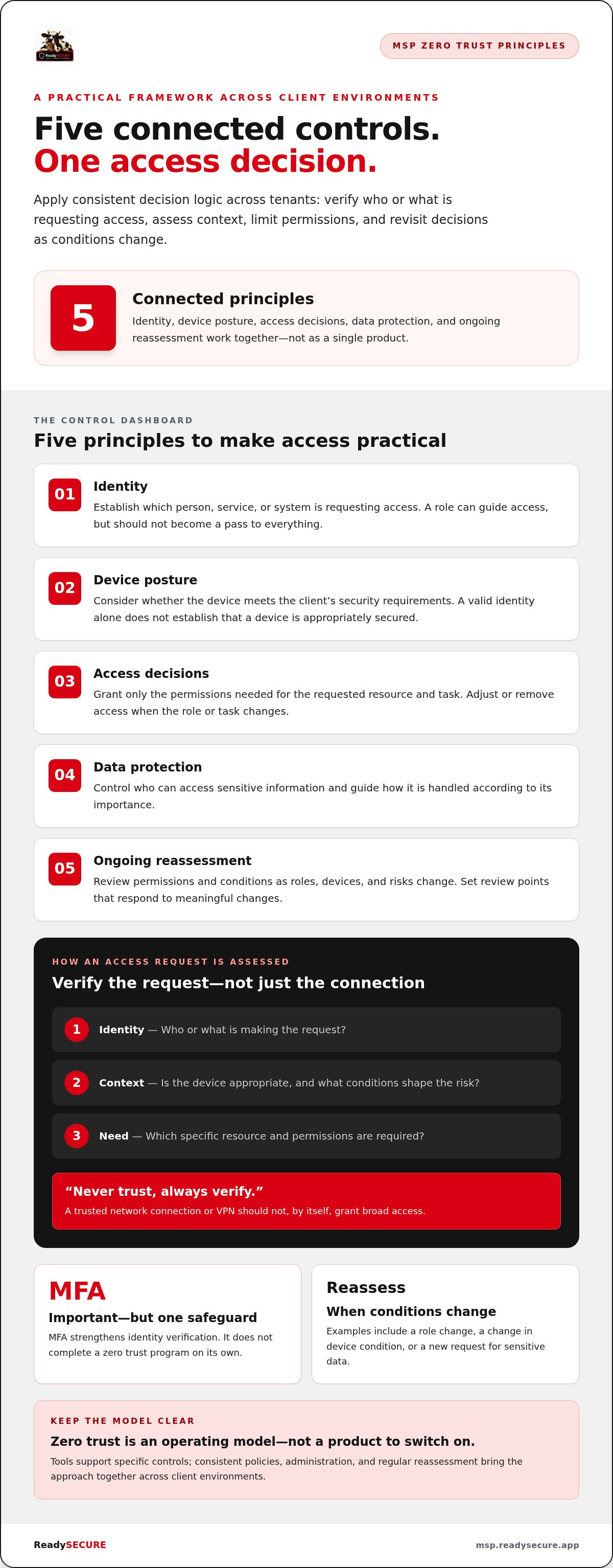
Zero trust is a security model that verifies each access request according to identity, context, and need rather than trusting access because it comes from inside a network perimeter. It puts “never trust, always verify” into practice by checking whether a user or system should access a specific resource, then limiting that access to what’s required. The Zero Trust Security Model traces the approach and its core ideas.
For zero trust security for msps, this is an operating model, not a product to install, a certification to earn, or a one-time project. It shapes how your team grants and reviews access across client tenants. Tools can support specific controls, but the strategy also depends on clear policies, consistent administration, and regular reassessment.
How zero trust differs from perimeter-based security
Perimeter-based security often treats a connection from a trusted network as safer than one from outside it. But network location alone can’t establish who is making a request, whether their device is appropriate, or whether they need access to a particular application. Once inside, broad permissions can expose more resources than a task requires.
Zero trust replaces that implicit trust with explicit, least-privilege authorization. For example, when a remote employee accesses a client’s finance application, access should depend on the employee’s identity, the application they need, and relevant access conditions. Connecting through a company network or VPN should not, by itself, grant broad access.
What zero trust does not mean for an MSP
Zero trust doesn’t mean treating every employee as malicious or making routine work unnecessarily difficult. It means designing access policies that account for risk and limit the impact of mistakes or compromised credentials. Employees can still receive the permissions they need to do their jobs, while access to unrelated client systems remains restricted.
Nor is zero trust another name for SASE or Zero Trust Network Access (ZTNA). These technology approaches can deliver particular capabilities, such as connecting users to applications with more granular access. They don’t, by themselves, define or complete an organization’s zero trust strategy. An MSP still needs to coordinate identity, device, application, and data controls.
Keep the distinction clear with clients: the architecture sets the principles and decisions, while individual tools support specific parts of the program. Neither a framework nor a technology eliminates security risk. The practical goal is a consistent way to verify, limit, and review access across environments, then improve controls as client needs and risks change.
The Zero Trust Principles MSPs Need to Apply Across Client Environments
For an MSP, zero trust becomes operational when you apply the same decision logic across client environments while adapting settings to each client’s risks, systems, and business needs. The NIST Zero Trust Architecture offers a useful foundation. Translate its ideas into clear policies: verify who or what is requesting access, assess the context, limit permissions, and revisit decisions as conditions change. That’s the core of zero trust security for msps.
Use five connected principles to make those policies practical:
- Identity: Establish which person, service, or system is requesting access.
- Device posture: Consider whether the device meets the client’s security requirements.
- Access decisions: Grant only the permissions needed for the requested resource and task.
- Data protection: Control access to sensitive information and handle it according to its importance.
- Ongoing reassessment: Review permissions and conditions as roles, devices, and risks change.
Identity and least-privilege access
Identity anchors the access decision. A user’s role can help determine which client resources they can reach, but role membership shouldn’t become a pass to everything. Least privilege means granting only the access needed for a defined task, then removing or adjusting it when the task or role changes. Role-based permissions make this standard easier to apply across tenants. MFA strengthens identity verification, but it remains one safeguard, not a complete zero trust program.
Device, application, and data controls
A valid identity doesn’t tell you whether a device is appropriately secured or whether the user needs the requested application. Access policies can account for device condition, the specific resource, and the risk associated with the request. Data controls help limit who can access sensitive information and guide how it’s handled. Together, these checks make the decision more precise than relying on a successful login alone.
Verification must continue after login because identities, devices, and access conditions can change while a session is active. Reassessment doesn’t have to interrupt users constantly. Instead, set review points and access rules that respond to meaningful changes, such as a role change, a change in device condition, or a new request for sensitive data.
Visibility supports this work, but it isn’t the decision or the response. Logs and reporting help your team see access patterns, gaps, and changes across client environments. Policies determine what access is appropriate; operational processes determine what to do when activity or device posture falls outside those rules. Keep shared standards consistent, document client-specific exceptions, and review them regularly. A multi-tenant security view can help organize oversight, while your broader program defines the controls and actions behind it.
Zero Trust Tools Compared: Match Each Control to Its Job
Zero trust isn’t a shopping list. It’s a set of security objectives, each supported by controls that address a different part of the client environment. For zero trust security for msps, match each tool to a defined job before adding it to the stack. That keeps investment focused and clarifies operational ownership across tenants.
| Security objective | Control category | Examples | Operational considerations |
|---|---|---|---|
| Verify identities and limit access | Identity and access management | Authentication policies, MFA, role-based permissions | Standardize access rules where practical. Track exceptions and review privileges when roles change. |
| Assess endpoint risk | Endpoint controls | Device security settings, endpoint protection, posture checks | Define acceptable device conditions and decide how access should respond when a device falls short. |
| Find and prioritize exposure | Vulnerability management | Asset and vulnerability assessments, remediation tracking | Prioritize findings by client context and risk, then assign clear ownership for remediation. |
| Reduce email-borne risk | Mail security | Email threat filtering and security configuration | Align controls with each client’s mail environment and establish a process for handling reported threats. |
| Protect sensitive information and demonstrate oversight | Data governance and compliance | Access policies, documented procedures, compliance evidence | Identify sensitive data, define responsibilities, and keep evidence useful for reviews and client reporting. |
SASE and ZTNA versus broader zero trust controls
Secure Access Service Edge (SASE) combines networking and security capabilities in a cloud-delivered approach. Zero Trust Network Access (ZTNA) provides more granular access to specific applications rather than broad network access. Both can address network-access needs, but neither covers every control objective in the table. Identity, endpoint security, vulnerability management, mail security, and data governance still matter. There’s no single architecture every MSP client must adopt; choose controls based on the client’s environment and risk.
How to assess tools without creating tool sprawl
Start with the gap, not the product. Identify the client risk, map it to a control objective, and decide who will operate the control and review its results. Then assess whether the tool supports clear tenant separation, useful cross-client visibility, and reporting your team can act on. A consolidated platform can streamline oversight, but it doesn’t automatically create a zero trust architecture. Policies and operational ownership still need to connect the controls.
For Microsoft environments, use the same objective-first approach to evaluate configuration and hardening choices. This guide to M365 security hardening tools for MSPs covers Microsoft-specific options. Keep the overall stack disciplined: add a tool when it fills a defined control gap, then review whether it overlaps with capabilities you already manage.
A Practical Zero Trust Roadmap for MSPs and Their Clients
Zero trust security for msps works best as a managed improvement program, not a tenant-wide switch flipped in one change window. Start with evidence, choose a focused control gap, and expand once you understand the security impact and operational cost. A shared sequence makes the work repeatable while leaving room for client-specific risks and requirements.
- Assess. Baseline identities, access rights, devices, critical resources, client risks, and existing controls. Record what’s in place, where exceptions exist, who owns each control, and what information is missing. This prevents teams from buying or changing tools before they understand the gap.
- Prioritize. Rank gaps by potential business impact, exposure, client requirements, and your team’s capacity to implement and support changes. Choose a first milestone with a defined scope, such as tightening access to one critical application or reviewing privileged accounts.
- Pilot. Test the change with a limited user group, application, or client environment. Check whether the control addresses the intended gap, creates user friction, or increases support workload. Record issues and adjust the policy before expanding.
- Standardize. Turn the tested approach into a documented baseline that can be adapted across tenants. Define ownership, approved exceptions, client communication, and rollback considerations before wider deployment.
- Review. Reassess the control as client needs, roles, and environments change. Use findings and feedback to choose the next improvement rather than treating deployment as the finish line.
Prioritize controls and roll them out in phases
Keep each phase narrow enough to manage and meaningful enough to matter. For a client with sensitive business systems, a first milestone might be restricting access to a critical resource by role and documenting approved exceptions. Agree with the client on the change’s purpose and impact, assign an operational owner, and record how to reverse the change if it disrupts essential work. Then expand based on what the pilot shows.
Measure progress and communicate it to clients
Track control coverage, unresolved vulnerabilities, access exceptions, and remediation status. Distinguish activity, such as completing a review, from evidence that a control has been implemented, such as fewer unmanaged exceptions or broader coverage of an agreed safeguard. Measure progress by controls implemented, gaps addressed, and exceptions managed, not by claiming risk has been eliminated. Clear reporting helps clients understand what changed, what remains open, and what comes next.
Consistent, white-label reporting makes progress easier to explain across client environments. ReadySECURE’s white-label reporting tools help MSPs present security work under their own brand. To support a repeatable program with consolidated visibility across client environments, explore the MSP security platform.
How MSPs Can Operationalize Zero Trust with a Unified Security Workflow
Zero trust depends on connected decisions, but the work behind those decisions can become fragmented across client tenants. A unified security workflow helps MSPs coordinate visibility, prioritize action, and communicate progress through consistent processes. It supports the architecture; it doesn’t replace the policies, access controls, and client-specific decisions that make zero trust work.
Give each security capability a distinct role. Vulnerability management helps identify and prioritize technical exposure. Microsoft 365 security hardening supports stronger configuration of identities, data, and devices within M365 tenants. Mail security helps protect client inboxes from phishing, malware, and spam. Compliance capabilities help organize evidence and governance activities. These controls contribute to a wider program, but no single workflow or platform implements every zero trust requirement.
Coordinate security visibility across client tenants
A multi-tenant console gives an MSP a consistent operational view across client environments while keeping security work organized by tenant. That view can help teams review vulnerability findings, prioritize remediation in context, and track Microsoft 365 hardening needs. It also gives staff a practical basis for assigning work and following up instead of relying on disconnected reports and informal handoffs.
Compliance evidence serves a different purpose. It can help document control activity and support client oversight, but collecting evidence doesn’t automatically make an organization compliant. Teams still need to interpret requirements, address gaps, and maintain appropriate governance. Clear reporting shows what has been reviewed, what actions remain, and who owns the next step.
Turn operational capability into a client-ready service
Consistency matters to clients as much as coverage. A repeatable workflow helps your team explain security work in plain terms: which risk is being addressed, what control supports the work, and what follow-up is needed. White-label reporting tools let MSPs present that activity under their own brand, connecting technical operations to a professional client experience without overstating results.
ReadySECURE brings vulnerability management, Microsoft 365 security hardening, mail security, and compliance capabilities together in a multi-tenant security platform for MSP client environments. Its reporting tools support client communication, while expert-led vCISO support can strengthen security planning and governance. Incident response services provide additional support when a client needs help addressing an incident. These capabilities can reinforce a broader zero trust program, but MSPs still need to define policies, ownership, and ongoing review.
Build the workflow around the control objectives, then use consolidated visibility to make delivery more consistent across clients. For zero trust security for msps, the operational advantage is clearer priorities, accountable follow-through, and reporting clients can understand.
Turn the Next Improvement Into a Repeatable Advantage
The strongest next step is one your team can deliver consistently and explain clearly. Choose a client priority, define what progress will look like, and make the work part of a repeatable security service. That builds a stronger foundation for client trust and gives your team a practical way to develop its security program over time.
That’s the opportunity in zero trust security for msps: not a promise of perfect protection, but a disciplined way to improve how security decisions are made and managed. ReadySECURE supports that work with a multi-tenant platform, white-label reporting, vulnerability management, Microsoft 365 security, mail security, and compliance capabilities, alongside expert-led vCISO support and incident response.
Explore ReadySECURE’s security platform for MSPs to see how its capabilities can support your client security workflow. Start with a clear priority, build momentum from there, and keep strengthening the value your team delivers.
Frequently Asked Questions
Is zero trust the same as multi-factor authentication?
No. Multi-factor authentication (MFA) adds another identity check, but it doesn’t decide whether an authenticated user should reach every system or handle sensitive data. For example, an MSP can require MFA for an administrator and still restrict that administrator’s account to the client tenants and tasks they manage. Include MFA in the control set, then separately review permissions, account recovery processes, and access to critical resources.
Can a small MSP implement zero trust without a large security team?
Yes. A smaller team can begin with a manageable scope and build repeatable procedures instead of trying to overhaul every client environment at once. For example, document how staff request, approve, and remove privileged access, then apply that procedure to a small group of client accounts. Assign an owner and a review schedule so progress is trackable without a large dedicated security department.
How is zero trust network access different from a VPN?
ZTNA is designed to provide access to specific applications or resources under defined policies; a VPN generally connects an authenticated user to a network. The distinction matters if a contractor needs one client application but shouldn’t have broad network reach. Actual features vary by implementation, so assess how each option handles the access scenario. Neither replaces the need to manage identity, device, and data risks.
Does an MSP need SASE to implement zero trust?
No. SASE is one way to combine networking and security capabilities, and it may suit some client environments, but it isn’t a prerequisite for zero trust. A client with a narrow remote-access need may have different priorities from one focused on endpoint exposure or governance. Start with the control gap and operating requirements, then determine whether SASE addresses that need alongside other controls.
How can an MSP show clients progress on zero trust?
Show evidence tied to agreed control objectives, such as which privileged accounts were reviewed, whether access exceptions have owners, and what remediation remains open. Add context by explaining why a change matters to that client and what decision or action is next. Avoid reporting a high volume of completed tasks as proof of security. A useful update connects work performed to implemented controls and unresolved gaps.
What is the first step in a zero trust program for an MSP client?
Start by defining the scope of a baseline review. Pick a business-critical resource, identify who uses it, how they connect, and which controls currently govern access. Include relevant device and operational constraints, such as approved work patterns or legacy dependencies. This focused starting point helps the client understand proposed changes and gives the MSP a concrete basis for deciding what to address first.


