

What if email security could scale across every client without multiplying technician workload? For MSPs, the right email security platform for msps is more than another filter. It helps you manage protection, maintain visibility across client environments, and present security updates in clear, professional reports.
Email threats demand attention. The operational challenge is delivering protection consistently while managing separate tools, consoles, and client questions. A platform built for MSP operations can bring those tasks into a more manageable service, so your team spends less time switching views and more time supporting clients.
This guide covers the core capabilities to assess, from protection against phishing, malware, and spam to multi-tenant management and white-label reporting. It also explains how email security can fit alongside Microsoft 365 security, vulnerability management, and compliance in a broader client offering. ReadySECURE brings these capabilities together through a multi-tenant security console, giving MSPs a foundation for delivering and presenting security services at scale.
Key Takeaways
- Learn what separates an MSP-focused email security platform from a standalone filtering tool, and why the difference matters as your client base grows.
- Map the daily protection cycle from configuration and monitoring to review and client communication, with clear human oversight at every step.
- Use a practical scorecard to assess an email security platform for msps, including multi-tenant administration, client-level visibility, reporting, and workflow fit.
- Build a repeatable client service by defining baseline policies, monitoring responsibilities, escalation paths, and reporting before onboarding.
- See how ReadySECURE brings mail security together with broader MSP security capabilities through a multi-tenant console and white-label reporting tools.
What Is an Email Security Platform for MSPs, and What Does It Protect?
An email security platform for MSPs combines email threat protection with tools to administer and review security across multiple client environments. Unlike a filtering tool set up for one organization, an MSP-focused platform is designed to help a service provider manage separate client accounts and policies through a shared operational view.
A Managed Service Provider (MSP) delivers ongoing technology services to multiple customers. In this model, email security is both a protection layer and a service operation. Technicians need to understand what is happening for each client while managing environments consistently. Compare the specific protections and management features a platform provides, rather than assuming every product covers the same threats in the same way.
Which email threats do MSP platforms help address?
Email security products may help address phishing, malware, spam, and business email compromise (BEC). Phishing messages deceive recipients into sharing credentials or taking unsafe actions. Malware is harmful software delivered through or linked from a message. Spam is unsolicited bulk email, while BEC involves impersonation or manipulation to prompt actions such as sending money or changing payment details.
A convincing message can put an account, sensitive information, or a business process at risk. Protection depends on a product’s design and configuration, so look beyond category labels and assess the specific protections each platform provides.
What makes email security different for an MSP?
Managing one client is different from managing dozens. Separate tools and disconnected views can make routine oversight harder and client updates less consistent. MSP-focused administration brings client environments into a coordinated workflow while preserving visibility into each organization’s activity and status.
Multi-tenant email security lets an MSP manage and review email protection for multiple client environments through a shared administration structure, while keeping each client’s information distinct.
That structure supports repeatable policies, centralized visibility, and clear client-level reporting. It does not remove the need for technician judgment. Teams still need to interpret findings, make decisions about client-specific settings, and explain what an alert or report means. The operational value is control at scale: a consistent way to oversee protection while responding to each client’s needs.
How an MSP Email Security Platform Fits into Daily Protection
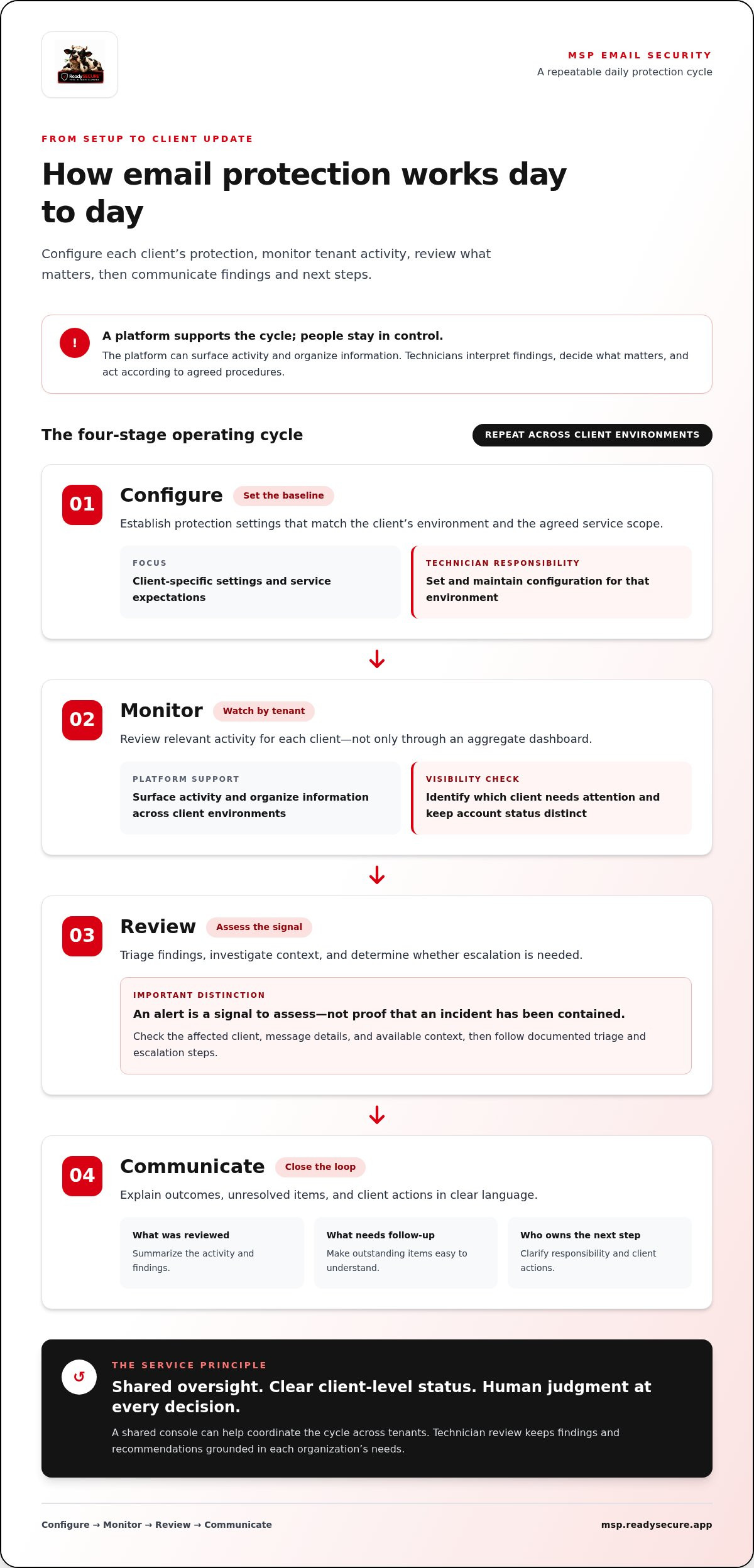
Email protection is an operating cycle, not a one-time setup. An MSP configures policies for each client, monitors activity, reviews alerts and trends, then communicates findings and next steps. A shared console can make that cycle easier to coordinate across tenants, but the platform is only one part of the service.
Keep responsibilities clear. The platform can surface activity and organize information; technicians interpret it, decide what matters, and act according to agreed procedures. Define which tasks the tool supports and which remain with your team, including any workflows or response actions that matter to your service.
- Configure: Establish protection settings that match the client’s environment and agreed service scope.
- Monitor: Review relevant activity by tenant, not only through an aggregate dashboard.
- Review: Triage findings, investigate context, and determine whether escalation is needed.
- Communicate: Explain outcomes, unresolved items, and client actions in clear language.
From email signal to technician action
An alert is a signal to assess, not proof that an incident has been contained. A technician can check the affected client, message details, and available context, then follow documented triage and escalation steps. If the event warrants incident response, distinguish that investigation and recovery work from the platform’s alert visibility. A practical MSP incident response plan template can help structure roles, decision points, and communications. CISA guidance for MSPs also provides security recommendations for service providers and their customers.
Why tenant-level visibility and reporting matter
A single roll-up view can hide which client needs attention. Tenant-level visibility helps technicians identify where an alert originated, review activity in the right context, and track outstanding actions without confusing one client’s status with another’s. Concise reports turn operational details into useful client updates: what was reviewed, what needs follow-up, and who owns the next step.
Multi-tenant visibility helps MSPs deliver consistent client service by pairing shared oversight with clear, account-specific status. White-label reporting can support a professional client experience, while human review keeps recommendations grounded in each organization’s needs. See how this operating model can extend across security services with ReadySECURE’s MSP security platform.
How to Evaluate Email Security Platforms for MSPs
Compare platforms by how well they fit your service operation, not by a headline feature or an unsupported performance claim. The right email security platform for msps should give technicians useful control across client environments and support clear, account-specific service delivery. Priorities vary: a lean team may value straightforward administration, while an MSP with a varied client base may need more granular roles and policy control.
Which operational criteria should an MSP compare?
Test the fit across the whole workflow, from separating tenants to preparing a client update. Use questions like these to guide your evaluation:
| Evaluation area | What to assess | Why it matters |
|---|---|---|
| Tenant separation | Can technicians view each client’s environment distinctly? | Reduces confusion and supports account-specific oversight. |
| Roles and access | Can access be assigned according to team responsibilities? | Helps align administration with internal workflows. |
| Policy management | Can teams maintain consistent baselines while accounting for client needs? | Balances repeatability with appropriate customization. |
| Visibility and reporting | Can technicians review activity and produce clear client-facing summaries? | Supports operational review and transparent communication. |
| Environment and workflow fit | What email environments, deployment requirements, and integrations are supported? | Surfaces technical and process dependencies before adoption. |
Review reports from both the technician’s and the client’s perspective. Technicians need enough detail to assess activity and decide what needs attention. Clients need a concise account of protection status, findings, and outstanding actions. The Canadian Centre for Cyber Security’s email security best practices can help frame the controls your service should account for.
How should an MSP judge security and service fit?
Assess the product’s stated threat coverage, how clearly it presents alerts, and how those alerts fit your escalation process. Document who reviews findings, who makes decisions, and what sits outside the platform’s role. Visibility is not the same as investigation, incident response, or recovery. A sound evaluation makes those boundaries explicit.
Consider email protection alongside Microsoft 365 security and other client controls. A tool may address one layer, while identity settings, access practices, and broader security policies shape the overall service. For the adjacent tenant-security topic, see the M365 security hardening tools guide.
Finally, weigh technician capacity and client mix. A platform that adds repetitive administration can strain a small team; a varied client base may need flexibility without sacrificing oversight. Compare the operational effort required to configure, review, report, and escalate. That is where platform fit becomes clear in everyday work.
How MSPs Can Put Email Security into a Repeatable Client Service
A repeatable service starts before protection is configured. Define what each client needs, document who owns each task, then establish a review and reporting rhythm your team can maintain. Use the same framework across accounts, but tailor settings and decisions to each client’s email environment, business priorities, and existing controls.
What should an MSP define before onboarding a client?
Start with a clear picture of the environment. Identify the email platform, users, business-critical workflows, and security controls already in place. A finance team handling payment instructions, for example, may have different communication and escalation needs from a small office with fewer sensitive workflows.
Before onboarding, agree on the operating rules:
- Scope: Record the client environment, key users or teams, relevant workflows, and protection requirements.
- Baseline: Document the starting policies and settings, plus any approved exceptions and the reason for each.
- Ownership: Name who reviews alerts, who decides whether to escalate, and which client contacts should be involved.
- Communication: Set expectations for how findings, unresolved issues, and requested client actions will be shared.
This creates a reference point for future reviews and prevents one-off decisions from becoming invisible operating rules. A baseline provides consistency; documented exceptions preserve room for client-specific needs.
How can MSPs make reviews useful to clients?
Turn technical activity into a short, decision-ready update. Summarize relevant findings, unresolved issues, and agreed next actions. Explain what the MSP will handle, what the client needs to do, and when the item should be revisited. Clear ownership keeps reporting from becoming a list of alerts with no path to resolution.
Keep the service repeatable without assuming every client follows the same setup. An email security platform for msps can support shared administration while technicians apply documented policies and client-specific judgment. Review the baseline when the client’s environment or business needs change, and record any resulting decisions.
Email findings are one part of the wider security picture. Vulnerability assessment can surface other weaknesses in a client’s environment, but those findings provide broader risk context rather than proof of email protection. Use an MSP security vulnerability assessment checklist to structure that adjacent review.
Make the process easier to deliver across accounts. Explore ReadySECURE’s MSP security platform for a white-label, multi-tenant approach to managing client security services.
How ReadySECURE Connects Email Protection to MSP Security Operations
ReadySECURE is a white-label, multi-tenant security platform that helps MSPs manage client security through a consolidated console. Its mail security protects against phishing, malware, and spam. This lets MSPs include email in a broader client security service rather than treating it as a disconnected tool. Choosing an email security platform for msps is about more than filtering. It is also about how email protection fits into day-to-day client management and reporting.
What does a consolidated MSP security view change?
Email risk rarely exists in isolation. ReadySECURE brings mail security together with Microsoft 365 security, vulnerability management, and compliance capabilities. This gives MSPs a foundation for considering email protection as one part of a client’s security posture, while keeping each capability’s purpose distinct. Vulnerability management, for example, addresses a different area of risk than mail security.
A consolidated console supports management across multiple client environments. White-label reporting tools let MSPs present security information under their own brand, helping turn technical activity into a client-facing service. Use reports to communicate relevant outcomes and follow-up needs, while grounding interpretation and decisions in each client’s environment. The platform brings related capabilities into the MSP’s operational picture; it does not replace technician oversight or clear service responsibilities.
This approach helps MSPs shape a consistent offering without making every client engagement identical. Establish a shared operating framework, then account for each client’s priorities and security requirements. A repeatable service is easier to manage, while client-specific judgment keeps it relevant.
How can MSPs explore the next step?
ReadySECURE brings together multi-tenant security management, white-label reporting, and mail protection as part of a broader client service. Assess how these capabilities align with your existing workflows, technician capacity, and approach to communicating security outcomes. Keep the evaluation practical: identify the needs you want to address, then consider how a consolidated platform can support that delivery model.
Explore a multi-tenant approach to client security management with ReadySECURE for MSPs.
Turn Email Protection into a Scalable Client Service
A strong email security platform for msps must do more than filter threats. It should help your team manage separate client environments, review activity clearly, and deliver consistent reporting while making ownership of decisions and follow-up clear.
Build the service around a repeatable cycle: understand each client’s needs, set a documented baseline, monitor activity, and communicate useful outcomes. Then evaluate how email protection fits alongside other security priorities instead of treating it as an isolated tool.
ReadySECURE gives MSPs a white-label, multi-tenant security platform with mail security alongside Microsoft 365 security, vulnerability management, and compliance capabilities. Its consolidated console supports multi-client security management, while white-label reporting tools help you present updates under your own brand. Together, these capabilities provide a foundation for a broader, more structured client security service.
Explore ReadySECURE for MSPs to see how its platform can support your approach to managing client security. With clear processes and the right operational fit, you can build a service that scales with confidence.
Frequently Asked Questions
What is an email security platform for MSPs?
An email security platform for MSPs helps managed service providers protect and administer email security across multiple client environments. Depending on the product, it can combine threat protection with centralized management, client-level visibility, and reporting. The key difference from a single-organization filtering tool is the operating model: MSPs need to manage separate client environments consistently. Compare each platform’s capabilities with your service workflow, since features vary.
How does an email security platform help an MSP manage multiple clients?
Multi-tenant management gives an MSP a shared way to oversee multiple client environments while keeping each client’s settings, activity, and reporting distinct. This supports consistent administration and clearer client updates. The platform does not replace technician processes. Define who reviews alerts, how findings are escalated, and how often activity is reviewed. Align those procedures with each client’s environment and the scope of the service agreement.
Can an MSP email security platform protect Microsoft 365?
Some email security platforms support Microsoft 365 environments, but deployment models and available controls vary by product. Evaluate how email protection fits alongside Microsoft 365 identity, data, and device security instead of treating email as a standalone layer. ReadySECURE includes both mail security and Microsoft 365 security capabilities in its broader platform. Include integration and configuration details in your evaluation rather than assuming they are identical across solutions.
What should MSPs look for in an email security platform?
Start with operational fit: multi-tenant administration, clear client-level visibility, useful reporting, and alignment with your existing service workflows. Then assess stated threat coverage, alert clarity, deployment requirements, and the division of responsibilities between the platform and your technicians. A practical choice should help your team manage protection consistently and communicate relevant findings and next actions to clients without obscuring who owns each decision.
Is email security software the same as phishing protection?
No. Phishing protection is one part of email security, which may also address malware and spam. An MSP-focused platform can add management, monitoring, and reporting capabilities to support service delivery across client environments. The scope differs by solution, so examine the specific protections and workflows offered. Do not assume a product label guarantees particular detection methods or coverage. Base your assessment on documented capabilities and your clients’ needs.
How can an MSP add email security to its managed services?
Define the client scope, baseline policies, alert ownership, escalation path, and reporting approach before onboarding. Document existing controls and any exceptions, then establish a review process your team can repeat while adapting decisions to each environment. Position email security as one component of a broader client security service. Explain what the service covers, how findings are communicated, and what actions may require client involvement. Avoid promising outcomes that depend on client-specific factors.


