

What good is a penetration test if the report lands, but nobody knows what to fix first or how to verify the fix worked? For an MSP, the value of penetration testing isn’t the test alone. It’s a clear path from authorized testing to actionable findings, remediation, and retesting.
It’s easy to confuse a penetration test with an automated vulnerability scan. A scan flags known weaknesses; a human-led test can explore how flaws combine and affect real systems. But the results depend on the engagement. Unclear scope, access, or testing boundaries can create risk, while a weak report can leave clients without practical next steps.
This guide will help you choose penetration testing that aligns with client risk and business goals, set firm rules and responsibilities, and assess whether a provider’s methods and deliverables support useful decisions. You’ll also learn how to build a repeatable workflow for prioritizing findings, coordinating remediation, arranging retests, and communicating progress to clients. Make each engagement easier to scope, manage, and explain as security assurance.
Key Takeaways
- Match penetration testing scope to the client’s objectives, critical assets, and authorized boundaries.
- Assess providers on relevant experience, clear methodology, disciplined scoping, and evidence-backed findings.
- Set client contacts, maintenance windows, backups, and escalation paths before testing begins.
- Turn findings into a managed workflow with owners, remediation priorities, retesting, and clear client updates.
- Define the responsibilities of the MSP, testing provider, and client to make the engagement easier to manage and explain.
What Penetration Testing Tells an MSP That a Scan Cannot
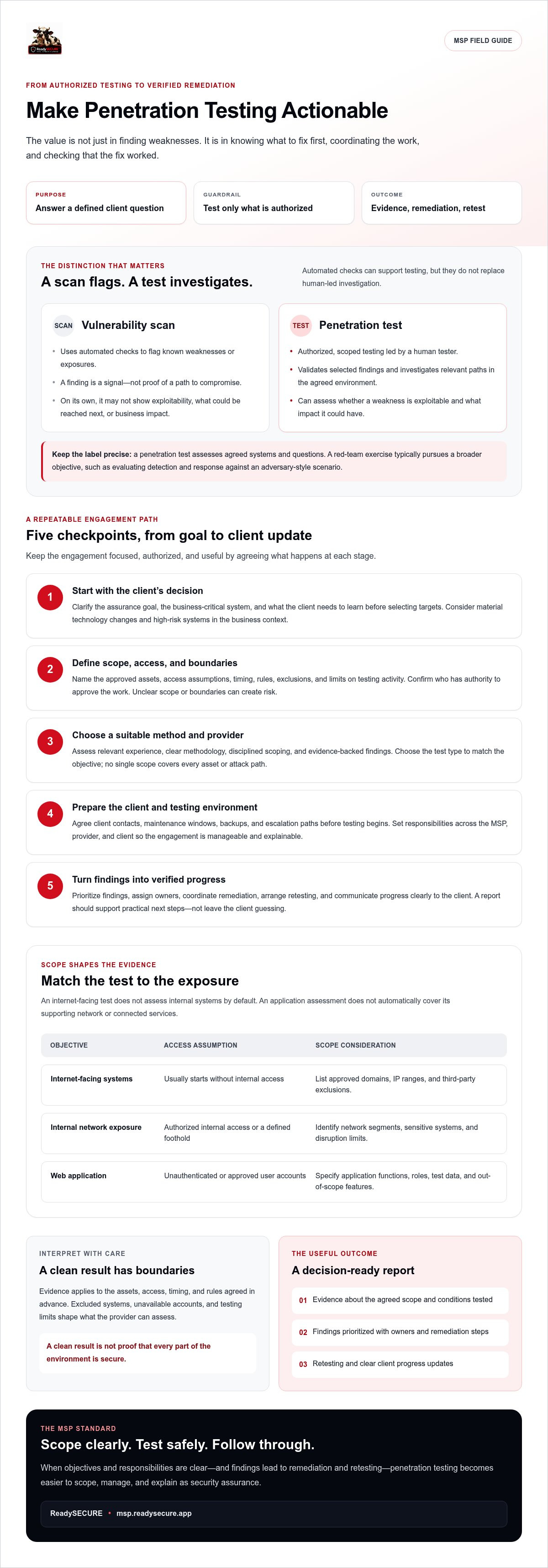
A vulnerability scan can flag a possible weakness. On its own, it can’t show whether the weakness is exploitable, what an attacker might reach next, or how the issue could affect the client’s business. That distinction matters when an MSP is deciding whether to recommend a penetration test.
Penetration testing is authorized, scoped security testing in which a tester evaluates whether weaknesses can be exploited and what impact they could have. The tester works toward agreed objectives rather than simply producing a list of potential issues. For a high-level overview of the practice and common methods, see What is a Penetration Test.
Penetration testing versus vulnerability scanning
A vulnerability scan uses automated checks to identify known weaknesses or exposures. A penetration test uses human-led investigation to validate selected findings and assess how they might be used in the agreed environment. Testers may use automated tools, too, but interpreting results and pursuing relevant paths requires judgment.
For example, a scan of a client’s customer portal might flag an outdated component. That finding is a signal, not proof of a path to compromise. A tester can check whether the issue is reachable, whether it can be exploited under the agreed conditions, and whether it could expose sensitive functions or data. The result may validate a risk, narrow its potential impact, or show that it isn’t exploitable in the tested context. Scans can support testing, but they don’t replace it.
Scope defines what the result means
Evidence from an engagement applies to the assets, access, timing, and rules agreed in advance. An external test with no credentials answers different questions from an internal test or an assessment with authorized user access. Excluded systems, unavailable accounts, and limits on testing activity also shape what the provider can assess. A clean result is not proof that every part of the environment is secure. It is evidence about the agreed scope under the conditions tested.
When an MSP should consider a penetration test
Recommend an engagement when a client has a defined assurance goal, faces a material technology change, or needs a closer assessment of a high-risk system. Set priorities using the business context: a customer-facing application, sensitive records, and a low-impact test environment call for different considerations. Clarify what the client needs to learn before selecting targets.
Keep the objective precise. A penetration test assesses agreed systems and questions; a red-team exercise typically pursues a broader objective, such as evaluating detection and response against an adversary-style scenario. Don’t use the labels interchangeably. Choose the exercise that fits the client’s goal, then set boundaries that let the tester work safely and produce evidence the MSP can act on.
Choose the Right Penetration Testing Scope, Access, and Method
Start with the client’s decision, not a menu of test types. Which system matters most to the business? What assurance is needed? Which assets can be tested, and who has authority to approve it? Clear answers keep the engagement focused and help prevent surprises for the client and provider.
Match the scope to the exposure and objective. An internet-facing test won’t assess internal systems by default. An application assessment won’t automatically cover its supporting network or connected services. For a structured approach to planning, execution, and post-testing activities, use the NIST testing and assessment guide as a reference point.
Match the test type to the client’s exposure
Choose agreed internet-facing assets when the goal is to assess external exposure. Consider internal network testing when the objective concerns what could happen from inside the environment. Web application or API testing may fit when the client needs an assessment of specific functionality, data flows, or access controls. No single scope covers every asset or attack path.
| Objective | Access assumption | Engagement consideration |
|---|---|---|
| Assess internet-facing systems | Usually starts without internal access | List approved domains, IP ranges, and third-party exclusions. |
| Assess internal network exposure | Tester receives authorized internal access or a defined foothold | Identify network segments, sensitive systems, and disruption limits. |
| Assess a web application | May be unauthenticated or include approved user accounts | Specify application functions, roles, test data, and out-of-scope features. |
Set access levels and rules of engagement
Black-box testing gives the tester little prior knowledge; grey-box testing provides selected information or accounts; white-box testing supplies deeper system details. These are planning choices, not quality rankings. Choose based on the question the client needs answered and the visibility the test should reflect.
Before work begins, have the provider and authorized system owners agree in writing on targets, access, testing windows, excluded systems, and permitted techniques. Name escalation contacts and define how the tester should handle sensitive data, unexpected access, or potentially disruptive findings. Confirm authorization covers every in-scope asset, especially when a third party owns or hosts it.
For MSPs planning client security workflows, explore MSP security resources alongside a carefully defined engagement. Lock the boundaries first, then select the method that can answer the client’s specific assurance question.
How to Evaluate a Penetration Testing Provider
A strong provider does more than find technical issues. They follow a method suited to the client’s objectives, stay within agreed boundaries, communicate clearly, and produce evidence the MSP and client can act on. Evaluate the engagement, not just the sales pitch. Certifications, familiar tools, and polished report design may be useful signals, but none proves that testing was thorough or findings were validated.
Use this checklist during provider selection:
- Relevant experience: Can the provider explain work on comparable systems, technologies, or business risks?
- Methodology: Does the proposed approach connect specific testing activities to the client’s objectives and in-scope assets?
- Evidence quality: How are findings recorded, validated, and distinguished from potential weaknesses that could not be confirmed?
- Scope discipline: How will the team handle exclusions, unexpected exposure, and limits on testing?
- Communication and ownership: Who authorizes the work, briefs the client, receives escalations, and coordinates remediation?
For a web application assessment, ask how the provider’s approach relates to recognized guidance such as the OWASP Web Security Testing Guide. The goal isn’t to demand a particular tool or checklist. It’s to understand how the proposed work maps to the application and the questions the client needs answered.
Questions to ask before approving an engagement
Ask the provider to walk through the plan in plain language. Which objectives does each test activity support? What assumptions, access, and exclusions shape the result? How are testing limits enforced? Agree on escalation steps for urgent findings, unexpected exposure, or activity that could affect service. Document responsibilities before testing starts, including the client contact who can authorize decisions and the MSP contact who manages communication.
What a decision-ready report should include
A useful report connects technical evidence to business context. The executive summary should state what was assessed, the objective, and the most important risks. Each finding should include enough evidence and reproduction guidance for the right technical owner to investigate, plus an explanation of likely impact and practical remediation direction. Prioritization should help the client decide what to address first, not leave them with an unranked list.
For penetration testing, also confirm whether retesting is included or available, which fixes it will verify, and how the provider documents the outcome. Retesting should not be assumed from the original report. Clarify who tracks remediation and who communicates status to the client. That closes the gap between receiving findings and demonstrating progress.
Prepare the Client, Manage Findings, and Verify Remediation
A well-run penetration testing engagement is a managed process, not a report handoff. Give every stage an owner, keep the client informed, and make sure findings move into an agreed remediation workflow.
A practical pre-test readiness checklist
Before testing begins, confirm written authorization from the appropriate system owners. Verify in-scope assets, exclusions, third-party dependencies, approved timing, and operational safeguards. Name the client and MSP contacts responsible for approvals, questions, and urgent escalation. Agree how the provider will communicate during testing and what to do if activity affects a service or exposes sensitive data.
Escalation readiness matters beyond the test itself. MSPs can use this incident response planning template to help structure contacts and response steps before an urgent issue arises.
Move from authorization to retest
- Authorize: Obtain documented approval from the people responsible for the systems.
- Scope: Record objectives, targets, exclusions, access, testing limits, and responsibilities.
- Prepare: Confirm contacts, communications, maintenance windows, backups, and escalation paths with relevant stakeholders.
- Test: Keep the provider and client contacts aligned with the agreed rules. Escalate unexpected exposure or operational concerns through the named channel.
- Report: Review evidence, business context, and recommended actions with the client and technical owners.
- Remediate: Assign each finding an owner, agreed priority, target action, and tracking status. Address the highest-impact risks first rather than treating every issue as equally urgent.
- Retest: Ask the provider to verify agreed fixes and document whether each retested finding is resolved, remains open, or needs further work.
Translate technical findings into decisions the client can act on. Explain which business service a weakness could affect, what change is recommended, who will make it, and how progress will be tracked. Keep unresolved findings visible, with context on their impact and any accepted risk or outstanding dependency. The MSP can coordinate ownership and client updates, while the client approves changes to its environment and the testing provider verifies fixes according to the agreed engagement.
A retest confirms the status of specific findings under the retest conditions. It doesn’t prove the entire environment is secure or validate unrelated controls. Close the loop with a concise status update and clear next steps. Explore MSP security services to support a more coordinated client security workflow.
Make Penetration Testing a Credible MSP Client Offering
Position penetration testing around a client’s business question, not fear. For example: “Can an external tester exploit weaknesses in the agreed customer-facing application, and what could those weaknesses expose?” That gives the client a clear reason for the engagement and a defined basis for evaluating its results.
Set expectations before presenting the service. Explain which systems are included, what the report will cover, who owns remediation, and whether retesting is available. Be direct about limits: findings reflect the agreed scope and testing conditions. A single engagement doesn’t guarantee compliance, prevent a breach, or eliminate risk. Clear boundaries make the assurance credible.
Define each party’s role
The MSP can identify the client’s objective, coordinate stakeholders, and connect findings to relevant ongoing security work. The testing provider performs the authorized assessment and documents its results according to the agreed engagement. The client approves access, identifies system owners, and makes or authorizes changes to its environment. Confirm these responsibilities in advance rather than assuming the MSP controls every step.
After the test, relevant findings may inform vulnerability management priorities, compliance discussions, or a need for vCISO support. Keep the handoff explicit: a platform that consolidates ongoing security management can support the broader workflow, but it doesn’t perform the penetration test or automatically validate that remediation worked. For more context on structuring an MSP service model, see the white-label security platform guide.
Explore ReadySECURE’s MSP security services
ReadySECURE serves MSPs through a multi-tenant security platform that brings vulnerability management, Microsoft 365 hardening, mail security, and compliance into one console. Its services also include on-demand penetration testing and vCISO support. These capabilities can be considered as parts of an MSP’s wider security workflow, while keeping testing distinct from platform functions.
When considering an engagement, discuss the scope, methodology, deliverables, workflow, and reporting with the provider. If you plan to resell or white-label the service, clarify those terms before making client commitments.
If the service mix fits your MSP’s needs, explore ReadySECURE’s MSP security services and assess how they could complement your client offering.
Turn Better-Tested Security Into Stronger Client Value
Make each engagement purposeful. Match the scope to the client’s business priorities, agree on authorization and boundaries, then evaluate the provider on evidence, communication, and useful reporting. Most importantly, treat the report as the start of the work, not the finish line. Assign owners, prioritize remediation, and document retesting without overstating what the assessment proves.
That discipline makes penetration testing a credible part of your client offering. It also creates a clearer link between a scoped assessment and ongoing security management. ReadySECURE offers on-demand penetration testing. Its multi-tenant platform consolidates vulnerability management, Microsoft 365 hardening, mail security, and compliance, helping MSPs connect testing with broader security workflows without treating the platform as the testing engine.
Build a service clients can understand and your team can manage. Explore ReadySECURE’s security platform and services to see how its offerings may fit your MSP. With clear boundaries and disciplined follow-through, you can provide useful assurance and keep moving client security forward.
Frequently Asked Questions
What is penetration testing?
Penetration testing is an authorized, scoped assessment that examines whether weaknesses in specified systems can be exploited and what impact that could have. A tester may combine manual investigation with technical tools to pursue agreed objectives. The result is evidence about the assets and conditions tested, not a complete assessment of every system or a guarantee that no other weaknesses exist. Scope and authorization should be agreed before testing begins.
What is the difference between penetration testing and vulnerability scanning?
A vulnerability scan uses automated checks to identify potential weaknesses, such as outdated software or known configuration issues. A penetration test investigates selected weaknesses to determine whether they can be exploited under the agreed conditions and what they might expose. A scan can support an assessment, but it doesn’t replace human-led testing. For example, a flagged application flaw may be unreachable or may create a meaningful risk only when combined with another weakness.
How often should a business get a penetration test?
There’s no single schedule that suits every business. Set frequency according to risk, business changes, client assurance needs, and any applicable contractual or compliance requirements. Reassess after material changes to important systems, such as a major application release or infrastructure change, if the change affects the test objective. Agree on the relevant scope and timing with system owners and the testing provider rather than treating one annual test as universal coverage.
What should be included in a penetration testing report?
A useful report identifies the agreed scope and approach, summarizes the most important results in business terms, and gives technical teams enough evidence to investigate each finding. Look for reproduction guidance, likely impact, risk context, and practical remediation direction. The report should distinguish validated findings from potential weaknesses that couldn’t be confirmed. Clarify whether retesting is included or available, what it will verify, and how the outcome will be documented.
Does a penetration test guarantee that a system is secure?
No. A penetration test provides evidence about specified assets under agreed conditions. It can’t prove that every weakness has been found or that systems outside scope are secure. Results are limited by factors such as access, testing time, exclusions, and system changes after the engagement. Use findings to guide remediation, then consider retesting agreed fixes. Treat the assessment as one part of ongoing security management, not a guarantee against breaches or risk.
Can an MSP offer penetration testing to its clients?
Yes, an MSP can include penetration testing in its client offering by defining the service scope, confirming written authorization, and establishing clear roles with the testing provider and client. The MSP should explain deliverables, reporting, remediation ownership, and any retesting arrangements before proposing the engagement. ReadySECURE offers on-demand penetration testing for MSPs. Discuss available scopes, delivery details, and any resale or white-label terms before making client commitments.
How should an MSP prepare a client for a penetration test?
Start by agreeing on the objective, authorized assets, exclusions, access, and testing limits. Get written approval from the relevant system owners, including third parties where applicable. Name client and MSP contacts for questions and urgent escalation, then coordinate testing windows, communications, backups, and operational safeguards with stakeholders. Before testing starts, make sure everyone knows how sensitive data or disruptive findings should be handled and who will receive the final report.


