

Multi-tenant Microsoft 365 security isn't an administrative burden; it's an untapped, high-margin profit engine. Most MSPs, however, experience the opposite reality. Your senior engineers burn billable hours toggling between separate client portals, fighting fragile scripts, and chasing unauthorized setting changes. According to CoreView, 45% of organizations suffered a measurable security incident due to tenant misconfigurations over the past year. You already know that manual tenant administration cannot keep pace with policy drift across dozens of unique client environments.
It's time to stop treating tenant defense as routine overhead and start treating it as scalable recurring revenue. In this guide, you'll discover how to centralize tenant hardening, eliminate configuration drift automatically, and package high-margin M365 security services across your entire client roster. We break down the exact operational strategies top MSPs use to enforce unified security baselines without expanding their engineering payroll.
Key Takeaways
- Eliminate swivel-chair administration by replacing isolated tenant portals and manual checks with centralized posture management.
- Evaluate the true operational maintenance costs of custom PowerShell scripts and Microsoft Lighthouse against dedicated platforms built for multi-tenant Microsoft 365 security.
- Execute a 5-step deployment framework to establish golden baselines across diverse client licensing tiers and automatically remediate unauthorized policy drift.
- Package automated tenant hardening into high-margin recurring service tiers that turn technical overhead into predictable monthly revenue.
- Translate complex cloud telemetry into white-labeled executive scorecards that demonstrate ongoing value and justify premium retainer fees.
The Reality of Multi-Tenant Microsoft 365 Security: Why the Native Stack Fails MSPs
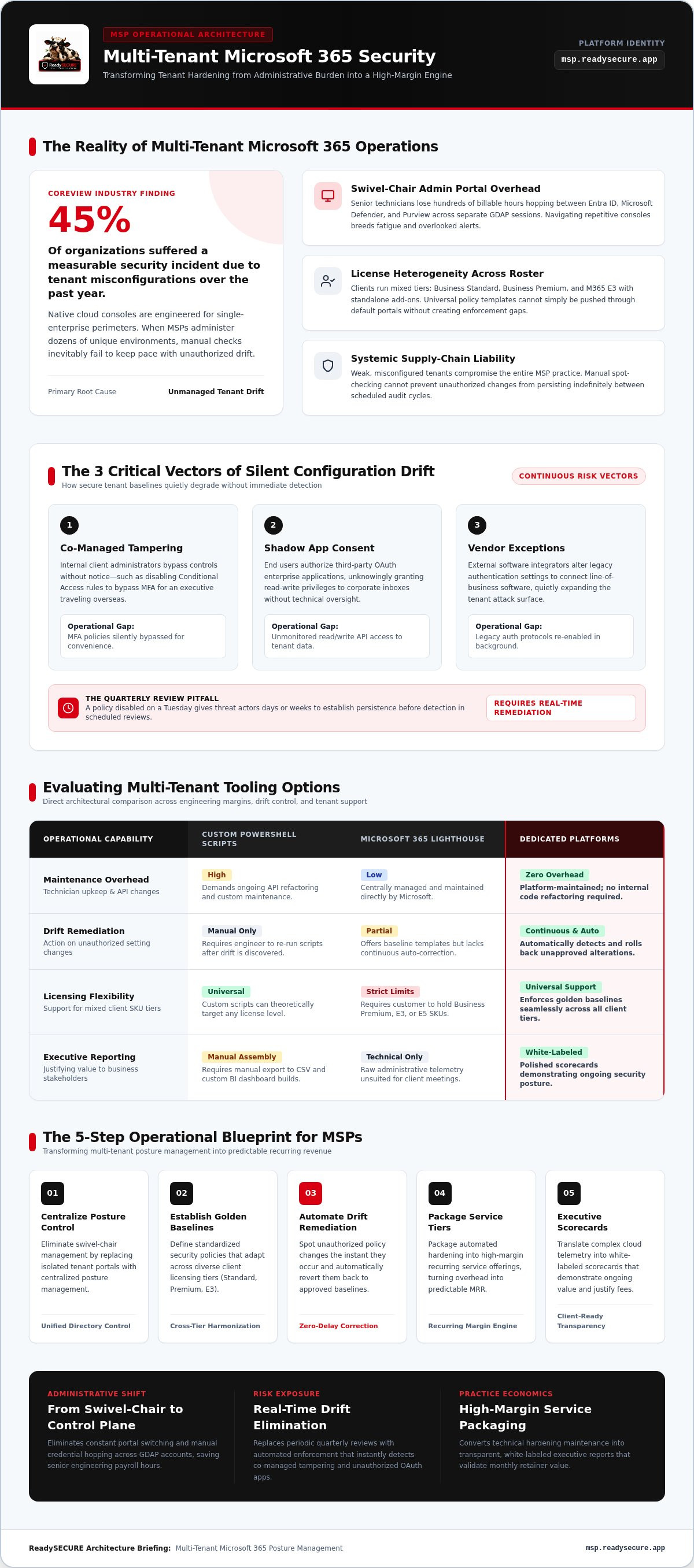
True multi-tenant Microsoft 365 security requires centralized posture orchestration across completely separate customer directories. Microsoft built its cloud ecosystem for single-tenant enterprise deployments, not managed service providers handling 50 distinct organizations. While enterprise IT teams secure one isolated perimeter, MSPs manage complex multi-tenant environments where every client maintains unique identities, distinct licensing tiers, and independent compliance requirements. Without an overarching control plane, maintaining uniform protection across standard multitenant software architecture breaks down into chaotic, tenant-by-tenant manual intervention.
License heterogeneity destroys standard policy enforcement. One customer runs Business Standard; another pays for Business Premium; a third insists on a hybrid mix of Microsoft 365 E3 and standalone Defender licenses. Because native security features depend entirely on these underlying licenses, your team cannot simply push a universal policy template through default portals. The result? Gaps emerge. Weak tenants expose your practice to systemic supply-chain liability, while your most expensive engineers waste valuable time deciphering mismatched security settings.
The Swivel-Chair Overhead of Native Admin Portals
Technicians lose hundreds of billable hours every quarter jumping between native admin consoles. To verify basic hygiene for a single client, an engineer must authenticate, navigate Entra ID, switch to Defender, check Purview, and repeat the entire loop across the next tenant. Granular Delegated Admin Privileges (GDAP) protect access, but manual credential hopping drains productivity. Alert fatigue sets in quickly. When engineers face repetitive portal navigation, they miss subtle indicators of compromise, delay tenant hardening tasks, and make accidental configuration errors that leave customers exposed.
The Hidden Danger of Configuration Drift Across Tenants
Configuration drift remains the single most dangerous vector for tenant compromise. It happens quietly, predictably, and constantly:
- Co-managed tampering: Internal client admins disable Conditional Access rules to bypass MFA for an executive on travel.
- Shadow application consent: End users authorize third-party OAuth enterprise applications, granting read-write privileges to corporate inboxes without technical oversight.
- Vendor exceptions: External software integrators alter legacy authentication settings to connect line-of-business tools, silently widening your attack surface.
Quarterly security reviews fail to catch these changes in time. A policy disabled on a Tuesday gives threat actors days or weeks to establish persistence before an engineer discovers the gap during scheduled maintenance. Achieving resilient multi-tenant Microsoft 365 security demands automated, real-time drift detection that spots unauthorized modifications the instant they happen.
Evaluating Multi-Tenant Tooling: PowerShell vs. Native Lighthouse vs. Dedicated Platforms
Every MSP hits a crossroads when scaling multi-tenant Microsoft 365 security. You can build internal automation, rely on Microsoft's native partner tools, or deploy a dedicated management surface. Each path directly impacts your engineering margins, technician utilization, and breach liability. Choosing the right engine determines whether your security practice scales smoothly or collapses under technical debt.
| Operational Capability | Custom PowerShell | Microsoft 365 Lighthouse | Dedicated Platforms |
|---|---|---|---|
| Maintenance Overhead | High (ongoing API refactoring) | Low (Microsoft managed) | Zero (platform maintained) |
| Drift Remediation | Manual execution only | Partial (basic templates) | Continuous and automated |
| Licensing Flexibility | Universal (custom code logic) | Strict (requires Premium/E3/E5) | Universal across all tiers |
| Executive Reporting | Manual CSV and BI builds | Raw technical telemetry | White-labeled scorecards |
The High Cost of Maintaining Custom PowerShell Scripts
Building internal scripts feels cost-effective until you tally unbillable engineering payroll. The retirement of the legacy MSOnline and AzureAD modules forced teams to rewrite entire libraries for the Microsoft Graph PowerShell SDK. Graph API updates and schema deprecations break production scripts without warning. Storing delegated app secrets across internal repos introduces severe supply-chain liabilities. When only one senior engineer understands your custom codebase, you don't have scalable automation. You have an operational bottleneck.
Limitations of Microsoft 365 Lighthouse for Modern MSPs
Microsoft 365 Lighthouse provides zero-license baseline visibility for CSP partners, but rigid guardrails limit its real-world utility. Lighthouse mandates specific client licensing tiers like Business Premium or E3, completely ignoring customers on basic plans. It caps tenant sizes at 2,500 seats. Most importantly, it lacks white-labeled executive reporting to prove your value during business reviews. While it checks standard hygiene, enforcing comprehensive standards like CISA's SCuBA security configuration baselines across mixed environments still requires tedious, tenant-by-tenant manual fixes.
Standardizing your defense requires eliminating fragile code while managing every customer directory from a single interface. Elite teams bypass native limitations by leveraging a unified multi-tenant security architecture to enforce baselines automatically without inflating technician headcount.
How to Implement a Scalable Multi-Tenant Microsoft 365 Security Baseline in 5 Steps
Executing repeatable tenant defense requires an operational system, not heroic individual efforts. When managing multi-tenant Microsoft 365 security across dozens of client companies, ad-hoc administration creates configuration chaos. Your engineering team needs a structured deployment framework that audits existing risk, enforces standard configurations, and detects unapproved adjustments automatically.
The operational framework breaks down into five sequential phases:
- Audit cross-tenant configurations, legacy protocols, and OAuth permissions.
- Define a standardized golden baseline aligned to industry frameworks.
- Snapshot and back up production configurations for zero-risk rollbacks.
- Deploy policies systematically and enable automated drift remediation.
- Enforce unified mailbox protection and continuous posture surveillance.
Step 1 & 2: Audit Existing Environments and Define Your Golden Baseline
Start with total discovery. You cannot protect configurations you haven't inventoried. Review all client tenants to uncover active legacy authentication protocols, unmanaged administrative accounts, and dormant enterprise application registrations with expansive permissions. Conducting a systematic Microsoft 365 security assessment for msps establishes your security baseline and uncovers critical gaps before rolling out new controls.
Next, build your standardized golden baseline. Align your policies with established standards like the CIS Microsoft 365 Foundations Benchmark v7.0.0. Establish non-negotiable rules for phishing-resistant MFA, Conditional Access session controls, and granular role-based access. Ensure your baseline policies also account for internal oversharing and microsoft 365 copilot security risks before business users activate automated AI features.
Step 3 & 4: Backup Policies, Deploy Baselines, and Automate Drift Remediation
Never deploy security baselines blind. Snapshot existing Conditional Access, Intune compliance, and exchange settings across every directory prior to rollout. Immutable policy backups ensure your team can execute an instant rollback if an enforcement rule disrupts a critical client line-of-business application.
Push your golden baseline out in structured deployment rings. Begin with IT personnel and pilot users before applying tenant-wide enforcement. Once applied, activate automated drift remediation. When a co-managed administrator or third-party integrator disables a Conditional Access rule or alters an outbound sharing limit, your control plane must instantly flag the violation and revert the change to your approved baseline.
Step 5: Enforce Continuous Threat and Mailbox Security Monitoring
Identity protection is incomplete without active email defense. While reviewing native Microsoft 365 Lighthouse capabilities provides initial tenant visibility, enterprise-grade delivery demands consolidated protection against advanced phishing, executive impersonation, and malicious mailbox forwarding rules. Route threat telemetry from every tenant into a centralized command interface so Tier-1 technicians can triage incidents without switching credentials.
Continuous multi-tenant posture management is the automated, centralized orchestration of identity, device, and application configurations across multiple cloud tenants to enforce compliance baselines and neutralize security drift in real time.
Monetizing Tenant Security: Packaging High-Margin M365 Hardening Services
Stop treating tenant security administration as unbillable overhead. Most MSPs bury routine identity checks, mailbox rule auditing, and baseline configuration inside legacy flat-fee agreements. This erodes gross margins. Frost & Sullivan projects the SaaS security posture management market to reach $3.53 billion by 2030, showing that customers actively budget for cloud posture defense. Positioning multi-tenant Microsoft 365 security as a dedicated, tiered offering transforms continuous administrative work into recurring monthly revenue.
Adopting a white label security platform for MSPs establishes instant brand authority. Instead of appearing as a reseller pushing native tools, you present an elite proprietary security operation. This packaging shift gives you distinct pricing leverage, commands client trust, and insulates your margins from commoditized IT price wars.
Designing Multi-Tiered M365 Security Packages
Package your cloud security into transparent, value-driven subscription tiers that encourage clients to trade up:
- Foundational Posture: Enforces standard identity hygiene, baseline Conditional Access, legacy protocol blocking, and automated tenant drift alerts.
- Advanced Threat Defense: Adds deep mailbox security, suspicious forwarding rule remediation, enterprise application consent management, and regular vulnerability management scans.
- Strategic Compliance & Governance: Delivers continuous framework alignment, automated compliance reporting, and periodic vCISO support reviews for clients subject to strict regulatory oversight.
Tiering standardizes operational delivery across your technical bench. When every client sits cleanly inside a structured service level, provisioning takes minutes rather than weeks. Engineers deliver consistent defense while sales teams upsell higher-value subscriptions using standardized catalogs.
Delivering Executive Value Through White-Label Reporting
Raw configuration telemetry never justifies retainer renewals. C-suite decision-makers do not care about individual Graph API calls or raw JSON logs. They care about risk reduction, operational continuity, and audit readiness. Replace confusing technical readouts with white-labeled, executive-ready scorecards that clearly illustrate security posture improvements.
Use your quarterly business reviews to spotlight concrete protection metrics. Show exactly how many unauthorized admin modifications your team reverted automatically. Highlight malicious inbound payloads neutralized by mail security tools before reaching user mailboxes. When leadership sees tangible proof that your baselines prevent ransomware and account takeovers, billing questions disappear.
Ready to turn administrative overhead into a scalable profit center? Explore the ReadySECURE partner platform to package automated tenant hardening into high-margin service tiers today.
Scaling Your Security Practice with ReadySECURE
Scaling your practice requires an operational command surface engineered specifically for multi-tenant Microsoft 365 security. You cannot build a high-margin managed service on fragmented point tools and fragile internal scripts. ReadySECURE provides MSPs with a unified platform that consolidates tenant hardening, vulnerability management, mail security, and compliance GRC into one operational pane. You gain immediate oversight across every customer environment, eliminating manual portal hops while insulating your business from unbillable labor drains.
Total Multi-Tenant Control from a Single Command Surface
Stop forcing your senior engineers to manage tenants one directory at a time. ReadySECURE allows you to deploy standardized golden security baselines across your entire client base in minutes. The platform continuously monitors configurations, flagging unauthorized tampering and reverting policy drift before gaps become breaches.
By consolidating identity defense, mailbox hygiene, and vulnerability prioritization into a single interface, your technicians work faster and resolve threats with precision. You maintain complete control over identities, data access, and cloud endpoints without maintaining fragile in-house scripts. The result is total operational clarity, lower labor costs, and protected gross margins.
Expand Revenue with White-Label Delivery and Expert Backing
Transform your technical oversight into a branded client asset. ReadySECURE delivers fully white-labeled reporting that translates complex cloud posture telemetry into polished, executive-ready scorecards. Present these reports under your MSP brand during quarterly business reviews to highlight active threat remediation, demonstrate compliance alignment, and easily defend recurring retainer fees.
When high-value prospects demand enterprise-grade capabilities, you don't need to turn down contracts or hire specialized full-time talent. ReadySECURE backs your team with on-demand professional services, including vCISO support, penetration testing, and incident response. Win larger co-managed accounts and pass stringent compliance audits with dedicated cybersecurity expertise behind your brand.
Accelerate your MSP margins with ReadySECURE today and turn multi-tenant Microsoft 365 security into your most profitable recurring offering.
Turn Multi-Tenant Microsoft 365 Security Into Your Primary Growth Engine
Managing separate client tenants manually is a losing formula. The MSPs leading the market don't drown in individual admin portals or patch broken scripts; they standardize, automate, and monetize. Mastering multi-tenant microsoft 365 security means enforcing golden baselines across every directory, stopping policy drift instantly, and packaging automated tenant defense into predictable, recurring profit.
ReadySECURE delivers the consolidated command surface you need to scale efficiently. Unify tenant hardening, vulnerability management, and mail security under a single operational pane. Deliver 100% white-labeled executive reporting that validates your strategic authority during QBRs. When clients bring complex compliance mandates or active security scares, tap into on-demand vCISO consulting, penetration testing, and incident response teams without inflating full-time payroll.
Your clients need resilient cloud protection. Your business deserves premium margins. Take command of your cloud practice and turn technical overhead into an elite recurring service. Streamline your M365 security and protect your margins with ReadySECURE.
Frequently Asked Questions
What is multi-tenant Microsoft 365 security management?
Multi-tenant Microsoft 365 security management is the centralized orchestration of security baselines, identity policies, and threat postures across multiple customer cloud environments from a single console. Instead of logging into separate client directories individually, an MSP monitors configurations, deploys standard controls, and mitigates risks at scale. This operational approach eliminates swivel-chair administration, ensures uniform protection across all accounts, and scales cloud security delivery efficiently.
How does multi-tenant security software differ from Microsoft 365 Lighthouse?
Microsoft 365 Lighthouse provides basic hygiene monitoring for CSP partners, but it enforces strict operational guardrails. It requires specific client licensing tiers, limits tenant size to 2,500 users, and offers basic reporting. Dedicated platforms eliminate these restrictions. They support mixed licensing environments, automate continuous configuration drift remediation, and deliver fully white-labeled executive reporting that links directly into vulnerability management, mail security, and compliance workflows.
Can an MSP automate M365 configuration drift remediation across multiple clients?
Yes, dedicated multi-tenant platforms actively monitor tenant configurations against your defined golden baseline around the clock. When an unauthorized user, co-managed admin, or third-party application alters Conditional Access, MFA settings, or mailbox sharing rules, the system flags the violation instantly. Rather than waiting for manual audits, the platform automatically reverts the unauthorized setting back to the approved state, keeping every client environment hardened without technician intervention.
How do you secure Microsoft 365 tenants with mixed client licensing tiers?
Securing mixed environments requires a structured, tiered baseline strategy. Deploy universal baseline policies, like phishing-resistant MFA, legacy authentication blocks, and strict mailbox hygiene, across all directories regardless of license. For accounts holding Business Premium or Enterprise tiers, activate advanced Conditional Access session controls and device compliance policies. Using a unified management console ensures these differing policy layers deploy correctly across your roster without manual configuration errors.
What are the essential policies in an MSP golden security baseline?
An MSP golden baseline should align with frameworks like the CIS Microsoft 365 Foundations Benchmark v7.0.0. Essential controls include mandatory multi-factor authentication, Conditional Access rules blocking legacy authentication protocols, and restrictive external sharing settings. Baselines must also prohibit non-admin consent for third-party OAuth apps, mandate session timeouts on unmanaged devices, and block automated external mailbox forwarding rules to prevent unauthorized data exfiltration.
How does centralized tenant hardening help an MSP increase service margins?
Centralized hardening eliminates engineering payroll waste by automating repetitive tenant logins and manual policy deployments. Technicians manage dozens of environments in the time it once took to manage five. By automating baseline delivery and drift prevention, you turn labor-intensive administration into a standardized recurring service tier. This operational efficiency drastically reduces your delivery costs, unlocks higher billable utilization, and directly expands your gross margins.


