

What if reducing your security vendor count gave clients more consistent protection while freeing engineers to do higher-value work? That’s the opportunity behind msp security stack consolidation. The goal isn’t to cut tools blindly. It’s to remove overlap, control license sprawl, and reclaim time lost switching between disconnected consoles.
If your team is juggling 10 or more dashboards, you know the costs: burned-out engineers, fragmented workflows, and client reports that don’t reflect the quality of your work. Adding another tool rarely fixes the problem. A deliberate consolidation strategy can help you protect service quality while improving the economics of your security offering.
This article shows you how to assess your stack, find opportunities to reduce operational overhead, and build a streamlined security command surface. You’ll also learn how to make white-label reporting, Microsoft 365 security, and vulnerability management more repeatable. The result can be a clearer path from manual effort to scalable delivery, with a professional security offering your business can build on.
Key Takeaways
- See how overlapping tools and underused licenses can quietly erode security service margins.
- Learn how msp security stack consolidation can shift your team from disconnected tools to a unified, multi-tenant security command surface.
- Use a practical audit and platform-selection process to identify overlap and prioritize the capabilities your clients need.
- Compare fragmented and consolidated service models to understand how operational efficiency can affect package profitability.
- Explore how ReadySECURE brings vulnerability management, Microsoft 365 security, mail security, and compliance together with white-label reporting.
The Silent Margin Killer: Why MSPs are Drowning in Security Stack Bloat
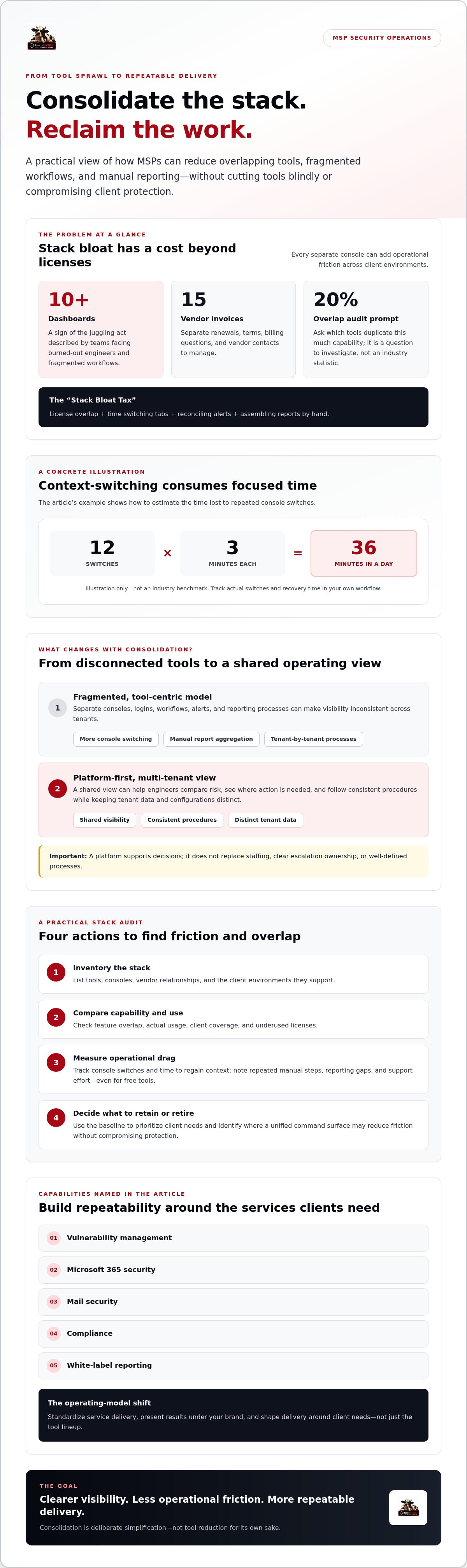
Security stack bloat is the accumulation of overlapping, disconnected tools, each with its own console, workflow, and vendor relationship. The cost goes beyond software licenses. The “Stack Bloat Tax” also includes engineer time spent switching tabs, reconciling alerts, and assembling reports by hand.
That tax can be especially difficult to manage across multiple client environments. A tool that works well for one client may not fit another client’s setup, access model, or reporting needs. Best-of-breed choices can leave technicians juggling separate logins and processes for every tenant. The result may be fragmented visibility and more opportunities to miss a finding or apply a change to the wrong environment. Disciplined workflows are essential to managed services cyber risk management.
For readers new to the service model, Managed security services (MSS) describes the broader practice of having a provider manage security services for an organization. For an MSP, delivering that work across multiple clients takes more than a collection of capable tools. It requires a repeatable operating model.
The Engineering Cost of Fragmentation
Every console switch interrupts the task at hand. Measure the impact rather than guessing: track how many switches engineers make during a typical day, then multiply that by the average time needed to regain context. For example, 12 switches at three minutes each equals 36 minutes of context-switching in a day. That’s an illustration, not an industry benchmark, but the calculation can reveal time that could otherwise support client work.
Repeated interruptions also make it harder to maintain focus. When skilled engineers spend their days navigating dashboards and copying findings into reports, meaningful security work gets squeezed. Manual report aggregation adds another burden: data may use different labels, time periods, or levels of detail, making client reporting inconsistent and harder to interpret.
The Licensing Trap: Paying for Overlap
Start with a direct question: how many tools duplicate 20% of the same capability? Treat that figure as an audit prompt, not an assumed industry statistic. Compare features, usage, and client coverage. Then account for the full vendor burden. Managing 15 invoices means tracking separate renewals, terms, billing questions, and points of contact, even before engineers open the tools.
“Free” tools still carry a cost if they take time to configure, monitor, document, and support. Count that labor alongside license fees. msp security stack consolidation starts with visibility: identify overlapping functions, underused licenses, repeated manual steps, and reporting gaps. That baseline helps you decide what to retire, what to retain, and where a unified security command surface might reduce friction without compromising client protection.
Strategic MSP Security Stack Consolidation: Moving to a Unified Security Command Surface
Consolidation isn’t just putting fewer icons on an engineer’s desktop. It means shifting from a tool-centric model, where each product has its own workflow, to a platform-first approach built around consistent service delivery across client tenants. A unified security command surface gives your team a shared view of findings, priorities, and client status without requiring a separate operating model for every customer environment.
A multi-tenant view can help an engineer compare risk across clients, identify where action is needed, and follow consistent procedures while keeping each tenant’s data and configuration distinct. Better visibility may reduce the delays caused by searching through separate consoles. Response speed still depends on staffing, processes, and clear escalation ownership, though. The platform should support your team’s decisions, not obscure them.
Build the operating model alongside the technology. A strong white label security platform for MSPs strategy defines which services you’ll standardize, how you’ll present results under your brand, and how client needs shape delivery. That makes consolidation a repeatable service model, not just a vendor swap.
Core Pillars of a Consolidated Stack
Start with capabilities that support consistent work across tenants. Unify vulnerability findings and prioritization so engineers can see what needs attention without reconciling separate reports. Establish a repeatable approach to Microsoft 365 hardening, while validating each tenant’s configuration and requirements. Bring GRC and compliance evidence into the same operating view so documentation becomes part of ongoing service delivery rather than a last-minute scramble.
The Role of Automation in Stack Efficiency
Automation should remove repetitive checks, not replace human judgment. Assess whether a platform supports recurring vulnerability scans, actionable prioritization, and evidence collection that fits your workflow. Integrated mail security can help filter phishing attempts before they reach inboxes. Confirm how policies and reporting work across tenants. For audit-focused clients, organized evidence can make reviews easier, but a platform should support audit preparation, not promise audit readiness.
Put those capabilities to work in a clear sequence: surface an issue, assign the next action, and document the outcome. That creates a more direct path from detection to resolution and reduces repetitive administration. As you evaluate msp security stack consolidation, check tenant separation, role-based access, reporting controls, and which tasks the platform actually automates. ReadySECURE brings vulnerability management, Microsoft 365 hardening, mail security, and compliance together in a multi-tenant console with white-label reporting. Explore the ReadySECURE security platform as one option for building that unified command surface.
Economic Impact: A Case Study in Security Consolidation
Consolidation earns its place only when the economics make sense. Compare two hypothetical operating models to see which numbers your own books need to reveal. These are not documented customer results. Keep service scope and client mix consistent, then compare direct labor, licenses, reporting effort, and security package revenue.
MSP Alpha: The Cost of Complexity
Assume MSP Alpha manages 50 clients across 12 security vendors and spends 15 hours per month preparing reports for each client. That adds up to 750 reporting hours monthly across the portfolio, before counting time spent managing vendor invoices, reconciling data, and maintaining overlapping licenses. These figures are scenario inputs, not verified industry benchmarks.
Alpha’s gross margin depends on what it charges and what it spends to deliver each package. Calculate it as (security revenue minus direct delivery costs) divided by security revenue. Include labor and attributable license costs. High per-seat license costs or time-consuming manual reporting can compress the margin even when package revenue looks healthy.
MSP Beta: The Profit of Unity
Now model MSP Beta consolidating vulnerability management and Microsoft 365 workflows into a multi-tenant platform. A consistent vulnerability management process can reduce duplicated handling and make findings easier to review across clients. White-label reporting may also reduce repetitive formatting, but don’t assume reports will take only minutes. Time the current workflow, then measure the new one after implementation.
The proposed 40% margin increase is a hypothesis to test, not a forecast. Track package revenue, licenses, labor hours, and reporting effort before and after consolidation. Compare gross margin using the same service scope and accounting basis. Record endpoints managed per technician (EPT) as total supported endpoints divided by the technicians assigned to that work. Interpret changes alongside service quality and workload, not as a target to maximize at any cost.
Stack ROI is the ratio of security revenue to the labor cost required to deliver that security service. For your msp security stack consolidation business case, establish a baseline first, then check whether fewer overlapping tools actually improve margin and technician capacity. Base the conclusion on measured operating data, not a headline percentage.
The 4-Step Blueprint for Consolidating Your MSP Security Stack
Successful msp security stack consolidation is a controlled migration, not a sudden switch-off. Protect client service while simplifying the systems behind it. Use these four steps to turn tool sprawl into a practical operating plan.
1. Audit Tools, Licenses, and Client Needs
Build one inventory of your security tools, vendor costs, license counts, renewal dates, and the people who use each product. Map features against actual client requirements. Flag duplicate capabilities, inactive seats, unused modules, and tools with no clear owner. These underused resources can quietly consume budget and create renewal risk.
Assess vendors on more than product features. Review support responsiveness, documentation, integrations, and whether the relationship helps your team improve delivery. Keep a capability only if it serves a defined client need or business requirement.
2. Select for Multi-Tenant Coverage
Choose a platform that supports your multi-client workflows, permissions, reporting, and tenant separation. Use 80% coverage as a planning target: prioritize a platform that handles most core requirements, then document specialized needs that still require another tool. Don’t force every client into an unsuitable workflow just to reduce the vendor count.
Test the platform against real tasks. Can engineers review vulnerability findings across tenants? Can they manage Microsoft 365 security and produce consistent client-facing reports? Validate each capability before committing to a migration plan.
3. Migrate in Phases and Protect Service
Start with a defined, lower-risk workflow, such as vulnerability scanning. Pilot it with a limited group of clients, verify access and reporting, and compare the results with the existing process. Keep the current workflow available until the replacement is validated. Schedule changes around client requirements, assign an owner, and document a rollback path before retiring any tool.
Train engineers on the security command surface using repeatable procedures. Tell clients what’s changing, why it supports their security service, and whether they need to take action. Explain the transition as a security improvement, but be precise about what will and won’t change.
4. Standardize Reports and Track the First 90 Days
Use a consistent white-label report format to show findings, priorities, completed actions, and open items. Standardization helps clients understand the work and gives your team a repeatable delivery process.
Set baseline measures before migration, then review them through the first 90 days: license utilization, time spent on routine tasks and reporting, migration issues, and client questions. Compare results with the baseline before making broader changes. To assess a multi-tenant platform for vulnerability management, Microsoft 365 security, and compliance workflows, explore ReadySECURE’s platform.
ReadySECURE: The Engine for High-Margin Security Consolidation
Once you’ve mapped your tools and migration priorities, choose an operating surface that fits how MSPs work: across multiple client tenants, with consistent workflows and branded reporting. ReadySECURE brings vulnerability management, Microsoft 365 hardening, mail security, and compliance into one multi-tenant console. The aim is to reduce the friction of managing disconnected tools and make security delivery easier to standardize.
This is the practical case for a cybersecurity platform for MSPs. Rather than centering your service on a vendor’s collection of separate products, build around a security command surface your team can use across client environments. Consolidation won’t eliminate every specialized tool, but it can give your core security work a more consistent home.
White-Label Branding for a Stronger Client Relationship
A client-facing experience shapes how customers understand your work. White-label reporting tools let you present security findings under your brand, with a consistent format for conversations about risk, priorities, and progress. This keeps your service identity in front of the client rather than making each vendor the visible face of delivery. Use reports to explain value, but validate outcomes in your own business before making claims about premium pricing or stronger client retention.
Your security command surface also gives your team a common place to review work across tenants while maintaining separation between client environments. This combination of visibility and client-specific handling can support a more professional, repeatable service experience.
Expert Support for Complex Security Needs
Tools are only part of the offer. ReadySECURE also provides expert-led vCISO and incident response support. vCISO support can add strategic expertise to client engagements, but it doesn’t replace your internal team or eliminate the need to hire. Incident response support can help address high-stakes situations. Confirm the scope and availability for each engagement. For clients with compliance needs, a consolidated view of compliance work can support organized documentation, but it shouldn’t be presented as a guarantee of audit readiness.
msp security stack consolidation creates business value when platform capabilities, expert support, and your service model work together. Define what your team owns, what the platform supports, and where expert assistance fits. Then package those capabilities under your brand with clear reporting and client expectations. This gives you a more focused foundation for delivering vulnerability management, Microsoft 365 security, mail security, and compliance across your client base.
Turn Consolidation Into Your Next Growth Move
Security stack sprawl complicates delivery, consumes engineering time, obscures client reporting, and makes it harder to see which services are profitable. A disciplined msp security stack consolidation strategy starts with an honest audit, moves through a phased migration, and measures results against your own baseline.
The opportunity is bigger than having fewer consoles. A white-label, multi-tenant console can give your team a consistent security command surface and help clients see the value of your work under your brand. ReadySECURE brings vulnerability management, Microsoft 365 security, mail security, and GRC into one platform, with white-label reporting and expert-led vCISO and incident response support. Review how each capability fits your service model, and validate automation and delivery details before making commitments to clients.
Start by mapping overlapping tools and identifying the workflows that cost your team the most time. Then assess a platform against those needs. Explore ReadySECURE for security stack consolidation and build a more focused foundation for consistent service delivery.
Frequently Asked Questions
What is MSP security stack consolidation?
MSP security stack consolidation means reducing overlapping, disconnected tools and bringing core security workflows into a more unified operating model. The aim isn’t to remove useful protection just to shrink the vendor list. It’s to make security delivery easier to manage across client tenants, with clearer workflows, reporting, and license oversight. A consolidated platform may bring capabilities such as vulnerability management, Microsoft 365 security, mail security, and compliance into one multi-tenant console.
How does consolidating tools improve my MSP margins?
Consolidation can improve margins by reducing duplicate license costs and the labor spent switching consoles, reconciling findings, and assembling reports. To verify the impact, compare direct delivery costs with security revenue before and after a change, using the same service scope. Track license utilization, technician hours, and reporting effort. The result depends on your contracts, platform costs, client requirements, and migration effort, so measure your own baseline rather than assuming savings.
Will I lose “best-of-breed” features if I switch to a single platform?
You might lose access to a specialized feature if the replacement platform doesn’t provide an equivalent capability. Avoid choosing based on vendor count alone. List the features each client actually uses, identify critical integrations and workflows, and test the proposed platform against them. A practical approach is to consolidate core needs while retaining a specialist tool when it serves a clear requirement. Confirm data access, permissions, and reporting before retiring any existing product.
How long does it take to consolidate a security stack?
There’s no universal timeline. The work depends on the number of tools and tenants, contract dates, integrations, client requirements, and how much testing and training your team needs. Build a phased plan instead of setting a deadline based on a general industry estimate. Pilot a lower-risk workflow, such as vulnerability scanning, validate the results and reporting, then expand in stages. Keep the existing process available until the replacement workflow is confirmed.
Can I white-label a consolidated security platform?
Yes, if the platform includes white-label capabilities and its terms support your intended use. Check which elements can carry your branding, including reports and client-facing materials, and whether tenant-level reports can be separated appropriately. ReadySECURE provides white-label reporting tools within its multi-tenant security platform. Clear branding can make service delivery feel consistent, but describe the underlying services accurately and don’t imply that your MSP developed technology it licenses from another provider.
What are the risks of having too many security vendors?
Too many vendors can create overlapping licenses, inconsistent workflows, scattered data, and more administrative work across renewals and support relationships. Engineers may also need to move between consoles to investigate or document an issue, increasing the chance of missed context or manual mistakes. Vendor diversity isn’t automatically a problem, though. Review whether each tool fills a defined client need, integrates with your processes, and justifies its cost and operational burden.
How does consolidation help with M365 security hardening?
A consolidated platform can give an MSP a shared view of Microsoft 365 security across client tenants, helping teams organize reviews and reporting without relying on disconnected workflows. ReadySECURE’s platform includes tools to harden identities, data, and devices within M365 tenants from a single view. Before selecting any platform, verify the specific checks, controls, and automation it supports, then test them against your clients’ configurations and requirements.
What is the “Stack Bloat Tax” and how do I calculate it?
The “Stack Bloat Tax” is the combined burden of overlapping licenses and staff time spent managing disconnected tools. Estimate it by adding the cost of underused or duplicate licenses to the loaded labor cost of tool administration, context switching, manual reporting, and vendor management over a defined period. Avoid double-counting time. Compare that total with the cost and effort of a proposed consolidated setup to judge whether the change makes financial sense.


