

What if the biggest risk in your network security assessment isn’t a missed vulnerability, but acting on a scan result you haven’t validated? Automated tools can surface useful signals, but they can’t define your authorization, account for every cloud-connected system, or decide which findings matter most to your business.
If the scope feels unclear and you’re concerned testing could disrupt operations, that caution is justified. A useful assessment isn’t just a scan report. It’s a governed improvement cycle that starts with clear boundaries and ends with verified fixes.
This step-by-step guide shows you how to set a safe, authorized scope across devices, network segments, and connected environments, then assess exposure without treating automation as the final word. You’ll learn how to validate findings, prioritize risks by relevance and impact, and turn results into practical remediation and follow-up actions.
We’ll move from planning and evidence gathering to analysis, reporting, and retesting. The result is a clearer view of meaningful network risks, fewer surprises during testing, and a process your team can repeat across client environments.
Key Takeaways
- A network security assessment can combine asset discovery, configuration review, vulnerability scanning, and validation. A scan alone won’t show whether a finding applies to your environment.
- Before testing, document authorization, objectives, included and excluded assets, testing windows, contacts, and escalation procedures.
- Check scan evidence against asset ownership, configuration, and business context before treating a result as a confirmed risk.
- Build remediation around evidence, assigned owners, risk, and feasibility, then retest to confirm that fixes worked.
- Reassess after material network changes or significant remediation, and consider specialist penetration testing when the scope requires exploitation testing.
What a Network Security Assessment Evaluates, and What It Does Not
A network security assessment is an authorized review of network exposure, security controls, and weaknesses. It builds a clearer picture of what’s connected, what’s reachable, and where defenses may need attention. Unlike a scan-only exercise, it can combine asset discovery, configuration review, vulnerability scanning, and human validation to connect technical evidence with the environment it came from.
The work should match a defined objective. Reviewing a new office network, for example, may involve checking which devices are present, what services they expose, and whether network segmentation limits unnecessary access between systems. The depth depends on authorization, the environment, available evidence, and the questions the assessment is meant to answer. For a broader foundation, see this overview of Information technology security assessment.
What is included in a network security assessment?
Depending on scope, an assessment may examine network assets, exposed services, device configurations, segmentation, and relevant security controls. Evidence might include an approved asset inventory, configuration records, and scan results. Reviewers compare that evidence with the intended setup to identify gaps and determine whether a technical finding applies to the system and its business context.
Standalone definition: A network security assessment is a scoped, authorized examination of network systems and controls that combines relevant evidence and validation to identify and understand security weaknesses. It can use scanning, but its purpose is broader than producing a list of detected issues.
How does an assessment differ from a scan or penetration test?
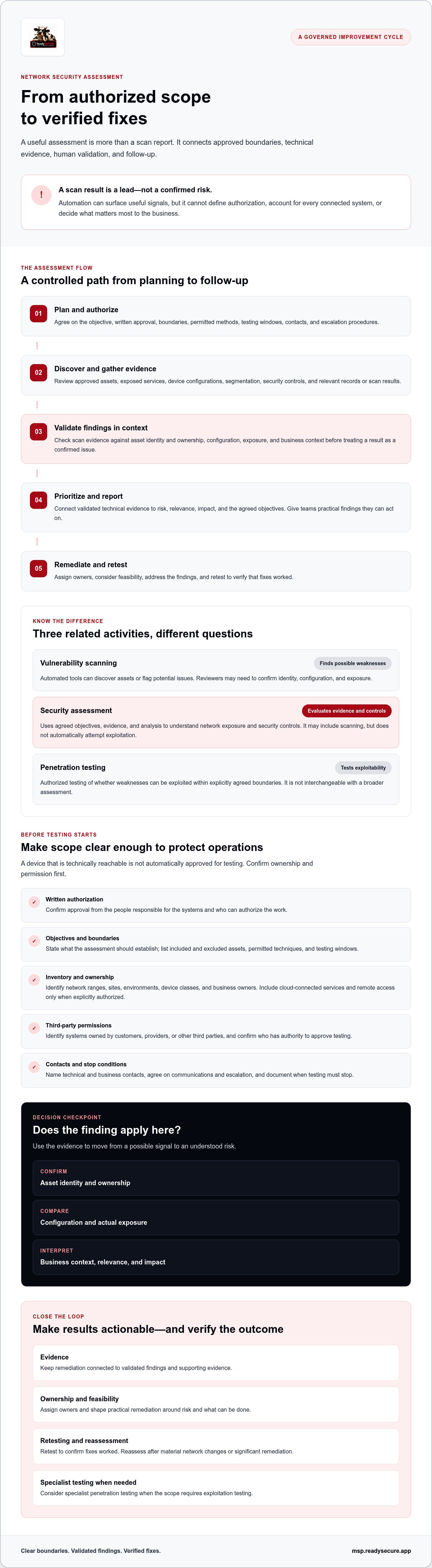
These activities can support one another, but they answer different questions:
- Vulnerability scanning uses automated tools to discover assets or flag possible weaknesses. A result is a lead, not always a confirmed issue. Reviewers may need to check asset identity, configuration, and exposure before deciding whether it’s valid.
- Assessment uses evidence and analysis to evaluate exposure and controls against agreed objectives. It may include scanning, but it doesn’t automatically involve attempts to exploit vulnerabilities.
- Penetration testing is authorized testing of whether weaknesses can be exploited within explicitly agreed boundaries. It can provide evidence of exploitability, but it isn’t interchangeable with a broader assessment.
Keep the boundary clear. Scope and authorization determine which systems, accounts, testing methods, and time windows are in bounds. A device you can technically reach isn’t automatically approved for testing. Confirm ownership and permission first, then choose methods that fit the objective and operational risk. This distinction helps decision-makers get useful findings without turning a routine review into unapproved or disruptive testing.
How to Scope and Prepare a Network Security Assessment Safely
Strong preparation protects both the assessment and the services people rely on. Before testing starts, make the authorization, boundaries, and response plan explicit. Use this sequence to turn an open-ended request into a controlled engagement:
- Authorize: Obtain written approval from the people responsible for the systems. Confirm who can approve testing on behalf of the organization.
- Define objectives: State what the work should establish, such as identifying exposed assets or reviewing selected security controls. NIST Cybersecurity Framework assessment resources can inform how you frame assessment objectives.
- Inventory scope: List network ranges, sites, environments, device classes, and business owners. Include cloud-connected services and remote access only when they’re explicitly authorized.
- Set boundaries: Record included and excluded assets, permitted techniques, approved testing windows, and any limits on access. Identify systems owned by customers, providers, or other third parties, and confirm who has authority to approve work on each.
- Coordinate: Name technical and business contacts, agree on communications and escalation procedures, and document when testing must stop.
How do you define scope and obtain authorization?
Write scope so another team could tell exactly what is in bounds. Name the relevant networks, locations, environments, and device types rather than relying on broad labels such as “the corporate network.” Document exclusions, allowed testing methods, and testing windows. If a system belongs to a cloud provider or another third party, confirm the necessary permission before including it. A network security assessment is authorized only within the boundaries the responsible parties have approved.
What should teams prepare before testing begins?
Gather what’s available: asset records, network diagrams, access arrangements, system owners, and emergency contacts. Coordinate with operations teams on change windows, service dependencies, and how they’ll handle expected test activity or alerts. Agree on a stop condition, such as unexpected service degradation, and specify who can pause testing and who must be notified. A clear escalation plan is more useful than improvising during an incident.
For ongoing scan coverage across managed environments, see this vulnerability management buying guide. MSPs managing multiple client environments can also explore ReadySECURE’s MSP security platform as one option for organizing security work across clients.
How to Assess Network Exposure and Validate Findings
With approved assets confirmed, move from discovery to evidence. Review which services are reachable, how network zones are separated, and whether configurations match the intended security controls. Then validate each potential weakness against the asset and its business context. A disciplined network security assessment connects technical evidence to exposure and impact instead of treating every scanner alert as a confirmed risk.
Which network areas should an assessment examine?
Work through the areas included in the approved scope. Check internet-facing services, internal network segments, remote access paths, and network device configurations. Where authorized, review identity and access controls, segmentation between systems, patch status, and relevant logging. These checks can reveal whether a service is exposed beyond its intended audience or whether a control is missing, misconfigured, or difficult to verify.
Cloud services and Microsoft 365 may be related to network risk, but they aren’t automatically in scope. Include them only when authorization and objectives explicitly cover them. For Microsoft 365 findings, this M365 security hardening guide offers relevant follow-up guidance.
How do you validate and prioritize assessment findings?
Scan output alone doesn’t prove that a vulnerability is present, reachable, or exploitable on the affected asset. Treat each alert as a lead. Confirm the asset’s identity and owner, compare the reported issue with available configuration or version evidence, and establish whether the relevant service is reachable from the tested location. If safe and authorized, repeat checks to see whether the result is reproducible. Record both the evidence and any uncertainty.
Next, assess what the issue means in context. A technically severe weakness on an isolated system may need a different response than a less severe issue exposed to untrusted networks and connected to critical services. Consider:
- Exposure: Is the affected service reachable, and from where?
- Safeguards: Do access controls, segmentation, or other measures reduce the likelihood or impact?
- Business impact: What functions, information, or dependent systems could be affected?
- Confidence: Does the evidence confirm the issue, or is more validation needed?
Use technical severity as an input, not the whole decision. The NIST security assessment guidelines provide procedures for assessing security controls. Maintain a consistent evidence trail so teams can explain why a finding is valid, how urgent it is, and what further checks remain. That makes the assessment useful for prioritization, not just alert collection.
How to Turn Assessment Results Into a Remediation Plan
A finding only creates value when someone can act on it. Turn the assessment record into a tracked plan: preserve the evidence, assign an accountable owner, set a priority and target date, complete the fix, then retest. Keep confirmed issues distinct from observations and items that still need investigation. That clarity helps teams direct effort to the risks that matter most.
What should a useful assessment report include?
Give decision-makers enough context to understand both the results and their limits. Summarize the assessment scope, exclusions, methods, limitations, and date. For each finding, state the impact, recommend a practical action, and name an owner. Don’t present an observation or unverified lead as a confirmed vulnerability.
Use a consistent finding structure:
- Affected asset: Identify the system and its owner.
- Evidence: Record what was observed and how it was confirmed.
- Business impact: Explain the relevant exposure or operational consequence.
- Recommended action: Specify a fix or a next step for investigation.
- Owner: Name the person or team responsible for follow-through.
For example, if an approved review confirms that a service is unnecessarily reachable, record the evidence and exposure, identify the service owner, and recommend restricting access or changing the configuration. Avoid assigning a priority based on technical severity alone.
How should teams track remediation and retesting?
Rank actions by validated exposure, potential business impact, dependencies, available safeguards, and how feasible the fix is. Address urgent, reachable risks first. Schedule lower-priority improvements to fit operational capacity, and set target dates and escalation paths that reflect organizational risk. If a fix depends on another system or team, record that dependency so the item doesn’t disappear into a queue.
After remediation, retest the specific condition and save the evidence. A successful retest confirms that the tested weakness appears addressed under the conditions checked. It doesn’t prove the entire environment is free of risk. If remediation isn’t practical, document the residual risk and have the appropriate decision-maker formally accept it, with a review point if needed.
A consistent process is especially useful for MSPs tracking findings across client environments. Explore ReadySECURE’s MSP security platform to see an option designed for managing security across multiple clients.
When to Repeat Assessments and Bring in Specialists
A completed assessment describes the environment at a point in time. Networks change. New services, infrastructure, and access paths can shift exposure, so reassessment should respond to meaningful changes rather than follow a one-size-fits-all calendar.
What changes should trigger another network security assessment?
Revisit the affected scope after changes such as:
- New sites or acquisitions: Newly connected networks, devices, and access arrangements can introduce risks that weren’t part of the earlier review.
- Major infrastructure changes: Network redesigns, migrations, or substantial configuration changes may alter reachability and segmentation.
- Newly exposed services: A service made accessible from the internet or a broader network can change the threat picture.
- Significant remediation: Retest relevant areas to confirm key fixes and identify any new exposure created by the change.
- Material shifts in exposure: Changes to remote access or other externally reachable paths may justify a focused review.
Don’t automatically repeat every test across the entire environment. Document what changed, why reassessment is needed, and which assets or controls are affected. This keeps the work targeted and helps stakeholders understand how the scope differs from the previous review. Set the timing based on risk, obligations, the environment, and applicable guidance, not an assumed universal schedule.
When should an MSP consider external testing support?
An internal review may be appropriate when the team has the access, expertise, and evidence needed to assess the defined scope. Bring in specialists when objectives call for penetration testing, independent validation, or technical skills the team doesn’t have available. A scan or configuration review can identify areas of concern, but it may not answer whether a weakness can be exploited within agreed boundaries.
Before engaging a provider, align on written authorization, assets in and out of scope, permitted techniques, testing windows, deliverables, and who owns remediation. Confirm how findings will be communicated and what happens if testing affects a service. These decisions reduce ambiguity and help ensure the work answers a specific question.
ReadySECURE offers expert-led penetration testing as a potential next step when the assessment requires authorized exploitation testing. It complements a broader review; it doesn’t replace every network security assessment. If your objectives call for deeper testing, consider whether specialist support fits the scope and capabilities you’ve defined.
Make Your Next Assessment a Clear Path to Better Security
A strong network security assessment starts with clear authorization and scope, then goes beyond automated scan output. Validate findings against the assets and business context, prioritize the risks that matter, and assign owners to remediation. Retest fixes to confirm what changed, while recognizing that one successful retest doesn’t make an entire environment risk-free.
For MSPs, a repeatable process also makes it easier to manage security work across client environments. ReadySECURE provides a multi-tenant security platform designed for MSPs, with vulnerability management that combines continuous scanning and risk-based prioritization. Automation can help organize visibility, but human review remains essential for confirming findings and deciding what to do next.
Explore ReadySECURE’s security platform for MSPs to see how it could support your team’s vulnerability management workflow. Start by reviewing your client environments, identifying the work you need to coordinate, and exploring the platform as a way to manage that security workflow. With clear boundaries, validated evidence, and accountable follow-through, you can turn assessment results into practical next steps.
Frequently Asked Questions
What is a network security assessment?
A network security assessment is an authorized review of network exposure, security controls, and potential weaknesses. It can combine asset discovery, configuration checks, vulnerability scanning, and human validation to show what is exposed and what needs attention. Its scope depends on the systems, objectives, and testing methods approved in advance. Unlike a scan-only exercise, an assessment interprets evidence in context and can turn confirmed findings into practical next steps.
How do you perform a network security assessment?
Start by obtaining written authorization and defining objectives, included assets, exclusions, permitted techniques, and testing windows. Inventory systems and identify owners, including cloud-connected or third-party assets only when they’re approved. Review exposure, configurations, and relevant controls, then validate potential findings against asset context and available evidence. Document impact, assign remediation owners, and retest fixes. Coordinate with operations teams and agree on contacts and stop conditions before testing begins.
Is a network security assessment the same as a vulnerability scan?
No. A vulnerability scan uses automated tools to discover assets or flag possible weaknesses. Its results may be incomplete or require manual checks to confirm that an issue applies to a specific system. A network security assessment is broader: it can combine scans with configuration review, evidence gathering, and analysis of exposure and business context. It may include scanning, but it doesn’t automatically involve attempts to exploit vulnerabilities.
How often should a network security assessment be conducted?
There’s no single schedule that suits every organization. Set the cadence based on risk, obligations, environment, and available guidance. Reassess relevant areas after material changes, such as adding a site, changing infrastructure, exposing a new service, or completing significant remediation. Document why a reassessment is needed and adjust its scope to match the change. This keeps reviews relevant instead of repeating the same checks without a clear purpose.
Can a network security assessment disrupt business operations?
It can, depending on the systems and techniques involved. Discovery and testing may trigger alerts or affect a service, particularly if boundaries and operational dependencies aren’t clear. Reduce that risk by securing authorization, agreeing on testing windows, coordinating with operations, and documenting escalation contacts and stop conditions. Choose techniques that fit the objective and environment. No testing plan can eliminate all risk, so teams should know how to pause work if impact occurs.
What should a network security assessment report include?
A useful report records the assessment date, objectives, scope, exclusions, methods, and limitations. For each finding, include the affected asset, supporting evidence, business impact, recommended action, and accountable owner. Separate confirmed findings from observations or issues that need more investigation. Include remediation status and retest evidence as work progresses. This gives technical teams enough detail to act and helps decision-makers understand which risks need attention first and why.
When should an MSP use penetration testing instead of a network security assessment?
Use penetration testing when the objective is to determine whether authorized testers can exploit weaknesses within agreed boundaries. It’s a focused way to test exploitability, not a replacement for every broader review of assets, controls, and exposure. An MSP may bring in specialist support when independent validation or skills unavailable internally are needed. Before testing, confirm authorization, scope, permitted techniques, deliverables, and who owns remediation of any findings.


