

More scan data won’t make your MSP’s vulnerability service more effective. A multi-client remediation workflow will. The right vulnerability management software for managed service providers should help you see risk across separate client environments, prioritize what matters, and keep follow-up from consuming engineer capacity.
If you’re juggling inconsistent reports and long lists of findings, you already know the challenge: identifying vulnerabilities is only the start. Your team also needs a repeatable way to assess priority, communicate risk, and track remediation across clients. That’s why choosing on scan volume or feature count alone can leave the hardest work untouched.
This guide compares the capabilities, operating models, and business fit that matter in MSP delivery. You’ll learn what to evaluate in multi-tenant visibility, risk-based prioritization, reporting, automation, and expert support, plus how vulnerability management can fit within a broader client security offering. Use these criteria to build a consistent, risk-focused service that scales with your client base, without adding avoidable manual work.
Key Takeaways
- Choose vulnerability management software for managed service providers by how well it supports multi-client workflows, not by scan volume alone.
- Build a repeatable process from asset discovery and risk review to assigning action and communicating status.
- Compare asset coverage, prioritization, reporting, workflow, and support against your client needs and service model.
- Pilot the platform with a defined scope, clear ownership, and agreed client responsibilities before expanding.
- Match the platform to your team’s capacity and reporting needs, then decide how vulnerability management fits your wider security offering.
Why MSPs Need Vulnerability Management Software Beyond Occasional Scanning
Vulnerability management software helps identify, assess, prioritize, and track security weaknesses so teams can decide what needs attention and follow progress toward remediation. For MSPs, it provides a way to coordinate that work across client environments rather than treating each scan as a one-off task.
A point-in-time scan gives a snapshot of findings. A recurring vulnerability management process adds review, prioritization, ownership, and follow-up as environments change. The distinction matters: a report can identify a weakness, but it doesn’t establish who will address it, how urgent it is, or whether it has been resolved. For a high-level overview of the vulnerability management lifecycle, see Wikipedia.
Vulnerability scanning versus vulnerability management for MSPs
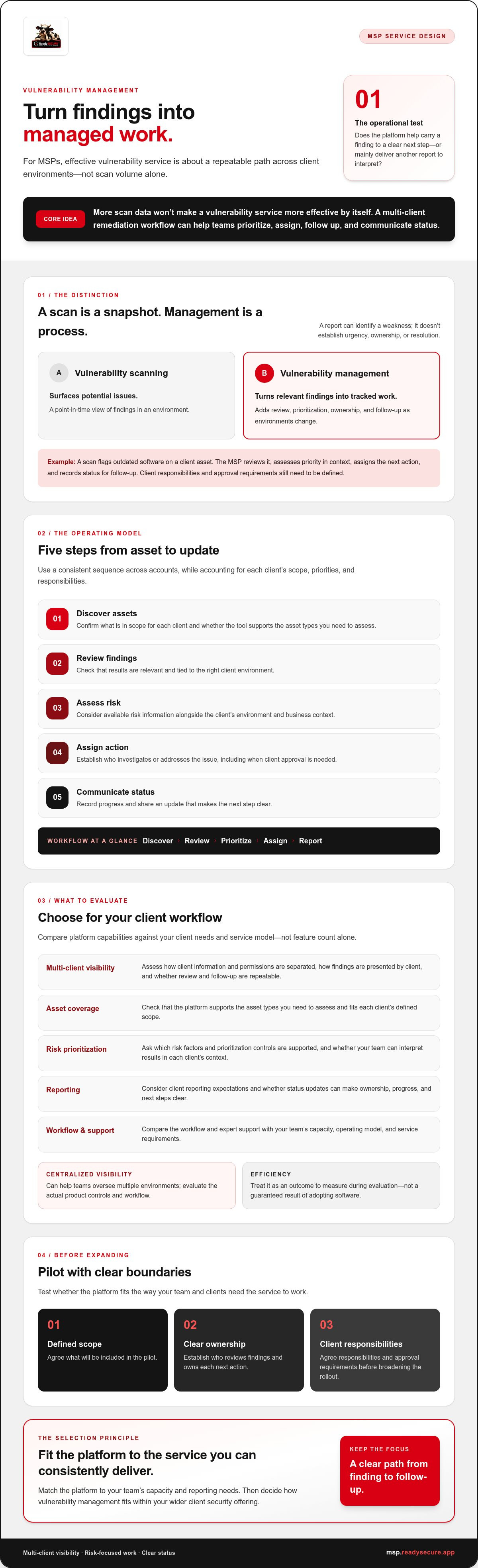
Scanning surfaces potential issues. Management turns relevant findings into tracked work. For example, a scan flags outdated software on a client asset. The MSP reviews the finding, assesses its priority in context, assigns the next action to the appropriate owner, and records status for follow-up. The software can support this workflow, but the MSP still needs to define responsibilities and client approval requirements.
This is the operational test for vulnerability management software for managed service providers: does it help your team carry a finding from detection to a clear next step, or does it mainly deliver another report to interpret? The answer affects how consistently engineers can handle work across accounts.
Why multi-client operations change the software requirements
Each client environment has its own assets, access boundaries, decision-makers, and reporting expectations. A useful platform should let an MSP assess how it separates client information and permissions, presents findings by client, and supports repeatable review and follow-up. Centralized visibility can help teams oversee multiple environments, but the specific controls and workflow need to be evaluated in the product.
Without a consistent operating process, engineers may review findings differently, track actions in separate places, or prepare client updates from scratch. That friction can grow as the client base expands. Look for a process your team can apply repeatedly while still accounting for client-specific scope, priorities, and responsibilities. Treat efficiency as an outcome to measure during evaluation, not a guaranteed result of adopting new software.
For MSPs, the goal isn’t simply to scan more often. It’s to create a clear, manageable path from finding a weakness to reviewing it, assigning action, and communicating status. That foundation makes it easier to assess which platform capabilities your service model actually needs.
How MSP Vulnerability Management Software Turns Findings into Prioritized Work
A useful workflow moves each finding toward a decision, an owner, and a status the MSP can explain to the client. The software can organize that work, but it can’t define your service policies or decide who approves remediation. Set those expectations first.
Use this sequence as a practical operating model:
- Discover assets: Confirm what is in scope for each client and whether the tool supports the asset types you need to assess.
- Review findings: Check that results are relevant and tied to the right client environment.
- Assess risk: Consider available risk information alongside the client’s environment and business context.
- Assign action: Establish who is responsible for investigating or addressing the issue, including when client approval is needed.
- Communicate status: Record progress and share an update that makes the next step clear.
That is the workflow in one sentence: discover, review, prioritize, assign, and report. It’s a general operating model, not a claim that every platform automates each step or supports the same controls.
Prioritizing vulnerability findings across client environments
A long list of findings can obscure which items deserve attention first. Risk-based prioritization helps teams direct review toward issues that appear more urgent, but methods vary by vendor. Before selecting vulnerability management software for managed service providers, ask which risk factors and prioritization controls it supports, and whether your team can interpret the results for each client’s context. CISA’s cybersecurity best practices for MSPs offer useful security context, but don’t assume they describe a particular product’s features.
Tracking remediation and communicating client status
Make ownership visible. Ask how a finding is assigned, how its status changes, and what the client can see. Confirm whether updates are recorded in the platform or require a separate process. Don’t assume ticketing integrations or automated remediation; verify those capabilities directly with each vendor.
Clear reporting connects technical detail to action: identify the issue, explain its priority, name the responsible party, and state what happens next. ReadySECURE’s MSP platform includes continuous vulnerability scanning, risk-based prioritization, and white-label reporting tools. Verify the available reporting customization and remediation workflows against your needs. To assess whether that approach fits your delivery model, review the MSP platform.
How to Compare Vulnerability Management Software for MSPs
Compare platforms against the service you need to deliver, not the length of a vendor’s feature list. For vulnerability management software for managed service providers, start with the essentials: client separation, relevant asset coverage, useful prioritization, clear reporting, workable processes, and support your team can rely on. Treat advanced automation or extra modules as useful only when they solve a defined operational need.
Use this scorecard to guide vendor conversations. Confirm each capability through documentation or a demonstration; don’t assume a feature works the same way across platforms.
| Area | What to verify | Essential when... |
|---|---|---|
| Multi-tenancy | How client data, users, permissions, and views are separated | Staff manage multiple client environments |
| Asset coverage | Which asset types are supported and what is included in scope | Your client environments vary |
| Prioritization | Which risk factors and controls inform finding priority | Your team needs to focus review effort |
| Reporting | Whether reports show clear findings and client-relevant status | Clients need understandable updates |
| Workflow | How findings are assigned, tracked, and updated | You need consistent follow-through |
| Support | What onboarding, documentation, and vendor assistance are available | Your team needs help adopting or operating the platform |
Which capabilities matter most in a multi-tenant platform?
Test the boundaries, not just the dashboard. Can a technician work in one client environment without exposing another client’s data? Can managers review portfolio-level status while retaining a client-specific view? Ask whether your team can standardize its review process while adapting ownership and reporting to each client. Verify the vendor’s permissions and separation model directly.
For context on scanning as one part of reducing exposure, review CISA's Cyber Hygiene services. The page describes CISA services; it isn’t a substitute for checking a vendor’s coverage or confirming that its tools fit your delivery requirements.
How to test usability, reporting, and support before choosing
Run a controlled demonstration with representative client scenarios. Have the staff who will operate the service complete routine tasks, then assess where steps are clear or require workarounds. Review sample reports for accurate technical detail, readable priorities, and client-appropriate presentation. ReadySECURE, for example, offers white-label reporting tools; confirm the available customization and fit for your reporting process.
Ask each vendor the same questions about onboarding, documentation, and support arrangements. Record what is confirmed, what requires manual effort, and what remains unverified. Select for operational fit and verified capabilities, not feature count alone.
How to Roll Out Vulnerability Management Software Across MSP Clients
Scale the process, not the guesswork. A deliberate rollout gives your team a chance to confirm scope, clarify responsibilities, and refine daily operations before extending vulnerability management software for managed service providers across more client environments.
Use a staged approach:
- Define scope: Document which client environments and assets are included, and note any exclusions or access constraints.
- Select a pilot: Choose a representative client environment that lets the team test ordinary service tasks.
- Set ownership: Assign who reviews findings, communicates with the client, and makes or approves remediation decisions.
- Review and expand: Capture staff feedback, refine the workflow, then apply the updated process to additional clients deliberately.
Document the baseline workflow before the pilot begins. Include review steps, responsibility boundaries, reporting expectations, and how remediation decisions are recorded. This gives the team a reference point for judging whether the process is manageable, rather than relying on impressions after rollout. For more detail on the operating model, see the vulnerability management process guide.
Set scope, roles, and client expectations
Agree on what the initial service covers. Identify the assets in scope, who at the MSP reviews findings, and which actions require client input or approval. Make the reporting cadence and escalation expectations explicit, but set them with each client rather than implying a universal service commitment. Clear boundaries reduce confusion when a finding needs attention or a decision.
Record these agreements where the delivery team can refer to them. A consistent framework helps staff follow the same core steps while respecting client-specific responsibilities and requirements.
Pilot the platform before scaling the managed service
Run the pilot through routine work from review to client update. Ask operators to note whether findings are understandable, how alert volume affects review, and how much effort it takes to prepare reports and track follow-up. Test the actual workflow your team will use, not only the vendor’s demonstration path.
Use the feedback to adjust ownership, review steps, and client communications before expanding. There’s no need to force a fixed deployment timeline. Scale when the process is clear enough for staff to repeat and the platform’s verified capabilities fit the service you intend to deliver.
Ready to assess a multi-tenant approach for your MSP? Explore the MSP security platform and evaluate how its capabilities align with your rollout plan.
Choose MSP Vulnerability Management Software That Fits Your Security Offering
The right platform fits the service you can deliver consistently. Match vulnerability management software for managed service providers to your clients’ needs, your team’s capacity, your operating model, and the reporting experience you want to provide. A feature matters when it supports that delivery plan, not simply because it appears on a product page.
Decide whether vulnerability management should stand alone in your service portfolio or sit alongside other security capabilities. If clients also need Microsoft 365 security or compliance support, a broader platform may be worth evaluating. Consolidation is a selection consideration, not a guarantee of lower costs or greater efficiency. For a wider evaluation framework, see the white-label security platform buying guide. If Microsoft 365 is part of the scope, use the M365 security hardening tools guide to explore that adjacent need.
When a broader security platform may fit an MSP
Compare the platform’s scope with the services your clients actually need and your team is prepared to support. ReadySECURE offers MSPs a multi-tenant security platform with continuous vulnerability scanning, risk-based prioritization, and white-label reporting. Its wider offering also includes Microsoft 365 security, mail security, compliance, and governance. Assess those capabilities against your own service plan, and verify the specific coverage and workflows that matter in a demonstration.
Questions to take into a vendor demonstration
Bring documented requirements and representative client scenarios. Ask the vendor to demonstrate how staff switch between client environments, review prioritized findings, prepare reports, and complete routine workflow steps. Then confirm product scope, supported assets, onboarding, available support, and any integrations your model requires. Separate what you see working from what is merely described; record open questions for follow-up.
ReadySECURE’s capabilities may suit MSPs seeking multi-tenant vulnerability management and white-label reporting, but fit depends on your requirements. Explore ReadySECURE for MSPs and assess the platform against your documented needs, team capacity, and client expectations.
Build a Vulnerability Service You Can Scale
The strongest buying decision starts with your operating model. Choose vulnerability management software for managed service providers that supports clear client separation, risk-focused review, practical follow-up, and reporting your clients can understand. Then test those capabilities with a representative scenario before expanding across accounts.
Keep the focus on execution. Scanning identifies potential weaknesses; a repeatable process assigns ownership, tracks decisions, and communicates progress. Match the platform to your team’s capacity and the needs of your clients, rather than paying attention to feature count alone.
ReadySECURE offers MSPs a multi-tenant platform with continuous vulnerability scanning, risk-based prioritization, and white-label reporting tools. Assess how those capabilities fit your requirements and service delivery approach. Explore ReadySECURE’s multi-tenant security platform.
With the right fit and a deliberate rollout, your team can build a clearer, more consistent vulnerability management service, and grow it with confidence.
Frequently Asked Questions
What is vulnerability management software for managed service providers?
Vulnerability management software helps MSPs identify, assess, prioritize, and track security weaknesses across client environments. It supports an ongoing process, rather than producing only a one-time list of scan results. Depending on the platform, MSPs may use it to review findings, understand risk priorities, monitor remediation status, and prepare reports. Check which asset types, scanning cadence, and workflow capabilities a vendor supports before deciding whether the software fits your service.
How does vulnerability management software differ from vulnerability scanning?
Vulnerability scanning identifies potential weaknesses; vulnerability management adds review, prioritization, ownership, and follow-up. A scan might flag outdated software on a client asset. The MSP then assesses the finding, decides who should investigate or remediate it, tracks progress, and communicates status. Software can support those steps, but it doesn’t automatically establish client responsibilities or remediation policies. Confirm which parts of that workflow a platform supports and which require separate processes.
What features should MSPs look for in vulnerability management software?
Prioritize capabilities that match your delivery model: multi-tenant client separation, relevant asset coverage, risk-based prioritization, clear reporting, workable finding and remediation workflows, and suitable vendor support. Also assess whether staff can review client-level status and portfolio-wide activity without compromising access boundaries. Useful extras depend on your service and client needs. Verify integrations, supported asset types, reporting customization, and automation with the vendor rather than assuming they’re included.
Can vulnerability management software manage multiple clients from one console?
Some platforms are designed for multi-tenant MSP operations, allowing teams to manage more than one client environment through a shared console. Capabilities vary, so check how client data, user access, permissions, findings, and reports are separated. Ask the vendor to demonstrate a technician switching between two representative client environments and viewing both account-level and overall status. A single console is useful only if its controls and views fit your operating requirements.
How do MSPs prioritize vulnerabilities across different client environments?
MSPs can use available risk information alongside client context to decide which findings warrant attention first. The appropriate priority may depend on factors supported by the chosen tool and the client’s environment, business requirements, and remediation responsibilities. Vendors don’t necessarily use identical methods. Ask what risk factors and prioritization controls their software applies, how staff can interpret the results, and whether the process can accommodate client-specific policies.
How can an MSP evaluate vulnerability management software before buying?
Start with documented requirements, then test a representative client scenario in a controlled demonstration. Ask staff who will operate the service to review findings, check client separation, follow routine workflow steps, and assess sample reports. Confirm asset coverage, onboarding, support arrangements, reporting options, and any required integrations directly with the vendor. Record what was demonstrated, what needs manual effort, and what remains unverified before comparing platforms.
Does vulnerability management software automatically fix vulnerabilities?
Don’t assume it does. Vulnerability management software may help identify, prioritize, and track findings, but remediation capabilities vary by platform and are not guaranteed by the presence of scanning. MSPs and clients still need to agree on who approves and carries out changes. Ask vendors to demonstrate any remediation workflow or automation you’re considering, and verify its scope, prerequisites, and effect on your client environments before relying on it.


