

The platform with the longest feature list may be the wrong choice for an MSP. The real test is whether it protects clients without adding work across deployment, tenant management, and support. Choosing inky vs avanan for msp phishing protection means looking beyond product claims to the capabilities and workflows available in the editions you are considering.
That comparison takes more than a feature checklist. Bundles, pricing models, and administration options can change, while inconsistent notifications or manual tenant setup can erode the value of strong threat detection. Start with what your team can deploy, manage, and deliver consistently across client environments.
This guide compares Avanan and INKY through the MSP lens: deployment, threat handling, tenant operations, and business fit. It covers what to weigh against your existing technology stack, how daily administration affects service delivery, and how to build a repeatable phishing-protection offer. The aim is to choose based on documented capabilities and practical testing, then make protection a scalable part of your broader security operations.
Key Takeaways
- Assess protection capabilities, tenant operations, and commercial fit separately instead of choosing by feature count alone.
- For inky vs avanan for msp phishing protection, compare current documentation and product workflows rather than assuming similarly named features work the same way.
- Test deployment, tenant controls, alert triage, remediation, and reporting as distinct parts of daily service delivery.
- Use a repeatable scorecard to compare requirements, client experience, support workload, and service economics.
- Connect mail security to broader MSP security operations, including Microsoft 365 hardening, vulnerability management, and compliance workflows.
Avanan vs. INKY for MSPs: Define the phishing protection job first
Before comparing Avanan and INKY, define the job: protect users across MSP-managed client environments while giving your service team a repeatable way to investigate and respond. Assess three kinds of fit. Product capability covers the threats each solution addresses and the actions it supports. Operational fit includes setup, tenant administration, alerts, and remediation. Commercial fit covers licensing and whether your team can deliver the service sustainably across different clients.
This distinction matters because a feature that looks compelling in a product description can create friction when rolled out across multiple Microsoft 365 tenants. Tenant configuration, existing mail-flow architecture, and the selected product plan can all affect deployment and available controls. For this 2026 comparison, treat vendor names, bundles, licensing, and feature availability as time-sensitive. For every claim, record the documentation date and applicable edition. Don’t assume a feature applies to every plan.
What does an MSP need phishing protection to do?
Phishing protection should help detect suspicious messages and address risks from malicious links, attachments, and impersonation attempts. The term covers a range of deceptive techniques; What is Phishing? provides background on how attackers try to trick people into revealing information or taking unsafe actions. For an MSP, detection is only the beginning. The service also needs a practical way to handle alerts and communicate with users.
Separate the experience into two workflows:
- For end users: Messages and warnings should help people recognize risk and understand what action to take.
- For administrators: The team needs a clear path to review an alert, investigate the message, and take available remediation steps.
Test whether both workflows can be repeated consistently across clients. Your process should identify who receives an alert, who investigates it, who can act, and how the outcome is reported. Strong detection without manageable triage can shift effort onto the help desk. Efficient administration without adequate coverage can leave important risks unaddressed.
What does this comparison include, and exclude?
Base the comparison on current vendor documentation or clearly attributed evidence. For each capability, mark whether it is verified for the relevant edition, edition-dependent, or unverified. Review deployment, threat coverage, investigation, remediation, tenant controls, and notifications separately. Product rankings, review counts, and a single MSP’s experience can provide context, but they don’t establish which platform will suit another provider’s environment.
Keep Microsoft Defender for Office 365 in view as part of the client’s existing Microsoft security setup, rather than treating it as a third full product under review. The practical question is how Avanan or INKY fits your defined requirements and current environment. With the scope set, the inky vs avanan for msp phishing protection decision becomes a structured fit assessment, not a contest for a universal winner.
Compare Avanan and INKY on detection, deployment, and response
Compare what each product documents, then test how its controls work in your Microsoft 365 environment. The matrix separates established information from details that need edition-specific documentation. “Unverified” means the evidence used for this comparison doesn’t establish the capability. It does not prove that the product lacks it.
| Area | Avanan | INKY | MSP validation |
|---|---|---|---|
| Deployment approach | Verified: API-based protection for cloud email and collaboration apps, including Microsoft 365. | Unverified: The current deployment method and required tenant steps aren’t established by the evidence used for this comparison. | Confirm the setup sequence, permissions, mail-flow dependencies, and rollback steps. |
| Threat coverage | Edition-dependent: Verify documented coverage for malicious links, attachments, impersonation, and suspicious message patterns. | Edition-dependent: Check current bundle documentation for the same threat categories. | Record the exact plan and source for each supported threat type. |
| Investigation controls | Unverified: Confirm the relevant edition’s alert context, search, and analyst workflow. | Unverified: Confirm what message and threat details administrators can review. | Test whether technicians can quickly identify the affected tenant, users, and message. |
| Quarantine and remediation | Unverified: Verify available message actions and their scope in current documentation. | Unverified: Verify available release and remediation controls by bundle. | Check who can act, whether actions are tenant-scoped, and how the result is recorded. |
How should MSPs compare phishing detection claims?
Start with threat categories, not broad claims such as “AI-powered” or “advanced” protection. CISA’s CISA Guidance on Phishing Attacks offers context on deceptive tactics users may encounter. For each platform, record the documented detection method, the edition it applies to, and any stated limitations. Don’t treat an efficacy percentage as a guarantee of results in your clients’ environments.
Detection identifies a suspected threat. Response is the process of investigating it, deciding what to do, and taking action. That distinction is central to service delivery. A false positive that needs manual review or release can generate tickets, while unclear alert context can prolong triage. Test how analysts move from an alert to message details and available actions, including whether the workflow keeps tenant boundaries clear.
How do deployment and remediation affect service delivery?
Avanan is described as API-based, but that doesn’t establish the exact permissions, configuration steps, or controls for every current plan. For INKY, use current vendor documentation to confirm the deployment method and Microsoft 365 dependencies. Record what technicians must configure in each tenant, then repeat the test in a representative client environment before standardizing the rollout.
A 2023 MSP account described Avanan setup using generated transport rules, alongside granular controls and customer-level notification templates. Treat that as one operator’s historical experience, not a promise about current deployment or every tenant. Test quarantine, release, notifications, and remediation directly. A shared operating checklist and clear tenant reporting can turn those findings into a repeatable service. A multi-tenant security workspace can support consolidated client oversight.
Which platform fits your MSP’s tenant operations and client experience?
Detection matters, but daily workload determines whether a platform scales. Compare central administration, tenant separation, role controls, alert triage, and reporting as separate workflows. A product can protect mail effectively and still require too much manual effort to onboard clients, route alerts, or prepare useful reports. The right fit depends on how those tasks work with your service desk, client mix, and staffing model.
| Platform | Operational strengths supported by current evidence | Limitations and validation needs | Evidence confidence |
|---|---|---|---|
| Avanan | API-based protection for cloud email and collaboration apps. A 2023 MSP account described generated transport rules and customer-level notification templates. | That account is historical, not a guarantee of current workflows. Verify tenant onboarding, policy reuse, role controls, alert handling, and notification customization in current documentation and a test environment. | High for the API-based approach; low for current tenant workflows drawn from the anecdote. |
| INKY | Positioned within Kaseya’s ecosystem. As of January 1, 2026, the Advanced bundle is included with Kaseya 365 User; Pro is an upgrade. | That commercial relationship doesn’t establish cross-tenant controls, reporting, notifications, or reduced administration effort. Validate those workflows and confirm bundle terms for the service being evaluated. | High for the dated Kaseya bundle context; unverified for specific operational controls. |
Which operational criteria matter across multiple tenants?
Run the same onboarding scenario in a representative test tenant for each platform. Record whether settings can be reused, how delegated access is assigned, whether activity stays separated by client, and how quickly a technician can find a tenant’s alerts. Then estimate ongoing effort, including alert review, exceptions, client questions, and report preparation. These checks expose service-desk friction that feature lists and broad product rankings can miss.
How do notifications and support experience affect adoption?
Review the actual quarantine notice, user action prompt, and security event notification. Does each message explain what happened, what the user should do, and when to contact the MSP? Can your team align the wording and escalation path with its service model? A 2023 Spiceworks account raised customer-specific Avanan notification templates as a possible administrative burden. Treat that as a test question, not a current product verdict.
Client complexity also affects the result. A smaller MSP with a lean service desk may prioritize consistent onboarding and fewer manual exceptions. A provider serving clients with varied policies, delegated administrators, or reporting needs may place more weight on granular control and clear tenant separation. For inky vs avanan for msp phishing protection, score each workflow against your operating model. Don’t assume ecosystem fit guarantees operational fit.
Capture evidence during testing: setup steps, required roles, notification settings, time spent triaging sample alerts, and report usability. Label each finding verified, edition-dependent, or unresolved. That record gives the scorecard a practical foundation and helps turn a product choice into a repeatable service process.
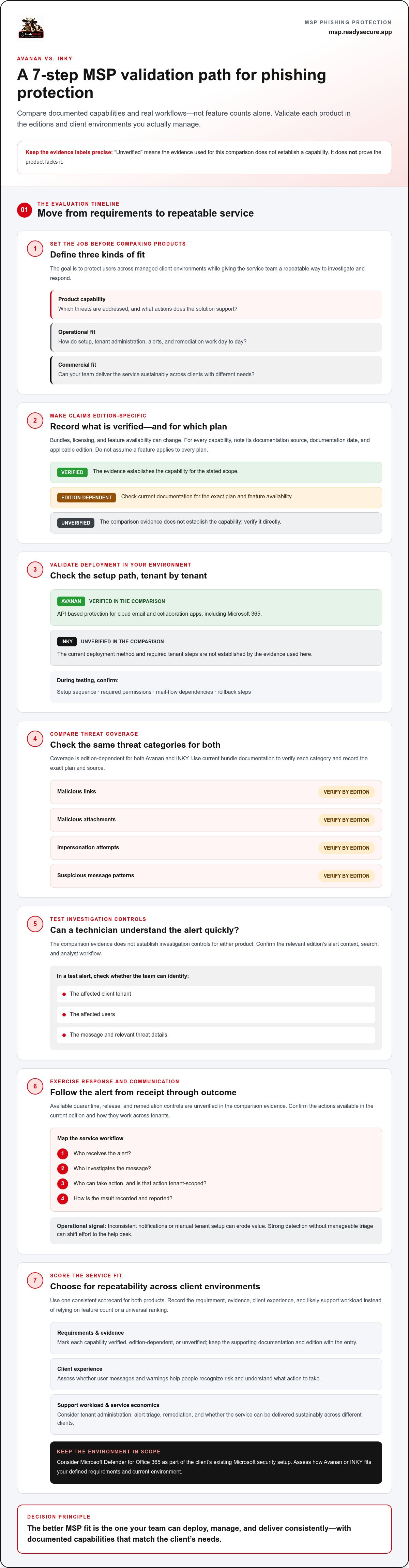
Use a repeatable scorecard to choose Avanan or INKY
A disciplined evaluation is more useful than a feature-count contest. Use the same client profile, test cases, and scoring rules for both products. This makes the inky vs avanan for msp phishing protection decision easier to explain internally and repeat as your client base grows.
What should an MSP test before selecting a product?
Choose a representative Microsoft 365 tenant that reflects a typical client environment. Apply the same scenarios to each product, and record the edition, test date, tenant configuration, and evidence source. Don’t fill gaps with assumptions. Mark findings verified, edition-dependent, or unresolved.
- Define requirements. List the threats, response actions, tenant controls, and client reporting needs your service must support.
- Verify claims. Match each requirement to current vendor documentation for the specific plan or bundle under review.
- Test workflows. Use consistent scenarios for suspicious messages, malicious links or attachments, user-reported emails, investigation, quarantine, release, and remediation.
- Score operational fit. Rate each product from 1 to 5 across security coverage, tenant operations, client experience, and support burden. Define each score before testing, then weight the categories to reflect your service model.
- Review service economics. Estimate setup and ongoing delivery effort, expected support demand, client adoption, and the service value you can sustain.
Measure the work, not just whether a button exists. Record the effort required to configure a tenant, maintain policies, review alerts, resolve exceptions, answer client questions, and prepare reports. A consistent test log can show whether an operational advantage holds across multiple examples. For adjacent Microsoft 365 controls, compare your needs with this guide to M365 security hardening tools.
How should the MSP model commercial fit?
Commercial viability depends on your delivery model, not a headline price or assumed savings. Compare estimated effort and support demand with the recurring value of the service you plan to offer. Include client onboarding, notification handling, reporting, and the time needed to explain security events. Then decide whether your service desk can deliver the experience consistently across client environments.
Include reporting in the service assessment. White-label reports can help align security results with your existing client presentation, but test whether the information is clear, useful, and practical to produce. Also consider how phishing protection fits alongside Microsoft 365 hardening, vulnerability management, and compliance work. This white-label security platform guide can help frame that broader service decision.
A useful scorecard is grounded in evidence and delivery capacity, not a universal winner. To organize multi-tenant security operations and client reporting, review the MSP security platform.
Build phishing protection into a scalable MSP security service
There’s no universal winner in the Avanan and INKY comparison. The defensible choice is the product whose verified capabilities match your security requirements, tenant workflows, and service model. Keep the supporting evidence with the decision: the edition assessed, current documentation, test results, and operational trade-offs. That record makes the choice easier to explain and revisit as products and client environments change.
When does a broader multi-tenant security platform make sense?
Email security is one part of a client’s security posture. An MSP may also need consistent visibility into Microsoft 365 hardening, vulnerability management, and compliance work. Managing these responsibilities through a shared command surface can help organize client oversight and establish repeatable delivery processes. The goal is not simply to add tools. It is to connect routine security work to a clear, sustainable service.
ReadySECURE provides MSPs with a multi-tenant security platform that brings mail security together with Microsoft 365 hardening, vulnerability management, compliance, and governance. White-label reporting supports a consistent client-facing presentation of MSP-delivered services. This is a broader operating model, not a claim of native Avanan or INKY integration. Evaluate those products on their own verified capabilities, then decide how phishing protection fits alongside the rest of your client security operations.
What are the next steps after the comparison?
Turn your evaluation into a service playbook before standardizing the offer. Keep the findings concise and practical. Record:
- Selection criteria: The security outcomes, tenant workflows, and client experience the service must deliver.
- Validated edition: The exact plan or bundle reviewed, with current documentation and test date.
- Tested workflows: What the team verified for onboarding, alerts, investigation, remediation, reporting, and user communication.
- Defined service: Who owns alert triage, client escalation, notifications, and reporting, and how those responsibilities work across tenants.
Then review the service in practice. Confirm that technicians can follow the documented process, clients understand the messages they receive, and reporting supports the service you intend to deliver. If an edition, workflow, or client requirement changes, update the evidence and playbook rather than relying on an old comparison.
Use inky vs avanan for msp phishing protection as a fit decision, then build from it. Mail security can anchor a broader recurring offer when it aligns with Microsoft 365 security, vulnerability management, and compliance workflows. A multi-tenant operating model and clear client reporting can make that offer more consistent across environments.
Explore ReadySECURE’s security platform to see how multi-tenant oversight and white-label reporting can support broader MSP security service delivery.
Turn your evaluation into a repeatable service
The next advantage comes from what happens after selection. Translate your inky vs avanan for msp phishing protection decision into a service blueprint your team can use across client environments. Define onboarding steps, assign alert ownership, standardize escalation, and set a clear format for client reporting. That turns a product decision into a consistent part of your MSP’s security delivery.
As your offer grows, consider how phishing protection fits into the wider client security picture. ReadySECURE brings mail security together with Microsoft 365 hardening, vulnerability management, and compliance in a multi-tenant security command surface. White-label reporting helps present that work under your MSP’s brand and gives clients a clearer view of the service you deliver.
Build with intention. Start with the workflow your team can deliver well, then expand the service around client needs and operational capacity. Explore ReadySECURE’s multi-tenant security platform to learn about connected, repeatable security delivery.
Frequently Asked Questions
Is Avanan or INKY better for MSP phishing protection?
Neither is automatically better for every MSP. The stronger choice is the one that meets your client requirements without adding avoidable service-desk work. For inky vs avanan for msp phishing protection, compare the same client scenario in each product, including a user-reported suspicious message and a false positive that needs review. Track how clearly a technician can understand the event, choose an action, and document the result.
Can Avanan and INKY protect Microsoft 365 clients?
Both are email security options for MSPs managing Microsoft 365 clients, but available controls depend on the product and edition. Before deployment, map each product’s setup requirements to the client’s existing configuration. Record which tenant permissions are needed and whether the proposed approach changes existing mail handling. Keep a record of the expected configuration so the service team can identify differences between clients before rollout.
How much does Avanan or INKY cost for an MSP?
As of October 2026, Avanan pricing starts at $4 per user per month and INKY pricing starts at $3.44 per license per month, with a 10-license minimum. Actual terms can vary by plan and MSP agreement, so treat these as starting points, not a quote. Compare the licensing basis alongside technician time, support demand, and the service value you expect to deliver to clients.
What should an MSP compare between Avanan and INKY?
Compare each product against a written list of client needs, not just feature labels. Include the message types you need covered, who can access alerts, what technicians can do with a flagged message, and how users report concerns. Capture the source for each finding, such as vendor documentation or a hands-on test. This evidence log helps your team revisit decisions when client requirements or product editions change.
Is Avanan easy to deploy across multiple MSP tenants?
Deployment effort can vary by tenant configuration and workflow. A Spiceworks MSP participant described an easy Avanan setup in 2023, including generated transport rules, but that account doesn’t predict results for every environment or current edition. For a practical estimate, time a test rollout from initial access through policy setup, user communication, and rollback planning. Record any steps that differ between tenants before setting a standard onboarding process.
Can an MSP resell phishing protection as a managed service?
Yes. An MSP can package phishing protection with defined onboarding, alert ownership, user guidance, escalation, and reporting. For example, set a clear boundary between routine message review and events that require a client decision or incident response. Then estimate the staff effort needed to deliver those tasks consistently. A service is easier to sustain when its scope, responsibilities, and client-facing outputs are clear before it is offered broadly.
What if neither product fits an MSP’s wider security stack?
First identify the gap precisely. Is it a missing protection capability, a tenant workflow your team can’t standardize, or a mismatch with how you report security work? That distinction helps avoid replacing a product when the real issue is process design. If broader client oversight is the priority, assess platforms built for MSP operations, including how they support multi-tenant work and service reporting, without assuming native integration with either product.


